Need help?
Do you have a question about the JLab Go Air Tones and is the answer not in the manual?
Remove protective tab and close the charging case door.
Red light on the case indicates charging. Remove earbuds from case.
One earbud will blink blue/white, indicating it is ready to pair.
Select 'JLab GO Air Tones' in your device's Bluetooth settings.
Turn off Bluetooth on previous devices, turn on for new device.
Controls for volume down, voice assistant, and track back.
Controls for volume up, play/pause, track forward, calls, and EQ.
List of voice prompts for power, connection, and battery status.
Cycle through JLab Signature, Balanced, and Bass Boost EQ settings.
Earbuds power off and charge when placed in the case.
Earbuds automatically power on and connect when removed.
Connect the charging case to a computer or USB power source.
Try different ear tips for a secure fit and optimal sound seal.
Dry earbuds before charging to prevent case damage; case is not water-resistant.
Steps to reset earbuds by tapping and forgetting Bluetooth connection.
One earbud solid white, other blinking blue/white after reset.
Avoid extreme temperatures, drops, and clean wax buildup for sound quality.
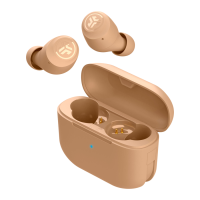
This document describes the JLab GO Air Tones earbuds, focusing on their functions, usage, and maintenance.
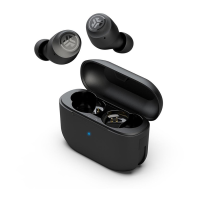
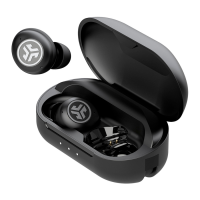
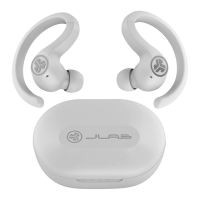
The JLab GO Air Tones are wireless earbuds designed for audio playback and calls, offering a range of features for a personalized listening experience. They are designed to be user-friendly, with simple pairing, intuitive controls, and customizable sound modes.
To begin using the earbuds, the first step is Bluetooth pairing. After removing the protective tab from the charging case and closing the door, the earbuds will indicate their charging status with a red light. Once removed from the case, one earbud will blink blue/white, signaling it's ready to pair. Users then navigate to their device's Bluetooth settings and select "JLab GO Air Tones" to connect. A voice prompt "Bluetooth connected" and blinking white lights on the earbuds confirm a successful connection.
For adding new or additional Bluetooth devices, users must first turn off Bluetooth on any previously connected device and then turn it on for the new device. Taking the earbuds out of the case will automatically put them into Bluetooth Pairing mode, allowing selection of "JLab GO Air Tones" in the new device's settings. It's important to note that only one Bluetooth device can be connected at a time. If experiencing connection issues or disconnections between earbuds, a manual reset procedure is available. This involves forgetting "JLab GO Air Tones" from the Bluetooth device settings, then quick tapping each earbud 7 times while in the charging case (each earbud will blink blue 4 times). After removing both earbuds, one will be solid white and the other will blink blue/white, indicating readiness to pair.
The earbuds feature intuitive button controls for various functions. On both the left and right earbuds, a single tap on the volume button adjusts the volume (down on the left, up on the right). A double tap on the left earbud activates Siri (iOS) or "OK Google" (Android), while a double tap on the right earbud controls play/pause. Pressing and holding either earbud for 1+ second allows users to track back (left) or track forward (right). For calls, a single tap answers, a double tap hangs up, and pressing and holding for 1+ second rejects incoming calls. A triple tap on either earbud cycles through the custom EQ settings.
The earbuds provide helpful voice prompts to keep users informed of their status. "Hello" indicates power ON, while "Ready to Pair" signifies that the GO Air Tones are ready to connect to a Bluetooth device. "Bluetooth Connected" confirms that an earbud is connected to a device. Battery status is communicated through "Battery Full" (100-75%), "Battery Medium" (75-25%), and "Low Battery" (less than 25%). "Low Battery" will play once when the power decreases to 10%. Finally, "Goodbye" indicates power OFF.
The JLab GO Air Tones offer three custom EQ settings, allowing users to tailor their audio experience. These modes can be cycled through by triple tapping either the right or left earbud. The available modes are:
Charging the earbuds is straightforward. When placed in the charging case, the earbuds will automatically power off and begin charging. A solid red light on the case indicates a charge level of 100-25%. If the case blinks red 4 times, it signifies that the charge is less than 25%, prompting the user to charge the case. Once removed from the case, the earbuds will automatically power on and connect to the last paired device.
The charging case itself can be charged by connecting it to a computer or a USB 5V 1A (or less) output device. While charging, the case will blink blue. Once fully charged, the indicator light will turn solid blue.
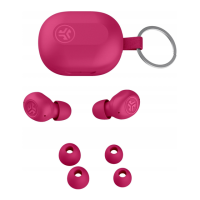
Proper fit is crucial for optimal sound quality and comfort. Users are advised to try all included ear tips to find the best fit and ensure a proper seal. To achieve the best fit, place the earbud in the ear canal and gently rotate it to adjust.
To ensure the longevity and performance of the JLab GO Air Tones, several maintenance tips and cautions are provided. It is crucial to fully dry off the earbuds before placing them in the charging case to prevent any damage, as the earbuds are sweat/water resistant but the case is not.
Users should avoid exposing the earbuds to extreme heat, cold, or humidity. Dropping or crushing the earbuds should also be avoided. Over time, wax may build up in the earbud tips, which can lower sound quality. To address this, carefully remove the wax with a cotton swab or another small tool.
If discomfort or pain is experienced, users should try lowering the volume or discontinuing use temporarily. If regular discomfort persists, it is recommended to consult a physician. Finally, the manual advises treating the earbuds with care, similar to a nice pair of sunglasses, and storing them in a safe location when not in use.
For further assistance, instructional videos are available at jlab.com/manuals. JLab also offers a store for products, product alerts, and a burn-in tool for headphones, accessible via their website and through apps on the App Store and Google Play.
 General
| Color name | 4625 W |
|---|---|
| Product type | Headphones |
| On/off switch | Yes |
| Product color | - |
| Wearing style | In-ear |
| LED indicators | Charging |
| Operating keys | Answer/end call, Play/pause, Reject call, Track \u003C, Track >, Volume +, Volume - |
| Volume control | Touch |
| Control unit type | On-ear control unit |
| Recommended usage | Calls/Music |
| International Protection (IP) code | IPX4 |
| Battery type | Built-in battery |
| Standby time | 60 h |
| Fast charging | No |
| Charging source | USB |
| Battery capacity | 43 mAh |
| Battery recharge time | 2.2 h |
| Continuous audio playback time | 32 h |
| Battery capacity (charging case) | 350 mAh |
| Quantity | 1 |
| Charging case type | Wired |
| Accessories included in set | 3 sizes gel eartips |
| Charging case connector type | USB Type-A |
| Wireless range | 10 m |
| Bluetooth version | 5.1 |
| Bluetooth profiles | A2DP, AAC, AVRCP, HFP, HSP, SBC |
| Connectivity technology | True Wireless Stereo (TWS) |
| Microphone type | Built-in |
| Microphone sensitivity | -42 dB |
| Warranty period | 2 year(s) |
 Weight and Dimensions
| Charging case weight | 27.5 g |
|---|---|
| Left earpiece weight | 3.7 g |

 To Next Page