VOICE PROMPTS
“Hello”: Power ON
“Earbuds joined”:
Earbuds paired to each other
“Ready to Pair”: JBuds Frames are ready
to pair to Bluetooth device
“Bluetooth Connected”:
Earbud is connected to device
“Battery Full”: 100-80%
“Battery Medium”: 80-20%
“Low Battery”: Less than 20%
When power decreases to 10%,
“Low Battery” will play
“Goodbye”: Power OFF
BUTTON FUNCTIONS
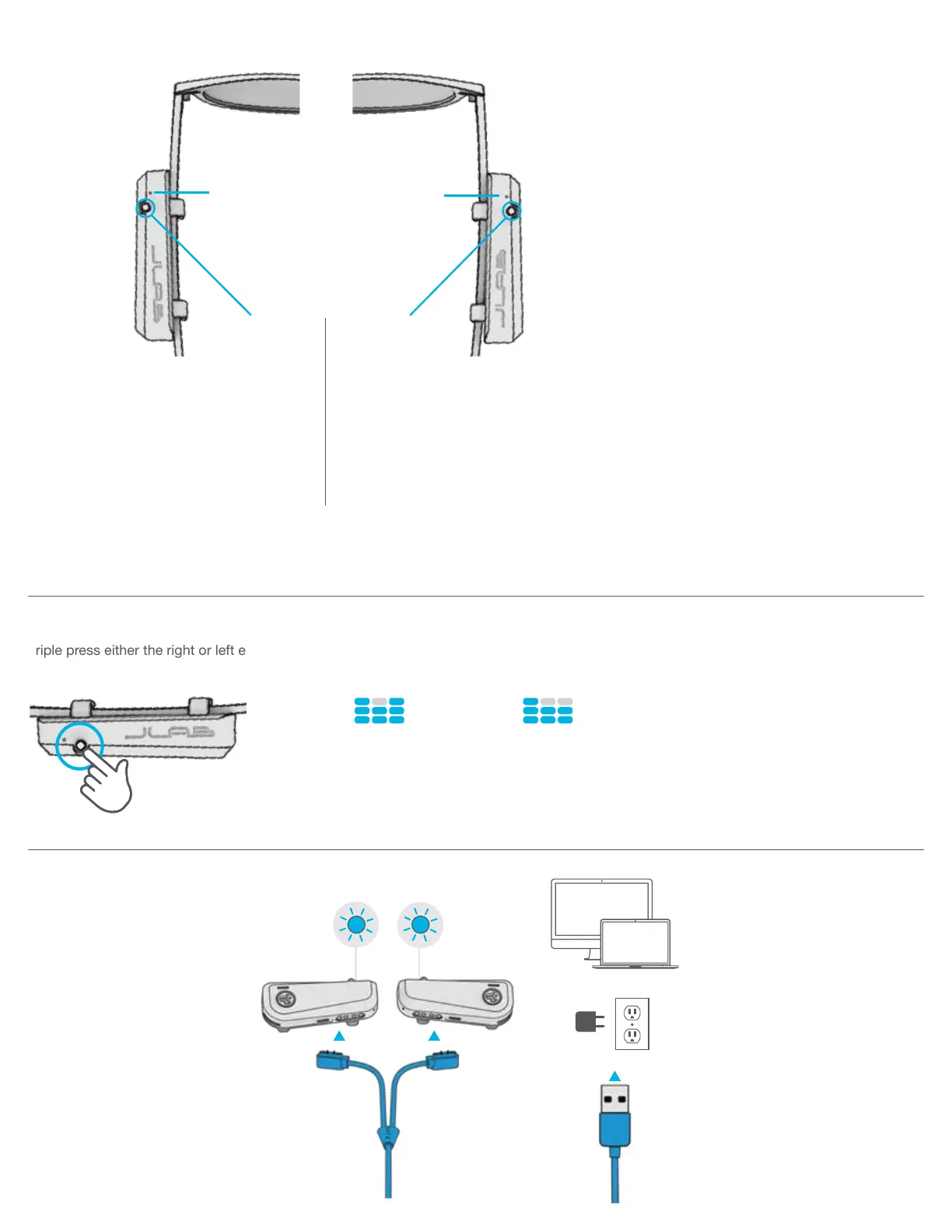
Triple press either the right or left earbud 3 times for different EQ settings.
EQ SETTINGS
JLab SIGNATURE
JLab C3™ signature
sound with amplified
bass and vocals
BASS BOOST
Amplified bass
and sub-bass
CHARGING
RIGHT
BUTTON
LEFT
BUTTON
INDICATOR
LIGHT
INDICATOR
LIGHT
VOLUME DOWN: Single press
SIRI (iOS) or “OK GOOGLE” (ANDROID):
Double press
TRACK BACKWARD: Press & hold 1+ sec
VOLUME UP: Single press
PLAY / PAUSE: Double press
TRACK FORWARD: Press & hold 1+ sec
ANSWER: Single press
HANGUP: Double press
REJECT INCOMING CALLS: Press & hold 1+ sec
EQ CHANGE: Triple press on either earbud (Cycles JLab Signature/Bass Boost)
POWER ON / OFF: Press & hold 3+ sec on either earbud (Button will power OFF both sides)
OR
Connect the JBuds Frames to computer
or USB 5V 1A (or less) output device.
CHARGING


 To Next Page