16
4.1-1
Layout
4.1 The display
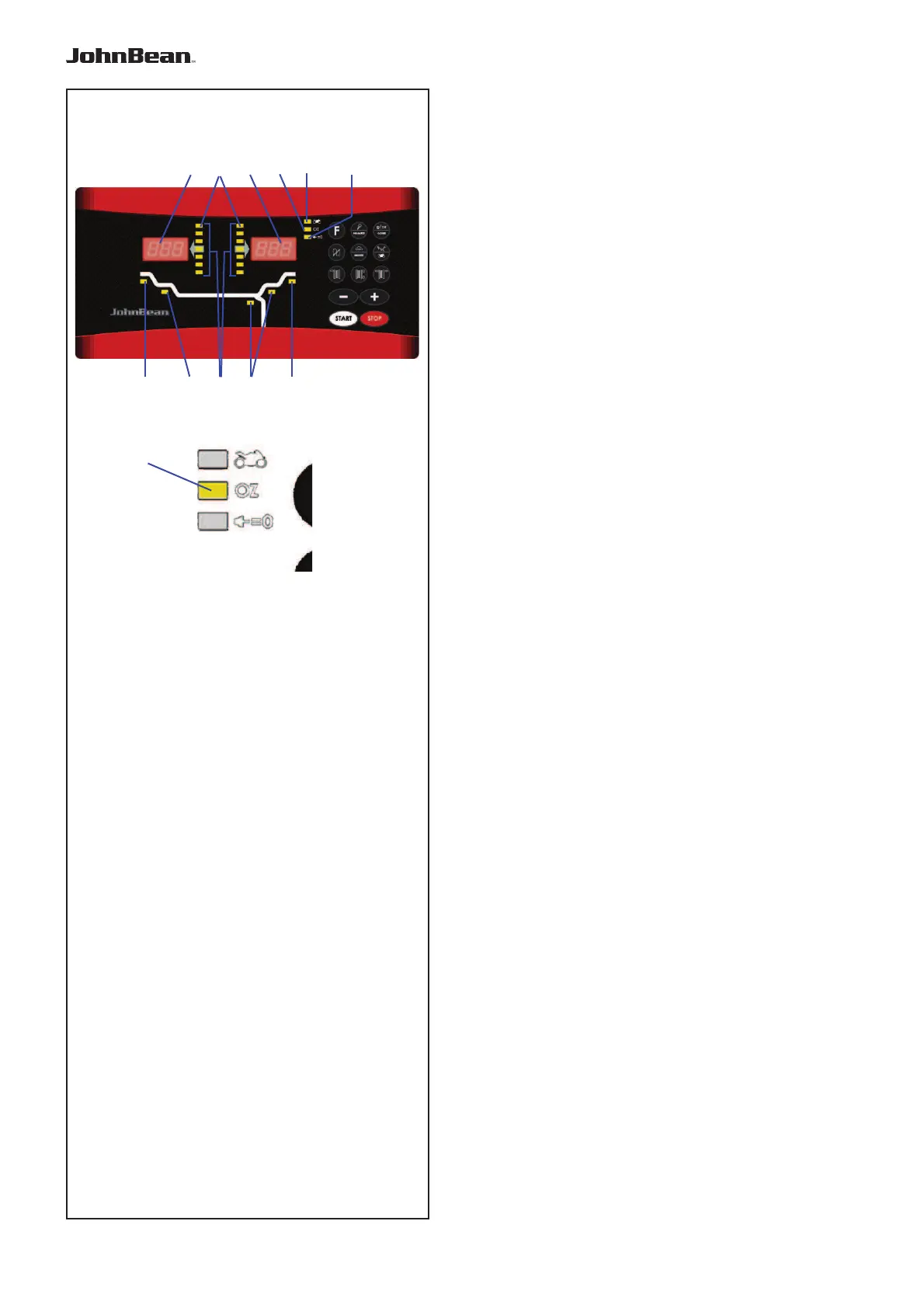
Refer to Figures 4.1-1.
1. Rotation indicators of the correction plane.
The indicators show the direction the operator has
to rotate the wheel (by hand) after a balancing run.
2. Weight Application Position (WAP) indicator.
The indicator will light up when the wheel is in the
correct position for weight application. This indicator
will be referred to as the WAP indicator.
Refer to the weight mode selected before applying
a weight!
3. Display.
Depending on the stage of the program the display
gives the operator information about rim sizes,
balancing weights, error codes, etc.
4. Weight units indicator, “Oz”.
The indicator will light if the weight is displayed in
ounces instead of grams.
5. Motorcycle Dynamic and Static Indicator.
The indicator lights up when you activate the
motorcycle wheel balancing program or the single
weight (static mode).
6. Flange compensation.
This indicator lights up when fl ange compensation
is activated
7. Weight Position Indicator.
Apply a clip-on weight to the rim at the position
indicated when the WAP indicator for this plane
lights up.
8.
Weight Position Indicator.
Apply a stick-on weight to the rim at the position
indicated when the WAP indicator for this plane
lights up.
.
64 51
27 8 7
33
8
4



 To Next Page