types
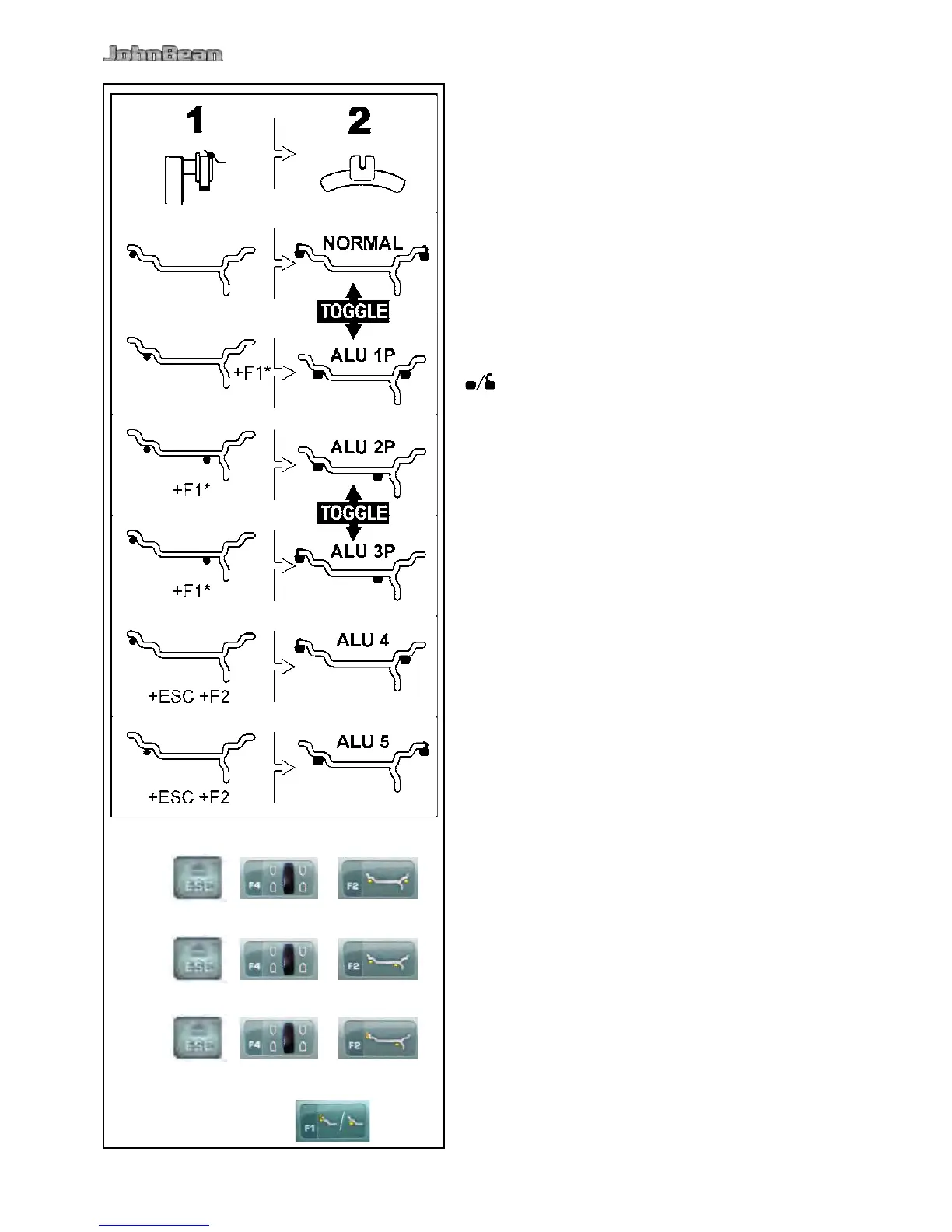
Fig. 5-7 shows the corrected reading positions of the
gauge head (1), depending on the required weight
application positions (2); adhesive weights and clip-
on weights.
Note:
The Alu1P mode is included in the Easyalu function,
but must be recalled from the Menu after the gauge
have been positioned on the rim.
* Select the menu key:
F4 to recall the required ALU P weight positions.
Fig. 5-7
= Point of application of gauge arm (1)
= Given weight position (2)
normal Normal weight and clip-on weight positions
on the rim ange - this mode is presented
immediately by the Easyalu function.
Alu 1 Adhesive weights applied symmetrically to the
rim anges with NOMINAL weight positioning.
Function not included in Easyalu mode. After
reading, set mode by using the buttons: ESC
+ F4 + F2 (Fig. 5-8).
Alu 1P Adhesive weights applied symmetrically to the
rim anges; the compensation planes for the
adhesive weights are read precisely using the
internal and external gauge arm. After reading,
recall mode from Menu F4.
Alu 2 Adhesive weights - Adhesive weight on rim
ange, adhesive weight hidden in rim disc with
NOMINAL positioning.Function not included
in Easyalu mode. After reading, use internal
calibration to set mode by using the buttons:
ESC + F4 + F2 (Fig. 5-9).
Alu 2P Adhesive weights - Adhesive weight on rim
ange, adhesive weight hidden in rim disc; the
compensation planes for the adhesive weights
are read precisely using internal calibration.
Alu 3 Clip-on weight on left rim ange, adhesive
weight hidden in rim disc. Function not
included in Easyalu mode. Weight positioning
is NOMINAL. After reading, set mode by using
the buttons: ESC + F4 + F2 (Fig. 5-10).
Alu 3P Clip-on weight on left rim ange, adhesive
weight hidden in rim disc; the compensation
planes for the adhesive weight is read
precisely using internal calibration.
Alu 4 Balance clip tted on left rim ange, adhesive
weight attached to right bead seat.
Alu 5 Balance clip tted on right rim ange, adhesive
weight attached to left bead seat.



 To Next Page