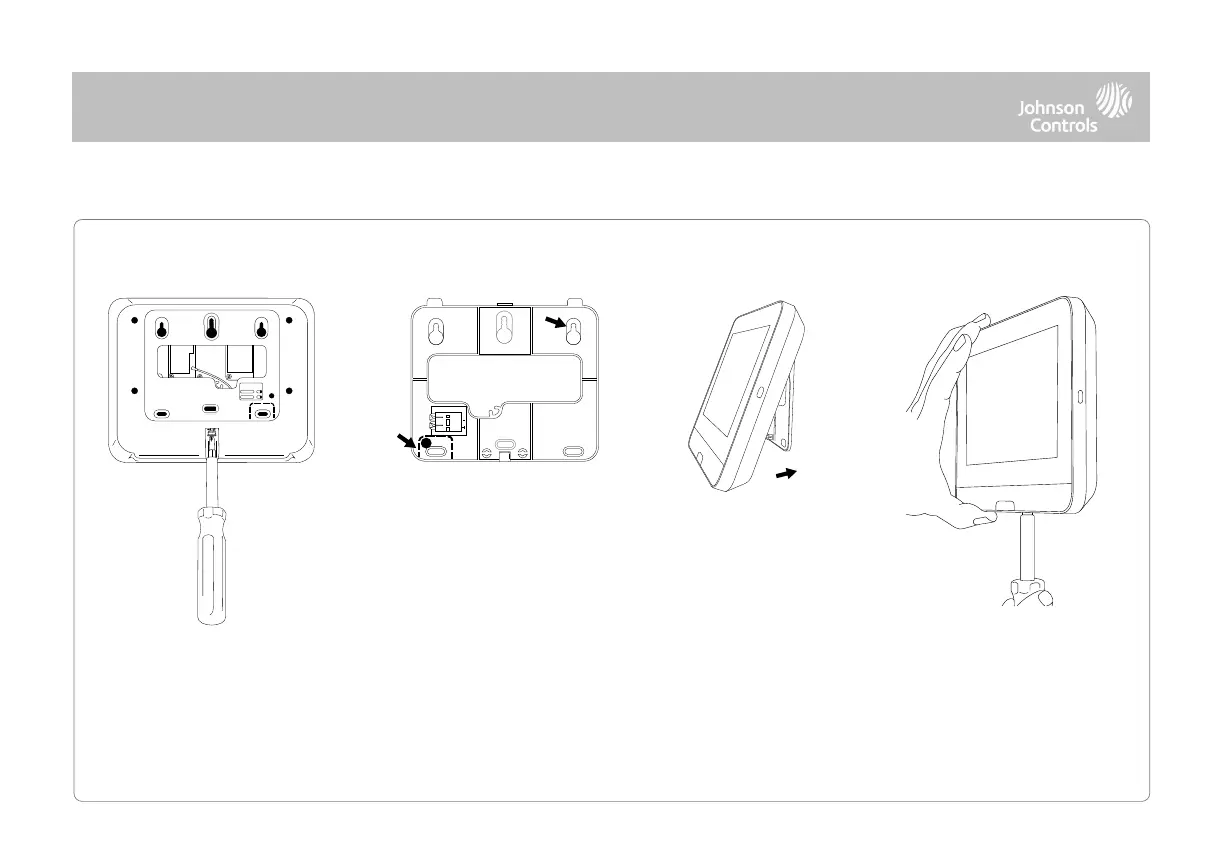
1. With a small phillips
screwdriver, undo the
locking screw from the back
of the panel and remove the
SmartMount backplate.
1. Mount the backplate to the
wall using flat head screws* and
appropriate wall anchors if
needed, ensuring it is level.
2. A screw is required in break-
away wall tamper for UL 2610
and EN Grade 2 installations.
3. Connect the power supply to
the barrel jack on the back of the
panel.
1. Latch the top of the IQ4
Hub onto the SmartMount
backplate.
2. Swing the panel down
towards the backplate and
press firmly against the wall.
Note: For UL/ULC Commercial Burg installations (UL2610/ULC-S304 Security
Level II compliant) and EN Grade 2 installations use only wall mount option
This product when installed as per these instructions does not present the risk of fire, electric shock, or injury to persons.
1. With a small phillips
screwdriver, screw in the
locking screw from the
bottom of the panel to
secure it to the wall.
*Screws shall be a minimum of 1” in length (25.4mm), size #6 (M3.5)



 To Next Page