EasyManua.ls Logo

Johnson Controls LN-IO -1 Series - User Manual

Johnson Controls LN-IO -1 Series
25 pages
Print Icon
To Next Page IconTo Next Page
Loading...
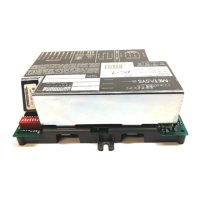
LN Application Specific, Remote I/O, and Free Programmable Controllers
Installation Instructions
1
Refer to the QuickLIT website for the most up-to-date version of this document.
Application
Follow these recommendations for proper installation and subsequent operation of each controller:
Properly inspect the product for shipping damage. Do not install damaged controllers.
Record the 12-digit Neuron® ID located on either end of the device (shown on the sticker below the barcode)
for commissioning.
Operate the controller under the following conditions:
- Ambient temperature:
LN-PRG203-2, LN-PRG300-2, LN-PRG4x0-2, LN-RTUL-1, LN-FCUL-1, LN-UVL-1, LN-HPUL-1: 32 to 158°F
(0 to 70°C), LN-IO301-1, LN-IO401-1 and LN-PRG5x0-2: 32 to 122°F (0 to 50°C)
- Relative humidity: 0 to 90%, noncondensing
North American Emissions Compliance
United States
Canada
IMPORTANT: Prevent any static electric discharge to the controller. Static discharge can damage the controller
and void the warranties.
Compliance Statement (Part 15.19)
This device complies with Part 15 of the FCC Rules. Operation is subject to the following two conditions:
This device may not cause harmful interference, and
This device must accept any interference received, including interference that may cause undesired operation.
Warning (Part 15.21)
Changes or modifications not expressly approved by the party responsible for compliance could void the user’s authority to
operate the equipment.
The term IC before the certification/registration number only signifies that the Industry Canada technical specifications were
met.
Industry Canada Statement
Le terme «IC» précédant le numéro d'accréditation/inscription signifie simplement que le produit est conforme aux
spécifications techniques d'Industry Canada.
LN Application Specific, Remote I/O, and Free
Programmable Controllers
Installation Instructions
LN-RTUL-1, LN-FCUL-1, LN-UVL-1, LN-HPUL-1, LN-IOxxx-1,
LN-PRG203-2, LN-PRG300-2, LN-PRG4x0-2, LN-PRG5x0-2
Code No. LIT-12011320
Issued December 2017


Questions and Answers

  • K
    Kimberly DavisSep 9, 2025
    Why is the hardware input not reading the correct value on my Johnson Controls LN-IO -1 Controller?
    • V
      vanessasandersSep 10, 2025
      If the hardware input on your Johnson Controls Controller isn't reading the correct value, it could be due to a few reasons. First, check that the wiring is correct according to this manual and the peripheral device’s manufacturer instructions. Second, use a voltmeter to check the voltage on the input terminal, looking for a short circuit (0 V) or an open circuit (10 V). Lastly, use a device configuration plug-in or wizard to check the configuration of the input, referring to the device’s user guide for additional information.
  • A
    Ashley ArmstrongAug 25, 2025
    What to do if fuse has blown (auto reset fuse) in Johnson Controls Controller?
    • B
      Bethany ColemanAug 25, 2025
      If the auto-reset fuse has blown in your Johnson Controls Controller, disconnect the power and output terminals. Wait a few seconds to allow the fuse to cool down. Check the power supply and output wiring if necessary.
  • A
    Ashley BlakeAug 25, 2025
    Why is the power transformer overloaded in Johnson Controls LN-IO -1?
    • J
      jramosAug 26, 2025
      If you suspect the power transformer is overloaded in your Johnson Controls Controller, verify that the transformer is powerful enough to supply all controllers.
  • K
    Kenneth SolisSep 23, 2025
    Why over-voltage or over-current at an input can affect Johnson Controls LN-IO -1 Controller?
    • B
      Brad GarciaSep 23, 2025
      If you are experiencing issues related to over-voltage or over-current at an input of your Johnson Controls Controller, be aware that an over-voltage or over-current at one input can affect the reading of other inputs. Respect the allowed voltage/current range limits of all inputs.
  • K
    Kevin CastilloSep 12, 2025
    What to do if hardware output is not operating correctly on Johnson Controls Controller?
    • I
      igarciaSep 12, 2025
      If a hardware output on your Johnson Controls Controller isn't operating correctly, start by checking that the wiring is correct, referring to this manual and the peripheral device manufacturer's instructions. Next, use the device configuration plug-in to check the output configuration, consulting the device user’s guide for more details. If it's a 0-10 V output and a 24 VAC powered actuator isn't moving, check the polarity of the 24 VAC power supply connected to the actuator and reverse the 24 VAC wire if necessary. Also, check the jumper setting for the external power supply.
  • A
    Alexander MillsSep 16, 2025
    How to fix service pin if it is not working in Johnson Controls LN-IO -1 Controller?
    • K
      Kari DelgadoSep 16, 2025
      If the service pin is not working on your Johnson Controls Controller, use the memory erase jumper to reset the Neuron chip’s memory. Then, load the correct APB or NXE into the controller using LN-Builder 3.4 or another network management tool.
  • W
    Wendy FowlerSep 4, 2025
    How to solve configuration problem in Johnson Controls LN-IO -1 Controller?
    • J
      Joseph BrownSep 4, 2025
      To address a configuration problem with the input on your Johnson Controls Controller, use the controller configuration wizard (LN-GPI) to check the input's configuration. Refer to the controller's user guide for more information.
  • M
    Michael WilliamsSep 5, 2025
    What to do if device not associated to controller in Johnson Controls LN-IO -1 Controller?
    • T
      Tyrone ThomasSep 5, 2025
      If a device is not associated with the controller on your Johnson Controls Controller, use the device configuration wizard to check the configuration of the input.
  • M
    Melinda ClaytonSep 23, 2025
    What to do if the temperature setpoint is not read properly on Johnson Controls Accessories?
    • Z
      zimmermanseanSep 23, 2025
      If the temperature setpoint is not being read correctly, there are a couple of things to check: * First, ensure that all connections are properly wired. * Second, make sure that the setpoint is configured correctly in the software, especially in relation to the selected sensor model.
  • S
    Sheryl Bass MDAug 30, 2025
    How to check wire type in Johnson Controls Controller?
    • P
      Patrick HooperAug 30, 2025
      To check the wire type for your Johnson Controls Controller, ensure it agrees with the specification of the LONWORKS LN- Series Network Communications and Interface Guide Technical Bulletin (LIT- 1201253) or Junction Box and Wiring Guideline for Twisted Pair LONWORKS Networks.

Johnson Controls LN-IO -1 Series Specifications

General IconGeneral
SeriesLN-IO -1 Series
Communication ProtocolLonWorks
Input Voltage24 VAC/VDC
Number of Inputs8
Number of Outputs8
Enclosure RatingIP20
Operating Temperature-40°C to 70°C
Weight0.2 kg

Related product manuals