EasyManua.ls Logo

Johnson 40-6526 - Using the Product; Operating Panels Overview

Johnson 40-6526
26 pages
Print Icon
To Next Page IconTo Next Page
To Previous Page IconTo Previous Page
Loading...
©2019 Johnson Level & Tool - Rev. 3 11
to adjust to your desired working status. (Note: Remote will not
power unit on.)
4. After finishing operation or before moving the instrument, turn the
power off.
7. Using the Product
Place the unit on a relatively level surface like a tripod, floor, etc
during operation.
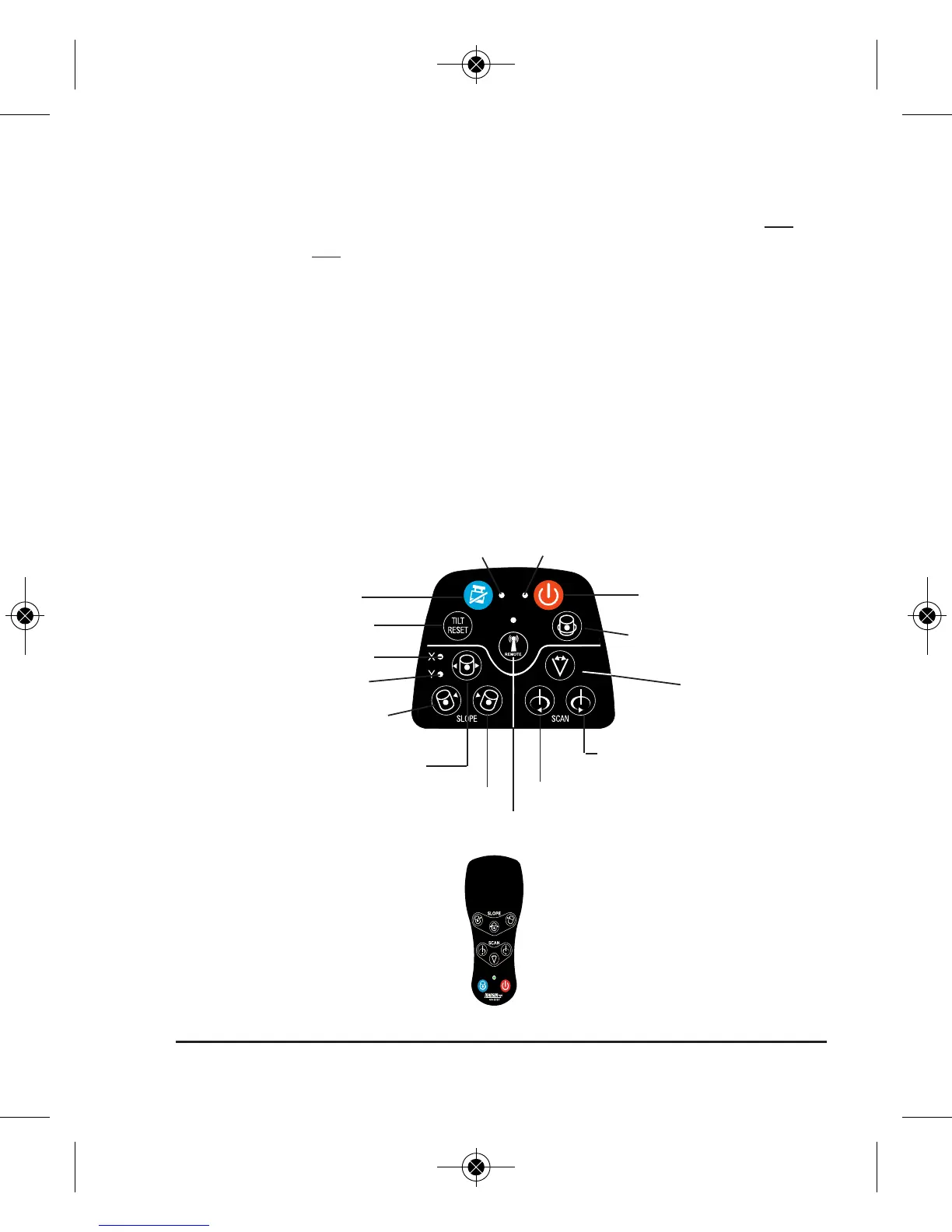
Operating Panels
TILT mode key
Reset TILT mode
X direction LED
Y direction LED
Remote Control Panel
TILT mode LED Power LED
Remote control LED
Slope key
Scan/dot
counterclockwise key
Slope adjustment key Scan/dot clockwise key
Remote on/off key
Rotating speed key
On/Off key
Scan key
Slope adjustment key
English 2019_Manuals 3/27/19 10:24 AM Page 11

Other manuals for Johnson 40-6526

Related product manuals