This document describes the multi compact DVB-S2/T2/C digital satellite meter, a professional tool designed for the installation and maintenance of satellite dishes and antenna systems. It supports dCSS and h.265 HVEC decoding, offering a comprehensive set of features for signal measurement and system setup.
Function Description
The multi compact is a digital meter for signal strength and quality, fully compliant with DVB-S/S2/T/T2/C standards. It features MPEG2, MPEG4, H.264/MPEG4 AVC, and H.265/HEVC hardware decoding, allowing it to display high-definition video signals. The device supports both automatic and manual scanning for channels and transponders. It includes an audible and visual alarm for signal lock, aiding in quick and accurate dish alignment. The meter can automatically calculate the azimuth (AZ) and elevation (EL) angles for satellite positioning. It also supports various DiSEqC protocols (1.0/1.1/1.2), Unicable systems, and 0/22kHz tone control, making it compatible with a wide range of LNBs and satellite configurations.
Important Technical Specifications
- Display: 4.3-inch High Definition TFT LCD Screen with a resolution of 480 (RGB) x 272 pixels and an active area of 95.04x53.86 mm².
- Video Decompression: MPEG-2 MP@HL, MPEG-1 Decoding, MPEG-4 ASP@L5 HD resolution, H.264 MP&HP@L4, H.265/HEVC, HW JPEG decoding.
- Video Format: Supports PAL-25 frame@720*576 and NTSC-30 frame@720*480. It also supports 4:3, 16:9 aspect ratios with Pan & Scan and Letter Box conversion.
- Audio Decompression: MPEG-1 Layer I/II, MPEG-2 Layer I/II.
- Audio Output Mode: Stereo, Mono, R/L.
- Satellite Input/Demodulation:
- Connector Type: F Type.
- Input Frequency: 950 to 2150 MHz.
- Signal Input Level: -65 to -25 dBm.
- Band Switch Control: 22KHz.
- LNB Supply: 13V/18V, IMax 400mA.
- Demodulation Type: QPSK, 8PSK, 16APSK.
- Symbol Rate: 2<Rs<45Mbaud (SCPC/MCPC).
- DVB-T/T2/C Input/Demodulation:
- Connector Type: Female Type.
- Input Frequency: 48 to 862 MHz.
- Signal Input Level: -79.5dBm (MAX).
- ANT Supply: 5V, 12V/24V Imax 100mA.
- Demodulation Type: QPSK, 16QAM, 64QAM, 256QAM.
- AV Output Interface: 3.5 mm jack (CVBS video, Stereo Audio L/R output).
- HDMI Output: HDMI 1.4.
- AV Input Interface: 3.5 mm jack (CVBS video, Stereo Audio L/R input).
- Data Service Port: USB 2.0 interface, supporting NTFS, FAT32, FAT16 file systems. Compatible file formats include wma, mp3, mp4, avi, jpg, jpeg, bmp, img.
- Power Supply:
- Battery: 7.4V/2600mAh Li-Ion Battery (actual labeling on the device prevails).
- Adapter: OUTPUT: DC12V/1.2A, INPUT: 100~240VAC 50/60Hz (subject to actual configuration).
- Power Consumption: Max. 10W.
- Physical Characteristics:
- Size (W x D x H): 17 x 12 x 4 cm³.
- Net Weight: 1kg.
Usage Features
The device is designed for ease of use with a clear menu-driven interface.
- Main Menu Navigation: Users can access DVB-S2, DVB-T2, DVB-C, Loop Search, Angle Calculation, Others, Multimedia, and System Setting menus using navigation keys and the OK button.
- DVB-S2 Setup: Allows selection of satellite, LNB type (C Band/Ku Band/Unicable I/Unicable II), LNB frequency, transponder, symbol rate, polarization (vertical/horizontal), 22KHz tone switch, DiSEqC mode (None/DiSEqC1.0/1.1), DiSEqC type & input (A/B port, Tone Burst Mode), LNB power (ON/OFF), and beep tone (ON/OFF).
- Quick Search (DVB-S2): After setting parameters, users can perform a quick search to view signal information. Manual scan (ENTER key) searches the current transponder, while auto scan (red key) performs a blind search for the current satellite.
- DVB-T2 Setup: Features include country selection, channel number adjustment, frequency input, bandwidth selection (5, 6, 7, or 8M), DVB standard mode (T/T2/T+T2), active antenna power (ON/OFF), LNB power (5V/12V/24V), LCN (ON/OFF), and beep tone (ON/OFF).
- Quick Search (DVB-T2): Similar to DVB-S2, a quick search displays signal information. Scan (OK or red key) searches the current channel, and auto scan (green key) performs an automatic search. The blue key can enlarge the signal strength and quality display.
- DVB-C Setup: Includes country selection, channel number adjustment, frequency input, standard selection (J83.A/C and J83.B), and beep tone (ON/OFF). Quick search functionality is also available.
- Loop Search: Displays up to 8 transponders or channels. Users can edit these in DVB-S2, DVB-T2, or DVB-C modes.
- Angle Calculation: Inputting satellite longitude, local longitude, and latitude allows the device to calculate polarization, azimuth, and elevation angles.
- Others Menu:
- Channel Manager: Switch between different channel lists (F1 key). Lock programs (red key), delete channels (green key), move channels (orange key), and confirm operations (blue key).
- Satellite List: View, add (red key), edit (green key), delete (orange key), and scan (blue key) satellites.
- Transponder List: View, add (red key), edit (green key), delete (orange key), and scan (blue key) transponders.
- Motor Setting: Five modes: USALS (controls motor based on local position, modifiable in Angle Calculation), DiSEqC 1.2 (64 positions for motor movement), Set East Limit, Set West Limit, and Disable Limits (unlimited movement). Settings can be saved (red key) or reset (green key).
- EPG: View Electronic Program Guide information.
- Multimedia: Play files from a USB drive inserted into the USB port.
- System Setting:
- Language: Change OSD language (default is English).
- Country: Change default country.
- Aspect Ratio: Adjust display aspect ratio (4:3 LB/PS, 16:9, full screen).
- Video Resolution: Set video output resolution (480p/576p/720p/1080i/1080p).
- HDMI Audio: Modify digital audio output format (PCM/RAW/MUTE).
- Time Zone: Adjust time zone.
- System Lock: Enable/disable system lock.
- PWR Unit: Change power unit (dBm/dBuV/dBmV).
- Torch: Switch torch on/off.
- Back LED: Switch keyboard LED on/off.
- KeyTone: Switch key tone on/off.
- Speaker: Switch speaker on/off.
- 12V: Switch DC 12V output on/off.
Maintenance Features
- Software Upgrade: The device supports software upgrades via the USB port. Users can insert a USB drive with the upgrade file, navigate to the upgrade interface, select the file, and confirm the upgrade. A warning advises against powering off or removing the USB during the process to prevent software damage.
- Factory Reset: A factory reset option is available to restore all user settings and the database to their default states.
- Version Information: Users can view information about the device's hardware and software versions.
- Channel List Management: The device allows saving the current channel list to a USB disk as a default database and restoring a channel list from a USB disk.
Important Safety Instructions
- Always read the user manual before operation.
- Ensure the satellite dish is installed with correct direction and angle. Contact a local dealer if issues arise.
- If the unit is moved from a cold to a hot area, turn it off and restart after 1-2 hours to prevent problems.
- Keep the meter in a clean, well-ventilated space.
- Do not cover the meter or place it on heat-emitting units.
- Clean the case with a soft cloth and a small amount of washing liquid.
- Do not remove the cover.
- Avoid exposing the unit to extreme heat, cold, or humid conditions.
- Prevent liquids or other materials from entering the unit.
Troubleshooting
The manual provides a troubleshooting guide for common issues:
- No display light up: Check power switch and battery.
- No sound or picture, but power light is ON: Pull out AV IN cable.
- No sound or picture (satellite related): Adjust dish, check signal level in Antenna Setup Menu, check cable connections, LNB, and other equipment.
- Bad picture/Blocking Error: Adjust dish, connect a signal attenuator if signal is too strong, change to a larger dish if satellite dish is too small, change to an LNB with lower noise factor, or replace faulty LNB.
- AV out No picture (Video): Check UHF channel, tune UHF properly, ensure TV is not in AV mode, check battery, or use adapter.
- Key not working: Ensure no blocks between the front panel.

 Need help?
 General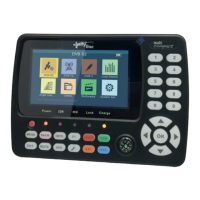

 To Next Page