3
English
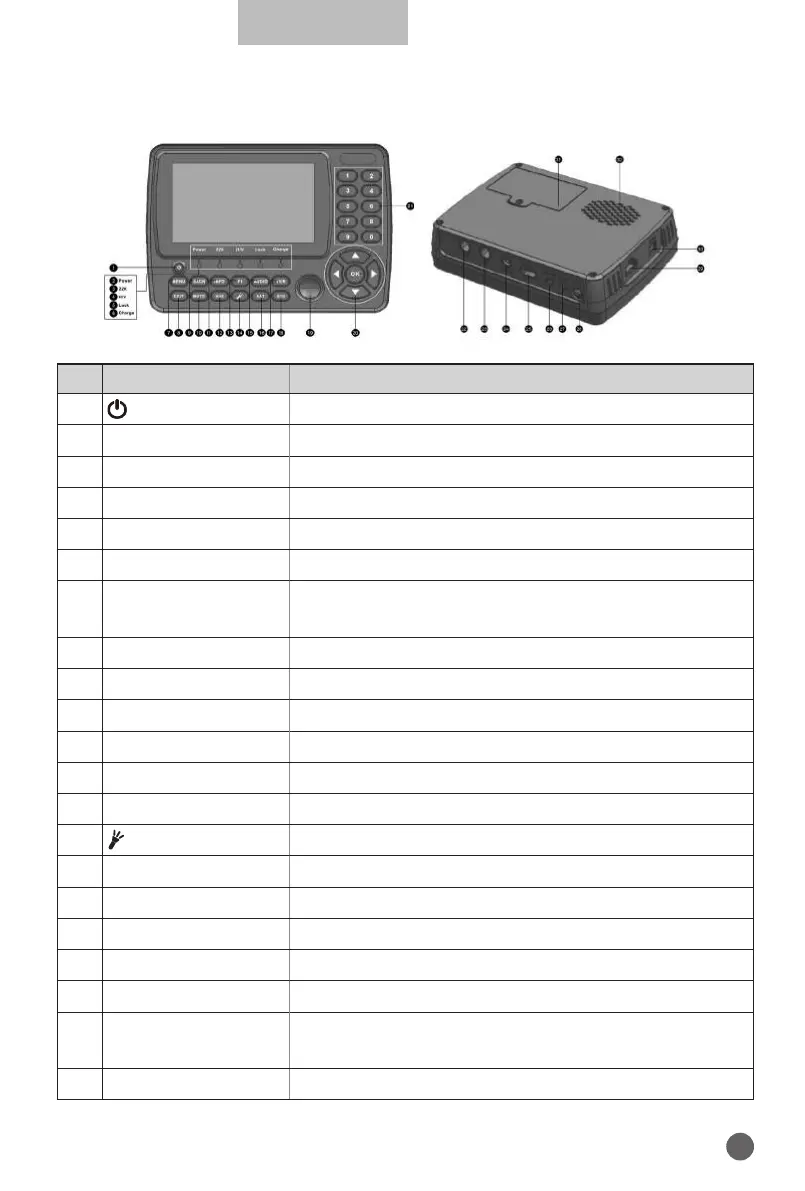
1.3 PRODUCT OVERVIEW& ILLUSTRATION
NO Description FUNCTION
1
Turn on/o meter
2 Power
Power indicator light
3 22kHz
22kHz indicator light
4 H/V
Vertical /Horizontal polarization voltage output light
5 LOCK
Signal lock indicator light
6 Charge
Charger indicator light
7 MENU
Show the main menu on the screen or jump back to
previous menu in sub-menu setting conditions
8 EXIT
Escape from present menu and save the settings
9 SCAN
Shortcut key for DVB-S2 menu
10 MUTE
MUTE
11 INFO
Channel information
12 AV-S
AV IN/OUT switch key
13 F1
Auxiliary function key
14
Turn on/o Torch
15 AUDIO
Audio type selection / Red key
16 SAT
Shortcut key for Sat Installation menu
17 T V/R
TV/Radio switch key
18 SYS
Shortcut key for System Setting menu
19 Compass
Mechanical compass
20 NEVIGATION KEY
Volume Control or move cursor, channel or change,
confirm etc
21 0-9
Number key to select channels or enter programming


 To Next Page