DPS5015
Published: 22.11.2018 Copyright by Joy-IT 5
Aer the rst start, the welcome screen is displayed followed by the main screen. Selected voltage and
current limits are displayed on the main screen. When the output is acve, the current actual values are
also displayed. On the right side of the screen there are icons and prompts that indicate the system status.
For a detailed descripon of the display, refer to the following illustraons:
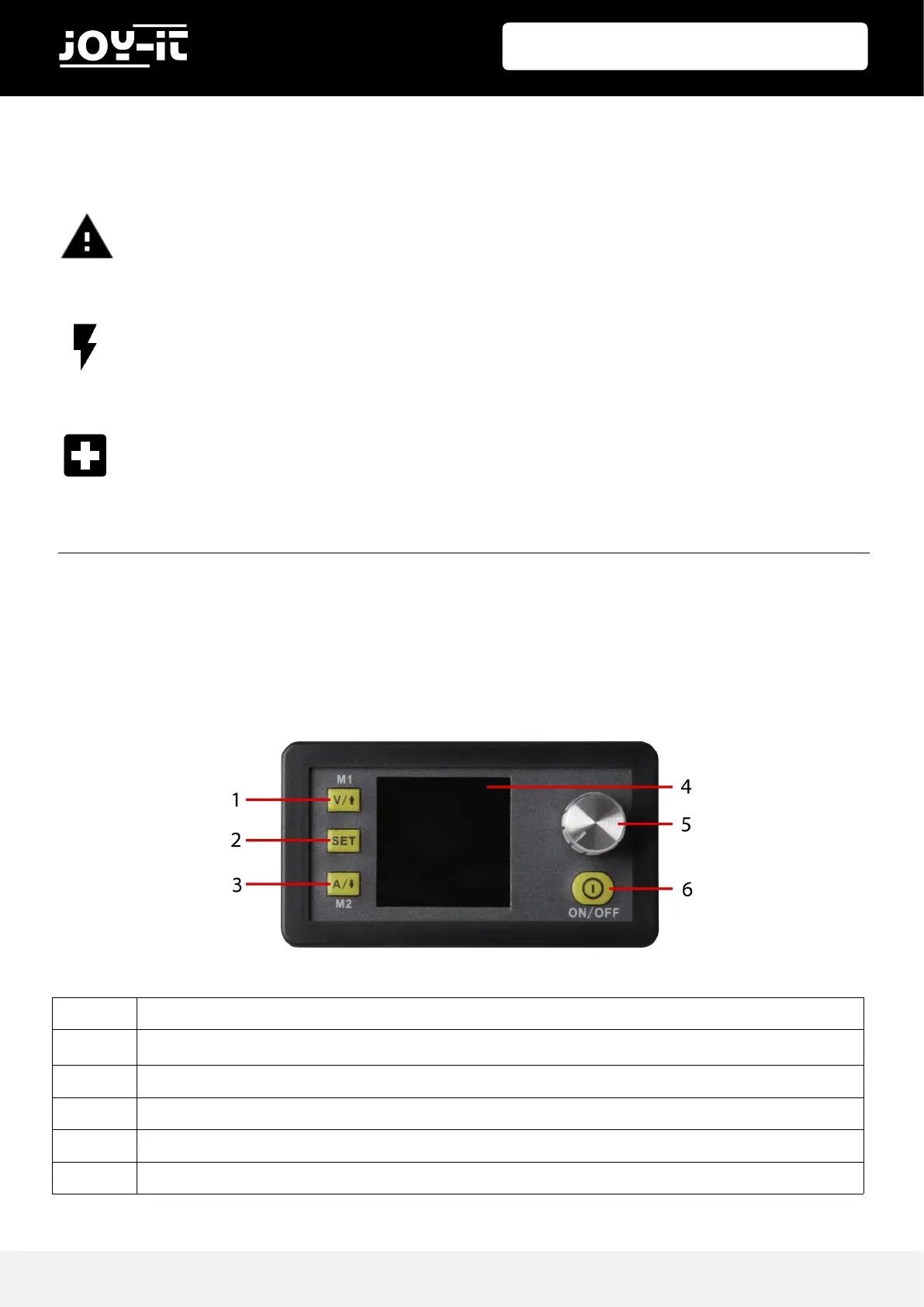
4. PANEL AND DISPLAY
1 Voltage seng / up arrow / M1 Data group
2 Data input / Extract data from a data group / Save value to selected data group
3 Limit value sengs / Down arrow / M2 Data group
4 1,44“ LCD-Display
5 Rotary switch / key lock
6 Output Acvate/deacvate
The permissible input voltage range is 6 - 60V (DC). Always ensure a sucient safety distance
and never exceed the maximum permissible input voltage. Non-observance can lead to
considerable damage to the device.
Aenon! Make sure that the input voltage is always Ensure that the input voltage is always at
least 1.1 mes the
Operate the device exclusively with direct current! Operang the device with alternang cur-
rent can lead to fatal electric shocks and irreparable damage to the device.


 To Next Page