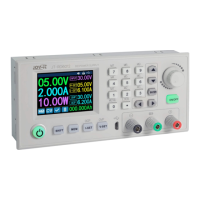
DPS5015
Published: 22.11.2018 Copyright by Joy-IT 7
6.1 OUTPUT VOLTAGE AND CURRENT LIMITATION
Press V/↑ to enter the voltage seng mode. Press the Rotary encoder to move the cursor to the numeric
value you want to change. Turning the knob clockwise increases the value and counterclockwise
decreases the value. Press V/↑erneut to exit. Alternavely, aer 30 seconds of inacvity, the seng
mode will automacally exit. Press A/↓um to set the output current limit in the same way.
6.2 SETTING THE DATA AND PROTECTION VALUES
In the main menu, press the SET buon to open the data seng menu.
SET VOLTAGE AND CURRENT LIMITS
Navigate through the menu to go to the U-SET (voltage) or I-SET (voltage limit) opon. Set the output
voltage and/or the output current limit here according to your needs. You can then use the SET buon to
return to the menu opons. Press the SET buon again to exit the menu.
SETTING THE PROTECTION VALUES
Navigate through the menu to access the limit value opons Opon S-OVP (Over-Voltage-Protecon), S-
OCP (Over-Current-Protecon) or S-OPP (Over-Power-Protecon). Use the Rotary encoder to set the
desired value. Press the SET buon to return to the menu opons and press the SET buon again to exit
the menu. The output is automacally deacvated when one of the protecon value limits is reached.
6. USE OF THE DEVICE
Aenon! These are the global system protecon limits! These are the global system protecon
limits and should not be confused with preset voltages and currents.


 To Next Page