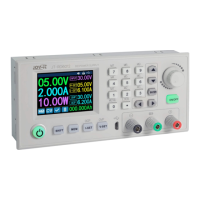
DPS5015
Published: 22.11.2018 Copyright by Joy-IT 9
6.4 DATA GROUP QUICK SELECTION
KEY COMBINATION FOR SELECTION OF M1/M2
Press and hold V/↑ or A/↓ for more than 3 seconds to quickly access the M1 or M2 data group. The
corresponding data group number is displayed on the right side of the screen. Data groups M1 and M2 are
ideal for frequently used sengs due to the DeepL access funcon.
SELECTION OF ANY DATA GROUP
Press and hold the SET buon for more than 3 seconds, M0 will be displayed on the right side of the
screen. Turn the Rotary encoder to select the desired data group (M1 through M9). To acvate the
selected data group, press the SET buon.
PROCESSING OF THE SELECTED DATA GROUP
To edit the selected data group, rst use V/↑ or A/↓ to navigate up or down through the menu opons.
Then press the knob and the corresponding numeric value will be highlighted by the cursor. Addional
knob operaons scroll through the available characters. Aer seng the desired value, press and hold the
SET buon unl the data group number is displayed on the right side of the screen. The data value is now
stored under the specied data group number. Press the Set buon again to return to the previous menu.
Repeat the above procedure to change one of the other numeric values for the selected data group. To
exit the menu, press the Set buon again.
STATUS OF THE SELECTED DATA GROUP WHEN SWITCHING ON
You can congure the device to automacally acvate the output when the device is turned on. To do
this, navigate to the S-INI opon and set the value to ON to acvate the opon. Aer selecng the desired
seng, press and hold the SET buon unl the data group number is displayed on the right side of the
screen. The data value is now stored. Press the Set buon again to return to the previous menu. To exit
the menu, press the Set buon again.


 To Next Page