JPL Agora 12
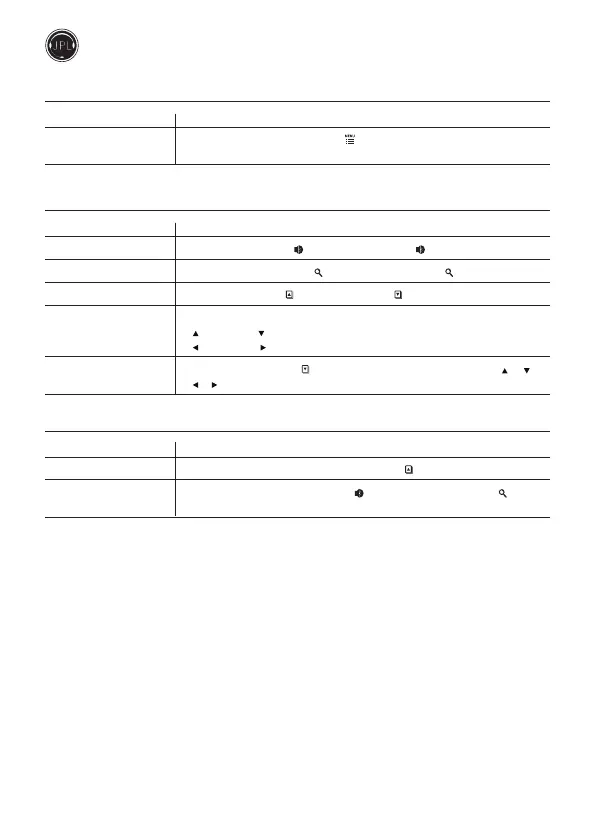
Camera Settings - Remote Control - Button Combination (Step-by-Step)
Function Operation
Activate Settings Mode Long press (5) AI zoom & Menu [ ] for 5s and release then press any
button to set video picture eect. Press (13) [ OK ] to conrm and exit.
Adjustable Camera Settings - Remote Control - Button Combination (Step-by-Step)
Function Operation
Camera Brightness Press (6) Volume up [ +] / (7) Volume down [ –]
Camera Contrast Press (8) Increase zoom [ +] / (9) Decrease zoom [ -]
Camera Colour Saturation Press (11) Page up [ ] / (12) Page down [ ]
Screen Mirror Eect Press (3) Direction button
[ ] Move up, [ ] Move down to mirror the screen horizontally
[ ] Move le, [ ] Move right to mirror the screen vertically
Move the Image aer Press (12) Page down [ ] and then press (3) Direction button [ ] [ ]
Magnication [ ] [ ] to move the image accordingly
Re-pairing Settings - Remote Control - Button Combination (Press at the same time)
Function Operation
Clear Bluetooth settings Long press (3s), (13) [ OK ] and (11) Page up [ ] together
Enter Pair Bluetooth mode Long press (3s), (7) Volume down [ –] and (9) Decrease zoom [ -]
together



 To Next Page