NXU-2A Operations Manual
Interoperability Now! 3-15
3.6 Network Configuration
After the NXU-2A has been assigned a valid IP address and is on the network, you may
configure it via telnet or a web browser. For telnet, use your PC’s telnet client to connect to the
IP address of the NXU-2A. Once a telnet connection is made, configuration of the NXU-2A is
identical to configuration via the serial port as described in Section 3.3 except that there is no
need to type +++ to enter command mode. The telnet connection to the NXU-2A will
automatically disconnect after two minutes of no activity, or LOGOUT may be typed to
disconnect the telnet connection manually.
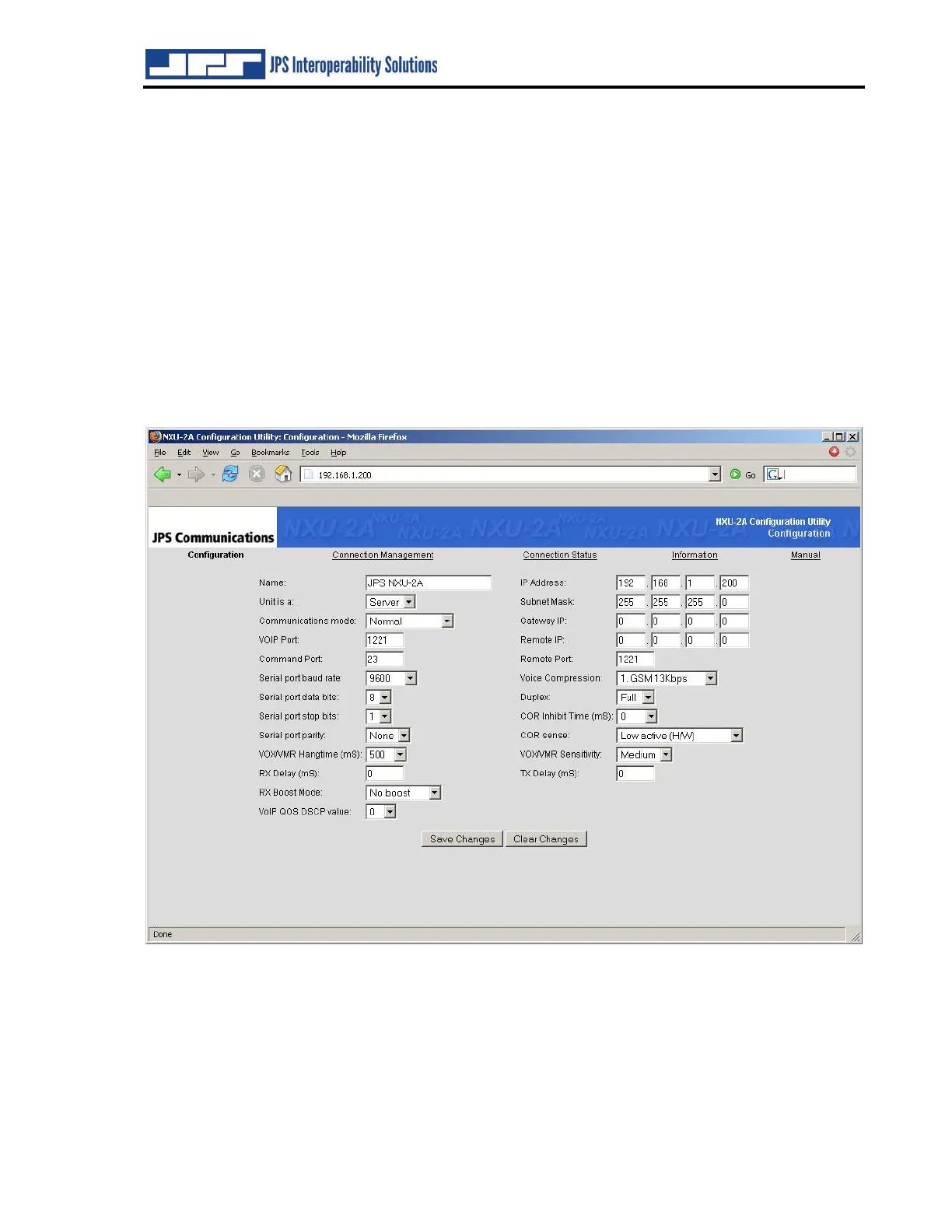
A web browser may also be used to browse the IP address of the NXU-2A. From the opening
page select NXU-2A Configuration. The following page will be seen where configuration
changes can be made and saved.
Figure 3-5 Network Configuration Screen
3.7 I/O DESCRIPTIONS
This section provides detailed explanations of the NXU-2A’s audio interfaces and its parallel
control inputs and outputs.


 To Next Page