- 1 -
1) Remove side plate setscrews
1
from the side plate.
2) Install control panel
2
on the machine head using screw
1
, at washer
3
and rubber seat
4
supplied
as accessories.
1. INSTALLING THE CONTROL PANEL
Installing hole
Screw
DDL-9000A
1
-
5
M5
DLN-9010
2
-
5
3/16-28
LH-3100
3
-
5
11/64-40
LZ-2280
3
-
5
3/16-28
LH-4100
2
-
5
M5
LH-3500
2
-
5
M5
DDL-8700 Series
3
-
6
3/16-28
<
The relation between the respective machine heads and the positions of installing hole of the
bracket are as described in the table.
>
The screws supplied with the machine as the accessories are for LH-3100. When they are used for
other machine heads, there is a possibility that the screw hole is crushed.
Do not use the screws supplied with the machine as the accessories with the machines other than
LH-3100.
When installing the control panel on DDL-8700, the machine with AK device is different from that
without the device in installing procedure.
With AK device : Install the control panel on the machine head bracket supplied with the AK device.
Without AK device : Remove the side plate setscrews and install on the side plate.
1
2
4
3
1
1 2
3 4 5
6
WARNING :
To prevent personal injury caused by abrupt start of the sewing machine, carry out the work after
turning OFF the power switch and ascertaining that the motor has completely stopped.
WARNING :
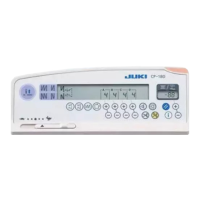
This Instruction Manual is for the control panel, CP-170.
Read "Safety Instructions" of the Instruction Manual for the control box carefully beforehand and
understand them before using CP-170.
In addition, be careful not to splash water or oil on it, or shock such as dropping and the like since
this product is a precision instrument.



 To Next Page