− 73 −
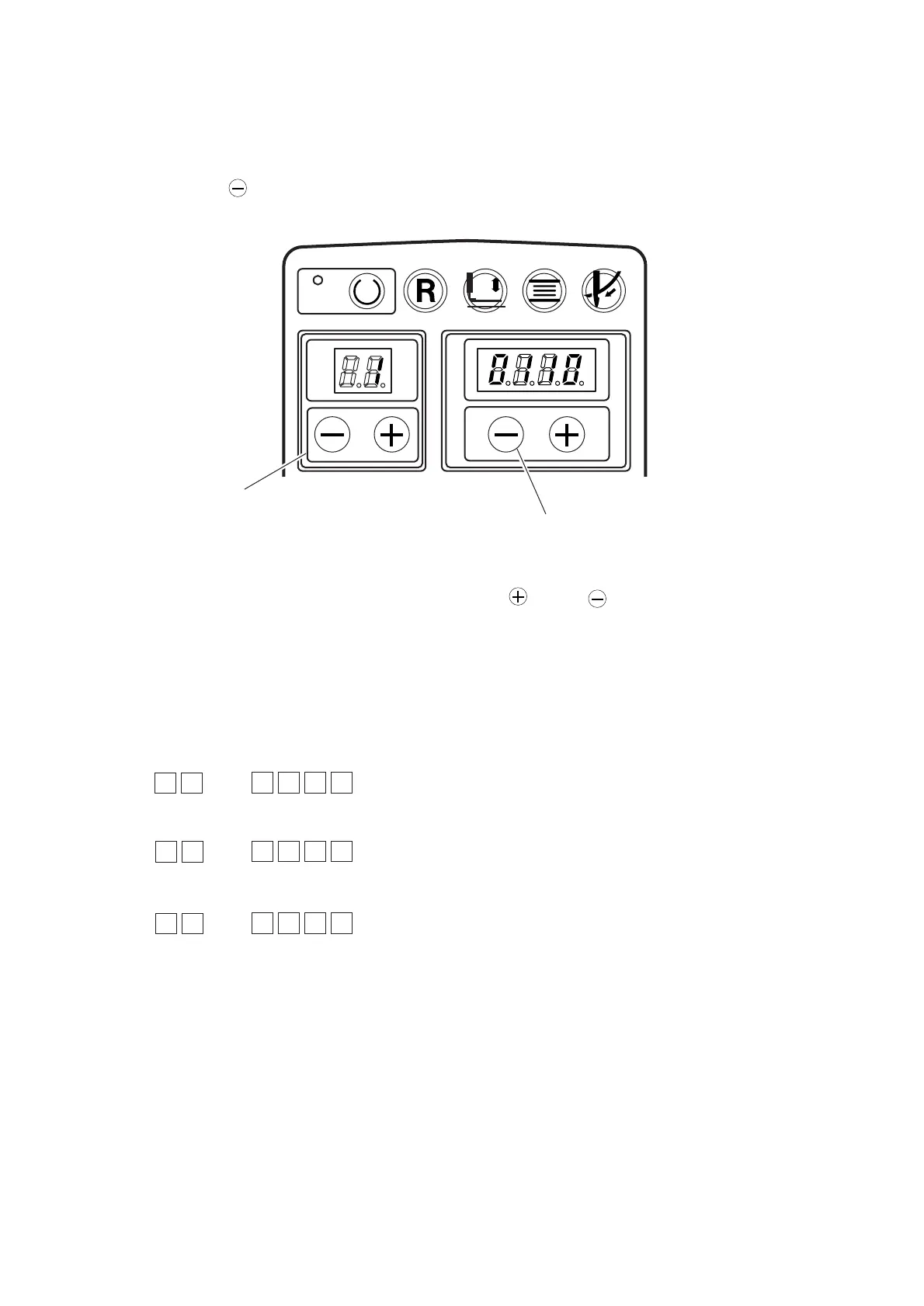
READY RESET CLAMP WINDER THREAD
8. TEST MODE
(1) How to use the test mode
Input check of the various sensors can be performed.
1) Pressing [Right ] key 1, turn ON the power.
2) Select the sensor No. you desire to make sure with [Left ] or [Left ] key 2. (No. 1 to 3)
No. 1 : Feed origin sensor, stitch base line sensor, stitch width origin sensor, and not used
No. 2 : Thread breakage detection, needle-up position detection sensor, knife return sensor, and presser fall
sensor
No. 3 : Not used, safety switch, start switch and presser switch
If you turn the sensor ON - OFF, the value will change 1/0.
Display when the sensor is ON :
(Feed origin sensor, stitch base line sensor, stitch width sensor and not used)
(Thread breakage detection, needle-up position detection sensor, knife return sensor, and presser fall sensor)
(Not used, safety switch, start switch, and presser switch)
1
011–
2 0010
3
–100
1
2



 To Next Page