30
No. Operation Display Remarks
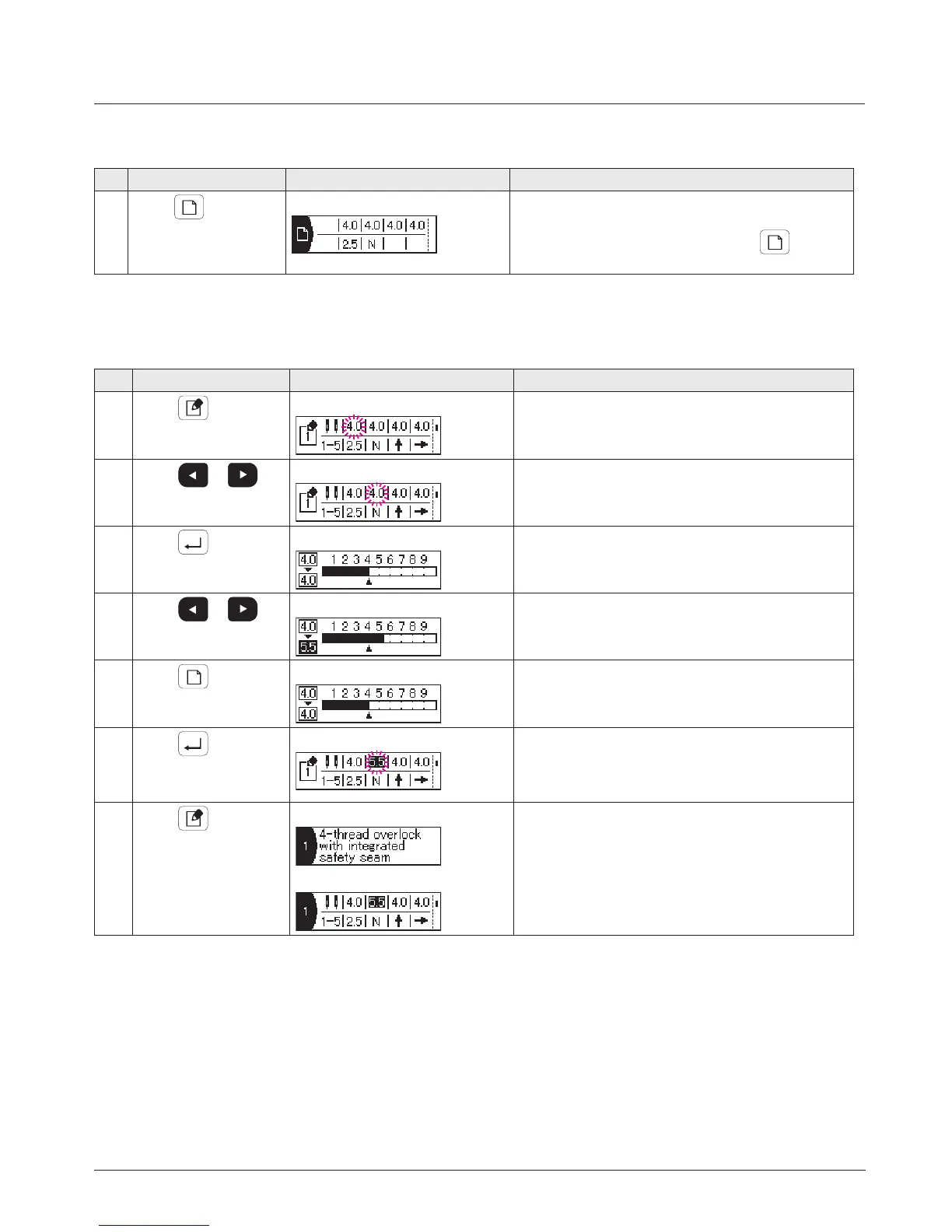
1
When
is pressed
Initial value display screen
The initial value of the selected stitch type is dis-
played.
The initial value is displayed as long as
is held
pressed.
2. How to display the initial value
No. Operation Display Remarks
1
When
is pressed
Edit item selection screen
Display of selected item ashes on and off.
2
When
or is
pressed
Edit item selection screen
Select the item you want to edit.
3
When
is pressed
Edit screen
4-a
When
or is
pressed
Edit screen
The value is set.
4-b
When
is pressed
Edit screen
The value returns to the initial value.
5
When
is pressed
Edit item selection screen
The value is stored in memory and the screen returns
to the edit item selection screen.
If the value differs from the initial value, the relevant
item is highlighted.
6
When
is pressed
Sewing type name display screen
Set value display screen
The screen returns to the previous screen.
3. How to edit the set value
* The initial value is the default value which has been fac-
tory-set at the time of shipment.


 To Next Page