Immersion Coolers
27
6.4. Setting the temperatures
This function is used to set the lowest desired temperature value.
Setting can be carried out in the start/stop condition.
Press one of the keys for a short moment. The setpoint
value instead of the actual value is indicated on the display for
about 8 seconds. The value can now be changed.
Change value:
Press to set a higher value.
Press to set a lower value.
Keep the keys depressed for the value to change fast.
Press enter to store the value.
6.5. Temperature control
The immersion cooler can only control the temperature if both - the
Pt100 sensor and immersion probe - are immersed into the same bath
fluid.
Application: Cooling a fluid in a vessel
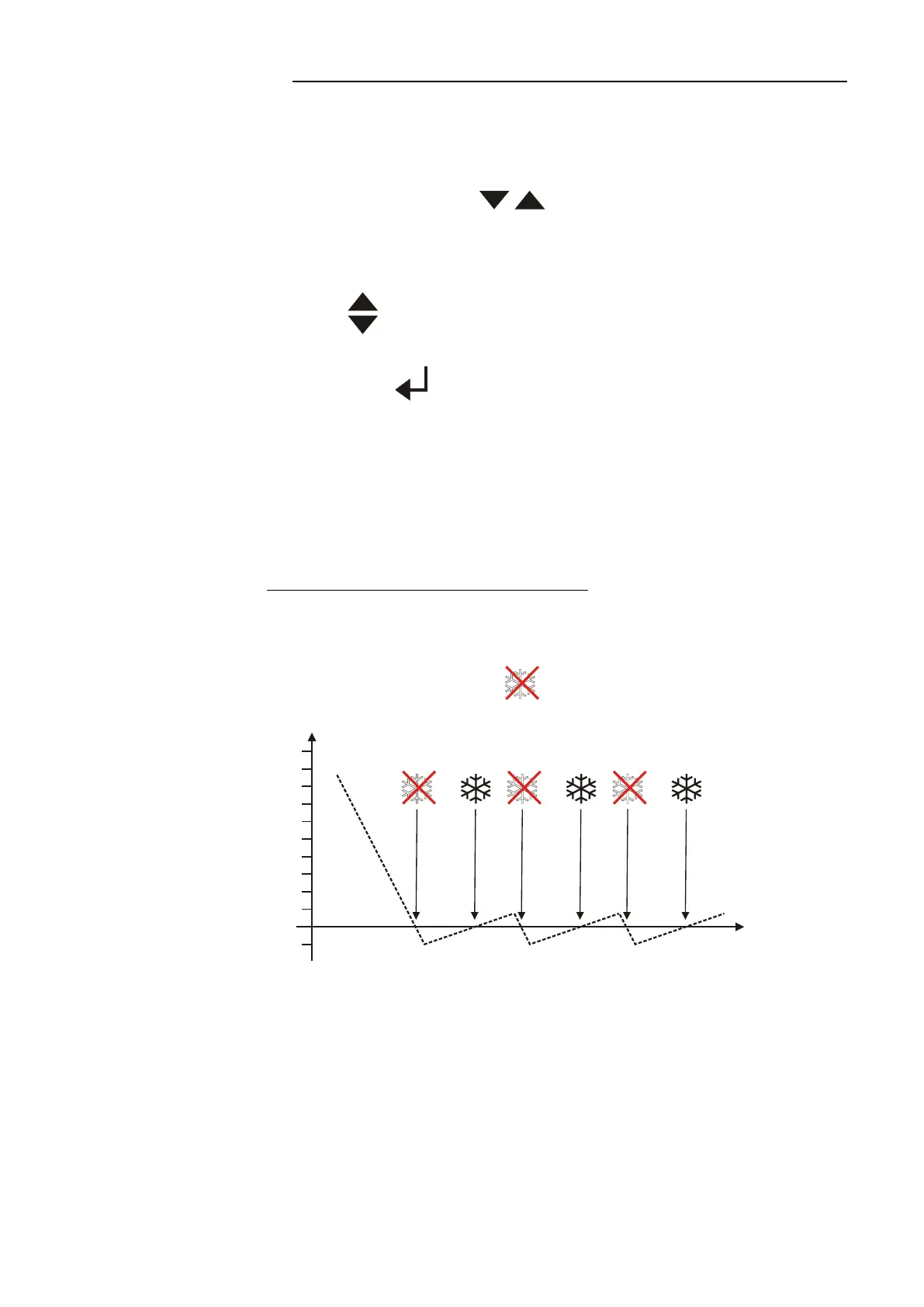
If the actual temperature falls below the setpoint temperature, the
compressor is switched off (on FT902, FT903: only one of the two
compressors).
The cooling control indicator goes out. If cooling is required
again, the compressor switches on automatically.
Example: Setpoint temperature –10 °C
The temperature curve resembles a two-point control (on-off).
Response time and amplitude of the temperature curve are depending
on the volume of the bath fluid (amongst others).
According to manufacturer's instructions, there is an off-period of
minimum 4 minutes to protect the compressor.


 To Next Page