EasyManua.ls Logo

Juntek DPM8600 - Display Interface Description; Instructions

Juntek DPM8600
26 pages
Print Icon
To Next Page IconTo Next Page
To Previous Page IconTo Previous Page
Loading...
Hangzhou Junce Instruments Co., Ltd.
16
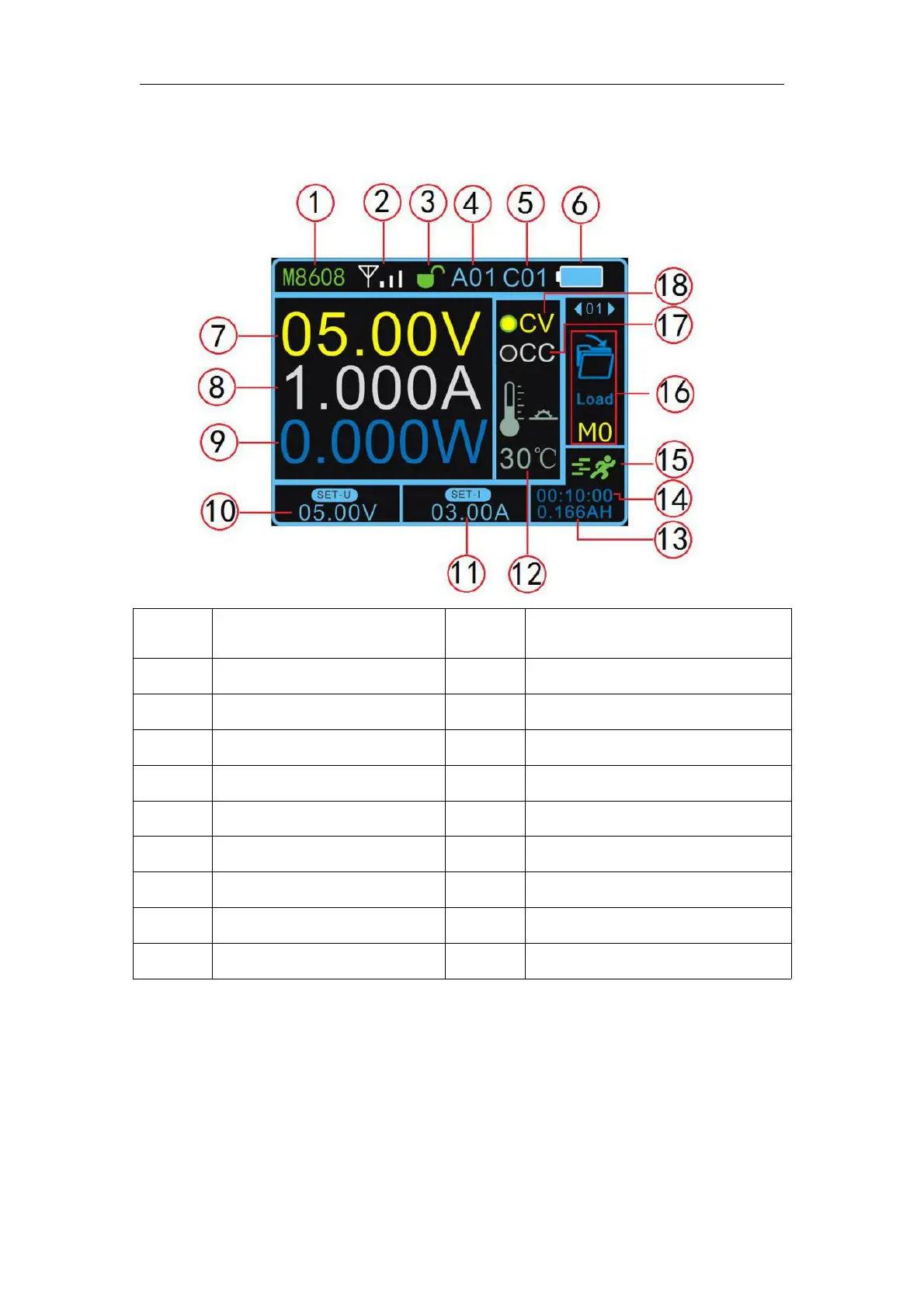
Display Interface Description
Label
Description
Label
Description
1
Product model
2
Signal indication
3
Button lock
4
Addresses 01-99
5
Channels 01-30
6
Battery capacity
7
Output voltage
8
Output current
9
Output power
10
Voltage setting
11
Current setting
12
Temperature display
13
Capacity
14
Operating time
15
Operating status
16
Function bar
17
Constant current indicator
18
Constant voltage indicator
Instructions
1.Voltage and current settings and output on / off
Press the button V, the cursor appears at the voltage setting, rotate the
knob to change the value, press the left and right buttons to change the step

Related product manuals