Hangzhou Junce Instruments Co., Ltd.
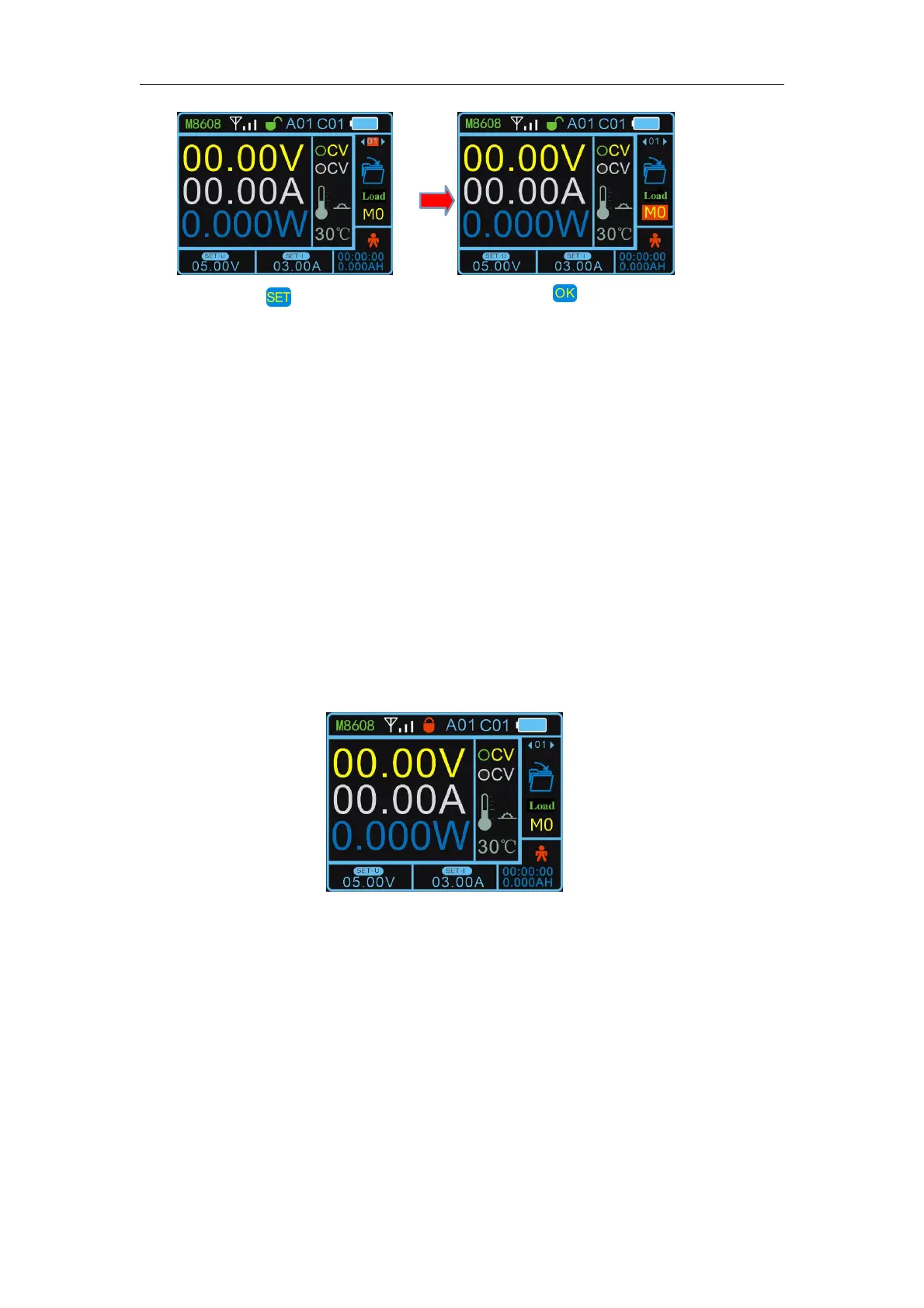
3.Quick Load
The data of M1, M2, M3, M4 storage location can be loaded by pressing
M1, M2, M3, M4 .
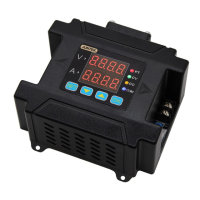
4.Button Lock
Press and hold the SET button to lock the button. When you press and
hold the SET button again can unlock the button, after the button is locked,
the button lock on the display will change to a red locked state, indicating that
the button is locked.
The button lock display interface is as follows:
5.Upper and Lower Limit Settings
After setting the voltage and current, select the upper or lower limit to
save in the function, you can set the current voltage and current value as the
upper or lower limit, the upper limit is displayed as MAX, the lower limit is
displayed as MIN. When the upper and lower limits are the same value, it is
displayed as LOCK. Select the restriction reset function to cancel the
restriction.
Upper and lower display interface:
Press the button and
the cursor will appear at
the position of the
function option box.
Press the button to
enter the function, and
change the parameters
through the left and right
buttons or the knob.


 To Next Page