Chapter 4: Pana 34 Operation
24 Pana 34 User Manual
4.1.1 Reset, Inputs, Presets and Overlays
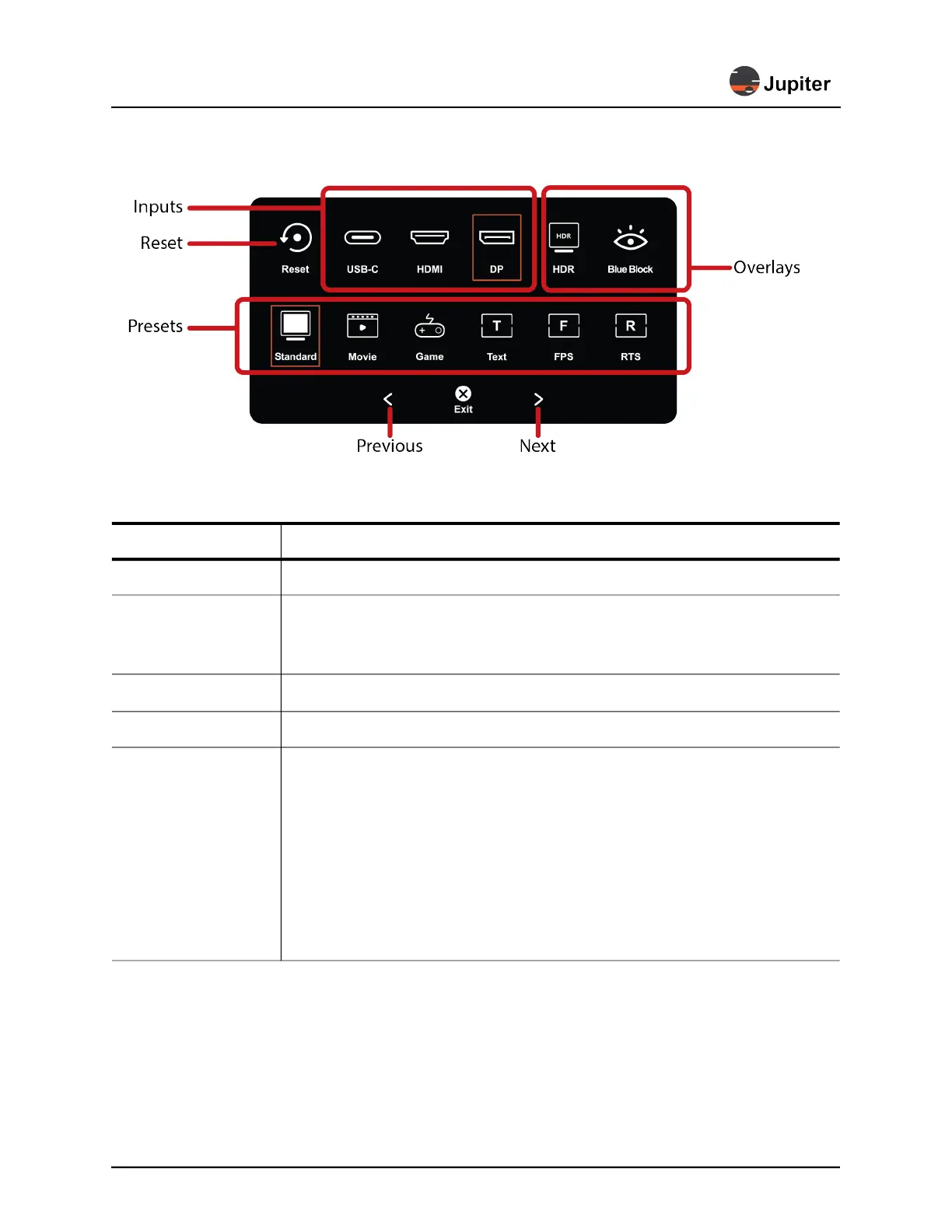
Figure 4.2: Reset, Inputs, Presets and Overlays
Table 4.1: Reset, Inputs, Presets and Overlays
Item Description
Reset Resets monitor to factory defaults
Inputs
Shows which input is selected with a box around the icon:
USB-C, HDMI, DP. Select
another input by touching icon for that input
* See section 3.1.4, Connectors,
on page 14 for a description of connectors
HDR
Use
HDR setting for watching HDR content
Blue Block Blue shift to ease eye strain. Like night mode on a cell phone
Preset Modes
Shows which preset mode is selected with a box around the icon:
Standard, Game,
Movie, Text, FPS, RTS Modes
•
Standard: default preset. Best all around settings
•
Game: enhanced settings for gaming
•
Movie: enhanced settings for movies
•
Text: enhanced sharpness for text
•
FPS (First-person shooter): enhanced images and screen response for FPS games
•
RTS (Real-time strategy): enhanced images and screen response for RTS games


 To Next Page