Unpack the Pana 34
Pana 34 User Manual 3
1.5 Unpack the Pana 34
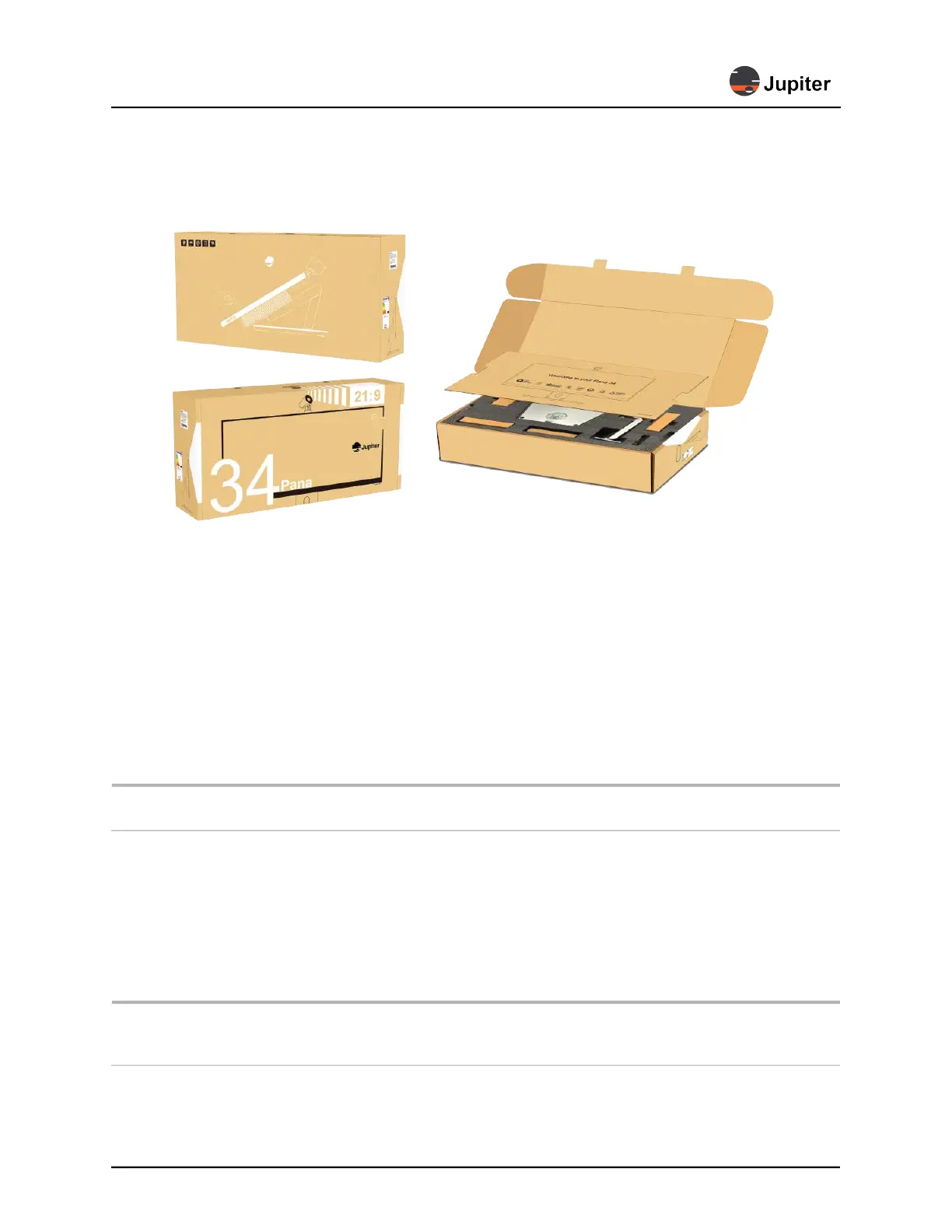
Figure 1.1: Pana packaging
1 Open box on a large stable table
2 Open flaps and lean the top of box backwards
3 Remove interior cardboard cover
4 Remove items in top foam protection (and verify with packaging list) and set aside
5 Remove top layer of protective foam
6 Leave monitor face down in protective bottom foam
7 Follow the directions in Section 2.1, Attach the Stand, Camera and Monitor on page 5 which
includes attaching the stand to the monitor and properly picking it up out of the box.
WARNING! Do not lift the monitor by the speaker coverings on the back of the monitor. The best
way to lift the monitor out of the box is AFTER the monitor is mounted to the stand.
1.6 Storage Considerations
Ensure that Product storage remains within the range of 0° C to 50° C. (32° F – 122° F)
1.7 Modifications to Product
CAUTION: Any changes or modifications, including but not limited to hardware and software
modifications not expressly approved by Jupiter Systems could void the user’s authority to
operate the equipment.


 To Next Page