Need help?
Do you have a question about the Juta CM5024Z and is the answer not in the manual?
Details on necessary tools, cables, and site preparation for controller installation.
Explanation of LCD icons and the functions of the controller's buttons.
Explains how to view various operational parameters like voltage, current, temperature, and accumulated power.
Configuration of High Voltage Disconnection (HVD) and Low Voltage Reconnection (LVR).
Setting LVD protection and configuring load working modes.
Steps for addressing Low Voltage Disconnection (LVD) protection.
Troubleshooting overload, short circuits, solar panel issues, and load shocks.
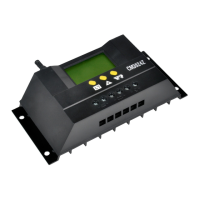
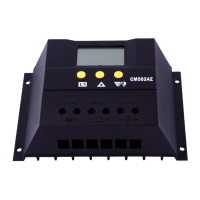
The JUTA CM50 Solar Charge Controller, specifically the CM5024Z model, is an intelligent and multi-purpose device designed for managing solar charge and discharge in various applications. This controller utilizes a fixed LCD display, providing a user-friendly interface that allows for flexible setting of various control parameters to meet diverse system requirements. Its core function is to optimize the charging of batteries from solar panels and manage the power discharge to connected loads, ensuring efficient and safe operation of a solar power system.
The CM50 series controller acts as the brain of a solar power system, regulating the flow of electricity from solar panels to batteries and from batteries to loads. It employs an intelligent Pulse Width Modulation (PWM) charge mode, which is crucial for maintaining battery health and extending its lifespan by preventing overcharging. The controller automatically identifies the system voltage level (12V/24V/48V), adapting its operation accordingly. This automatic identification simplifies setup and ensures compatibility with different battery bank configurations.
A key function of the controller is its ability to protect the battery from various harmful conditions. It includes Battery Low Voltage Disconnection (LVD) to prevent over-discharge, which can severely damage batteries. When the battery voltage drops below a preset threshold, the controller disconnects the load circuit. Conversely, it features High Voltage Disconnection (HVD) to prevent overcharging by cutting off the charging circuit when the battery reaches a high voltage limit. The controller also incorporates battery reverse connection protection, safeguarding both the controller and the battery from damage due to incorrect wiring. Furthermore, it offers battery reverse-discharge protection, preventing current from flowing back from the battery to the solar panel at night.
For load management, the CM50 controller provides settable operating modes. Users can configure how the load operates, including normal mode (24h), light control with time control mode (1h-23h), and pure light control mode (0h). These modes allow for flexible control over when the connected loads receive power, which is particularly useful for lighting systems or other applications where power delivery needs to be time-sensitive or dependent on ambient light conditions. The controller also includes overload and short circuit protection for the load circuit, automatically disconnecting the load if excessive current is drawn or a short circuit occurs, thereby protecting both the load and the controller itself.
The device also offers a valuable accumulated function for charge and discharge Ampere-hours (Ah). This feature allows users to monitor the total energy charged into and discharged from the battery over time, providing insights into system performance and energy consumption patterns. This data can be reset to zero, enabling periodic monitoring and analysis.
The CM50 controller is designed for ease of use, featuring a clear LCD graphic symbol display and simple button operation. The LCD provides visual feedback on various system statuses, such as charging status, discharge status, battery capacity, battery voltage, solar panel charge current, and load discharge current. This comprehensive display allows users to quickly grasp the operational state of their solar power system.
The buttons on the controller facilitate navigation through different interfaces and adjustment of parameters. A loop switch button allows users to cycle through various display pages, showing different parameters like battery voltage, ambient temperature, solar panel charging current, load discharging current, and accumulated charge/discharge power. Dedicated plus and minus buttons are used for adjusting control parameters. For instance, users can set the High Voltage Disconnection (HVD) voltage, Low Voltage Reconnection (LVR) voltage, and Low Voltage Disconnection (LVD) protection voltage. These adjustable parameters give users fine-grained control over their system's charging and discharging thresholds, allowing for customization based on battery type and application needs.
The controller also incorporates automatic temperature compensation, which adjusts charge-discharge control parameters based on the ambient temperature. This is crucial for battery health, as charging voltages need to be adjusted with temperature to prevent under- or overcharging. An external temperature sensor is included and should be placed near the battery to ensure accurate compensation.
For advanced users, the CM5024Z model offers remote monitoring and control functions (custom). This feature, if implemented, allows the controller to be connected to a host computer via a communication wire, enabling remote oversight and management of the solar power system.
Maintenance of the CM50 Solar Charge Controller primarily involves ensuring proper installation and understanding its fault indicators. The manual emphasizes the importance of using appropriate cable sizes to minimize voltage drop and selecting a suitable installation site that is free from dampness, dust, flammable, explosive, and corrosive gases. The controller should be installed on a fixed vertical plane, with adequate space (e.g., 10cm below) for thermal control, ensuring optimal operating temperature.
The controller provides clear indications for various fault conditions, aiding in troubleshooting. For instance, if the battery voltage drops below the LVD protection voltage, the screen will display a specific symbol, indicating that the load circuit has been disconnected. To resolve this, the battery needs to be recharged by solar panels or an external charger until it reaches the LVR voltage.
In case of an overload, the screen will display a flashing symbol indicating that the load circuit current has exceeded 1.5 times the rated current for more than 60 seconds. The controller enters an overload protection state, and users need to reduce the load and then press a button to restore power. Similarly, for a short circuit, a flashing symbol will appear, indicating a short circuit in the load loop. Users must check the load and cables for damage or short circuits and then press a button to restore power after troubleshooting.
The controller also indicates solar panel faults. If no solar panels are detected within 24 hours, a specific symbol will flash, prompting users to check the connection from the solar panel and ensure there isn't an open circuit between the panels and the controller. A "Load Shock Fault" is indicated if the load impulse current is more than twice the rated current, causing the controller to restart the load multiple times.
The product comes with a quality assurance policy, including guarantees for replacement, returning, and repairing within specified periods (7 days, 1 month, and 12 months after sale, respectively). If the exact usage date cannot be identified, an 18-month warranty period from the ex-work date is applied. The policy also outlines conditions under which charges may apply for repairs, such as damage due to improper operation, use beyond technical requirements, self-repair, inappropriate environmental conditions, or improper carrying/storage. This comprehensive approach to fault indication and warranty support helps users maintain the controller effectively and ensures long-term reliability of their solar power system.
 General
| Model | CM5024Z |
|---|---|
| Rated Load Current | 20A |
| Output Current | 20A |
| Protection Class | IP32 |
| Input Voltage | 12V/24V |
| Operating Temperature | -20°C ~ +55°C |

 To Next Page