Chapter 3---Electrical
Model 250 Service Manual 3-13
Table 3-1
HVPS -
P45 I/O Pinout
PIN # Description PIN # Description
1 GND (+80V) 9 +15V
2 GND (+15V) 10 -15V
3 GND (-15V) 11 G1 SUPPLY
4 GND (G1) 12 /HV_ENA
5 /HV_OK 13 V PARABOLA
6 H PARABOLA 14 H DRIVE (HVPS_SYNC
7 GND (DAF)
8 +80V
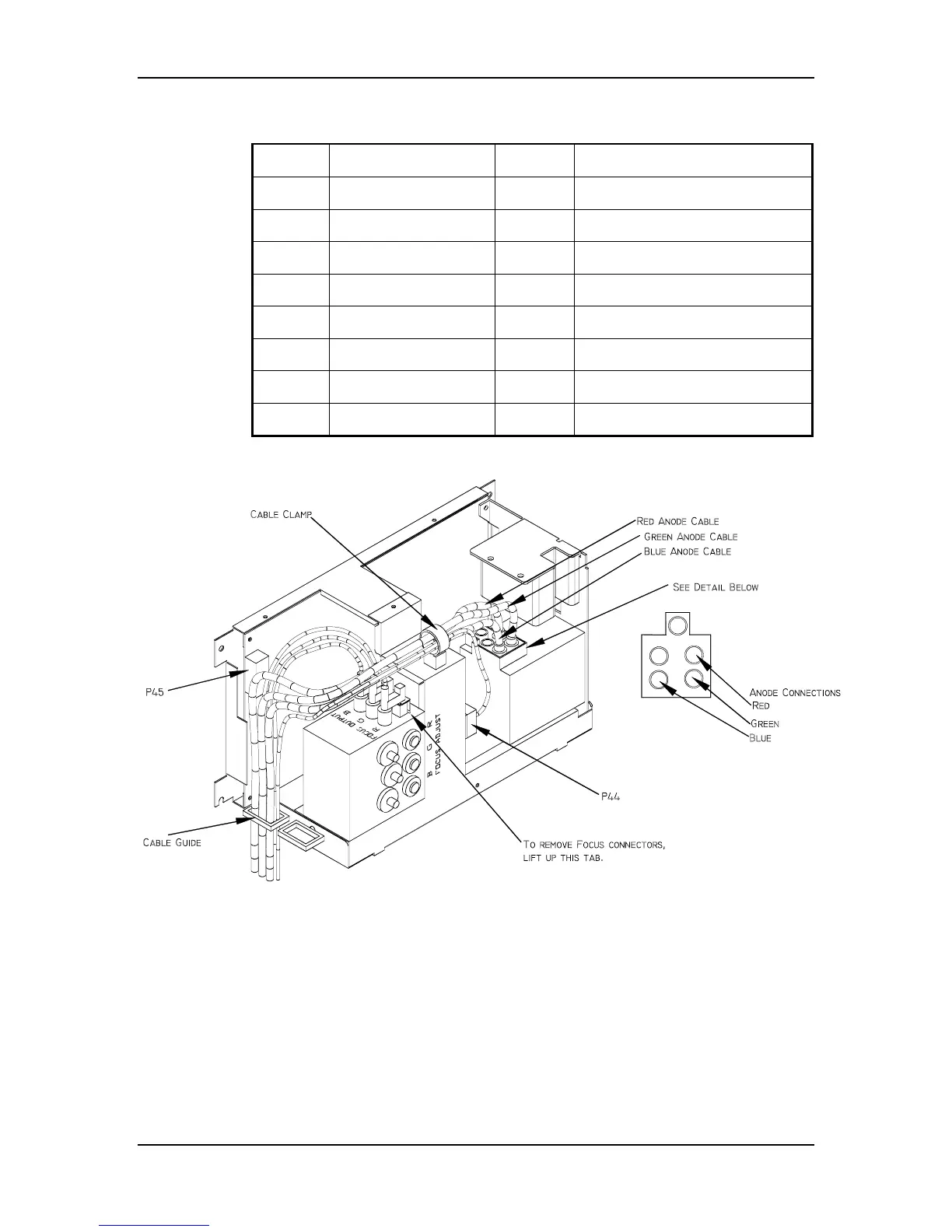
Figure 3-6
High Voltage Power Supply.
5.
Carefully slide the cover upward and outward to remove it.
NOTE
: Refer to Figure 4-5 for the remainder of this procedure.
6.
Disconnect the three CRT Anode Cables.
7.
Disconnect P44-G2 Out (at the middle-front of the HVPS).
8.
Unsnap the cable clamp at the top of the HVPS.
9.
Remove the Anode Cables and the P44 cable from the cable clamp.


 To Next Page