V-14FMG3/AV-14FMG3B
24
Item
Measuring
instrument
Test point Ad justment part Description
5. COLOUR [Method of adjustm ent using measur ing instrument]
PAL COLOUR
1. Input a PA L f ull field colou r bar sig nal (7 5% wh it e).
2. En ter th e SERVICE MENU.
3. Select 2. V/C f rom SERVICE ME NU.
4. Select 5. COLOUR with the MENU ▼/▲ key.
5. Set the initial setting value of PAL COLOUR with the MENU
- / + key.
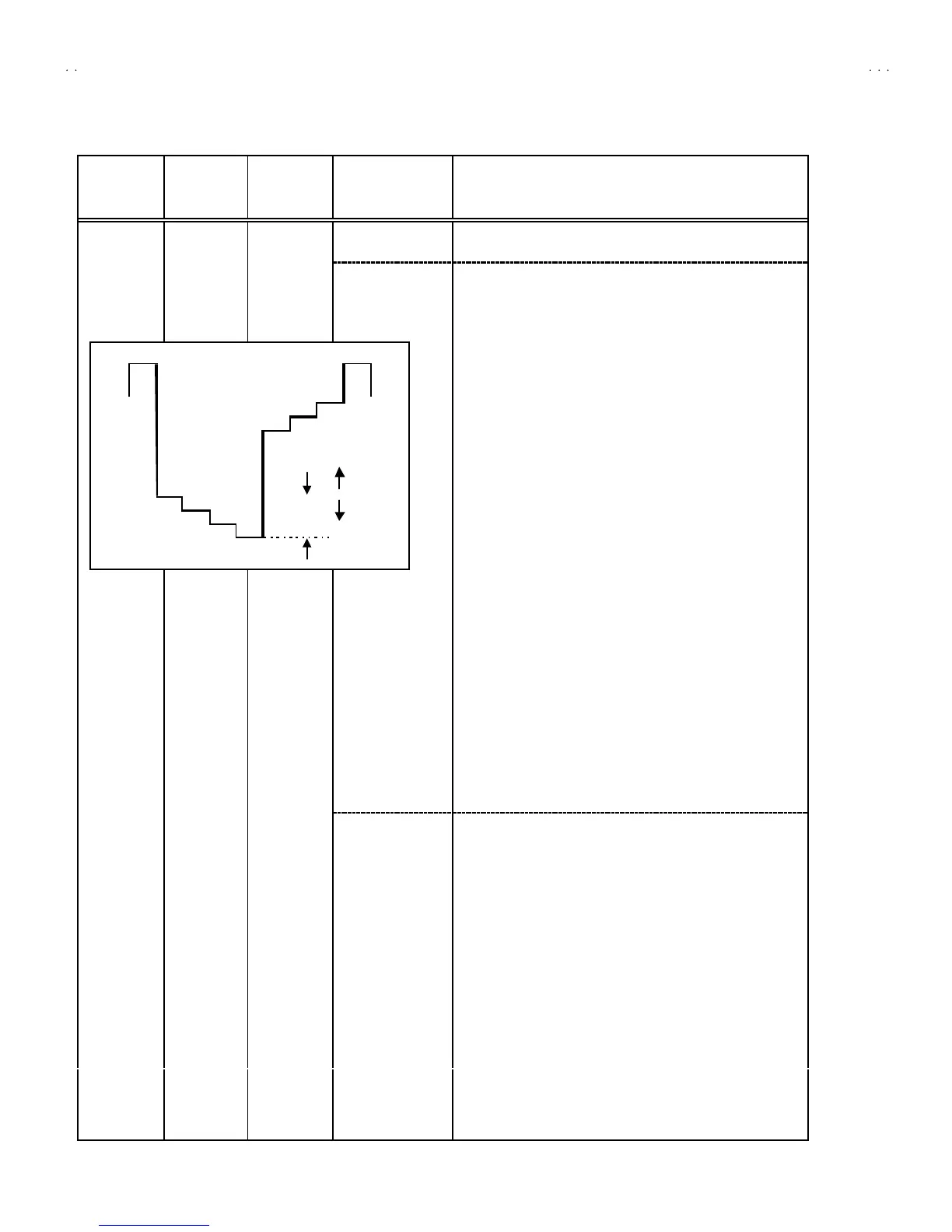
6. Con nect th e osc illosc ope be twee n TP -47G /R a nd TP-E (
#
).
7. Ad just P AL COL OUR to bring th e valu e o f (A) in the illustration
to + 12V (W - G). (Volt age valu e b et ween (W) an d ( G))
SECAM COLOUR
1. Input a SECAM full field colour bar signal (75% white).
2. Set the initial settin
NTSC 3.58 COLOUR
1. Input a NTSC 3. 58 full fie ld colo ur b ar sign al ( 75 % white) .
2. Set the initial setting value of NTSC 3.58 COLOUR with the
MENU - / + key.
3. Ad just NTSC 3.5 8 COL OUR to br ing t he valu e of (A) in th e
illu str ation t o +10V






 To Next Page