oint Ad justment part Description
7.SECAM
BL ADJUST
[Method of adjustment using measuring instrument]Ad ju st ment
of SECAM
BL AC K
OFFSET
Remote
control unit
Signal
generator
1. Input a SE CAM full f ield c olour b ar sign al.
2. En ter th e SERVICE MENU.
3. Select 2. V/C f rom SERVICE ME NU.
4. Select 7. SECAM BL ADJUST with MENU
▼
/
▲
key.
5. Set the initial setting value with the MENU - / + key.
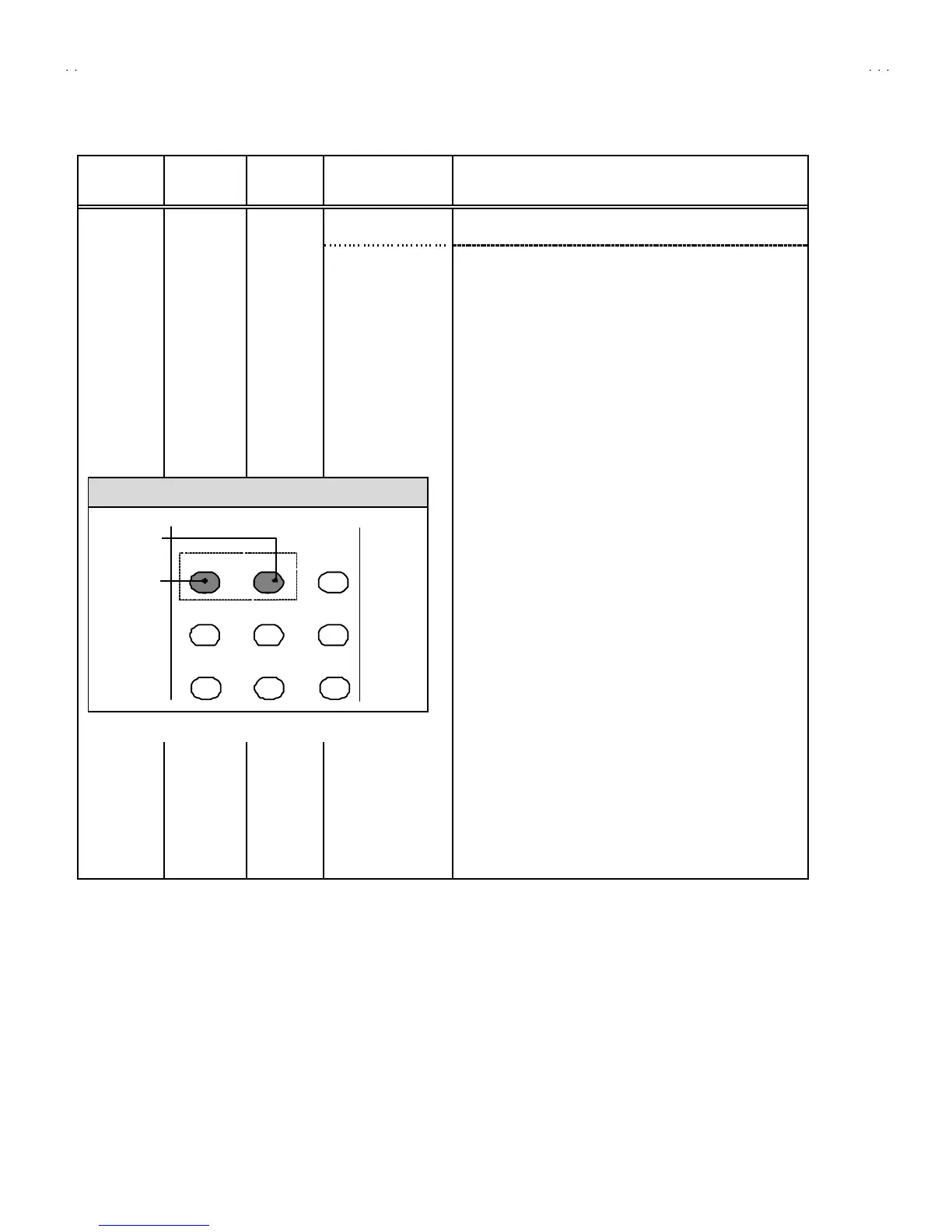
6. Switch the
①
ke y (c olou r OFF) an d
②
key (c olou r ON ) on the
remote co ntrol an d make sure th at th ere is no colo ur on th e
blac k an d wh it e scree n.
7. If t he bla ck an d whit e scr ee n is no t best with th e init ia l sett ing
value, make fine adjustment unt il you get t he best black and
white screen .
8. W hile watch ing th e scre en, adjus t th e valu e t o be th e s ame
colo ur b etwee n O N & OFF b y t en key on t he r em ote c ontro l
un it.
9. Press the DI SPLAY key t wice to return to the normal screen.
KEY ASSIGNMENT OF REMOTE CONTROL UNIT
12 3
4
56
7
8
9
COLOUR
ON
COLOUR
OFF




 To Next Page