36
POWER
RM-C394G
123
DISPLAY
789
456
SLEEP TIMER
0
TV RETURN
LIGHT
TV
CATV
PAUSE/STILL
OPEN/CLOSE
TV / DVD
RETURN
AUDIO
REPEATA-B
CANCEL
SLOW
ZOOM
TITLE
AUDIO
ANGLE
SUBTITLE
INPUT
C.C.
DVD SETUP
SELECT
/ENTER
TV MENU
MUTING
DVD
CONTROL
PLAY MODE
PREV NEXT
TV/DVD
DVD MENU
F.SEARCH
PLAY
B.SEARCH
STOP
+
CH
VOL
VOL
+
CH
Password
Parental
5
1
2
3
4
/Enter/Setup/Return
0 9/Cancel
Language Picture Parental Other
Password
Parental
1
0 9/Cancel
/Enter/Setup/Return
Language Picture Parental Other
Password
Parental
1
1
2
3
4
/Enter/Setup/Return
0 9/Cancel
Language Picture Parental Other
Password
Parental
1
/Enter/Setup/Return
0 9/Cancel
Language Picture Parental Other
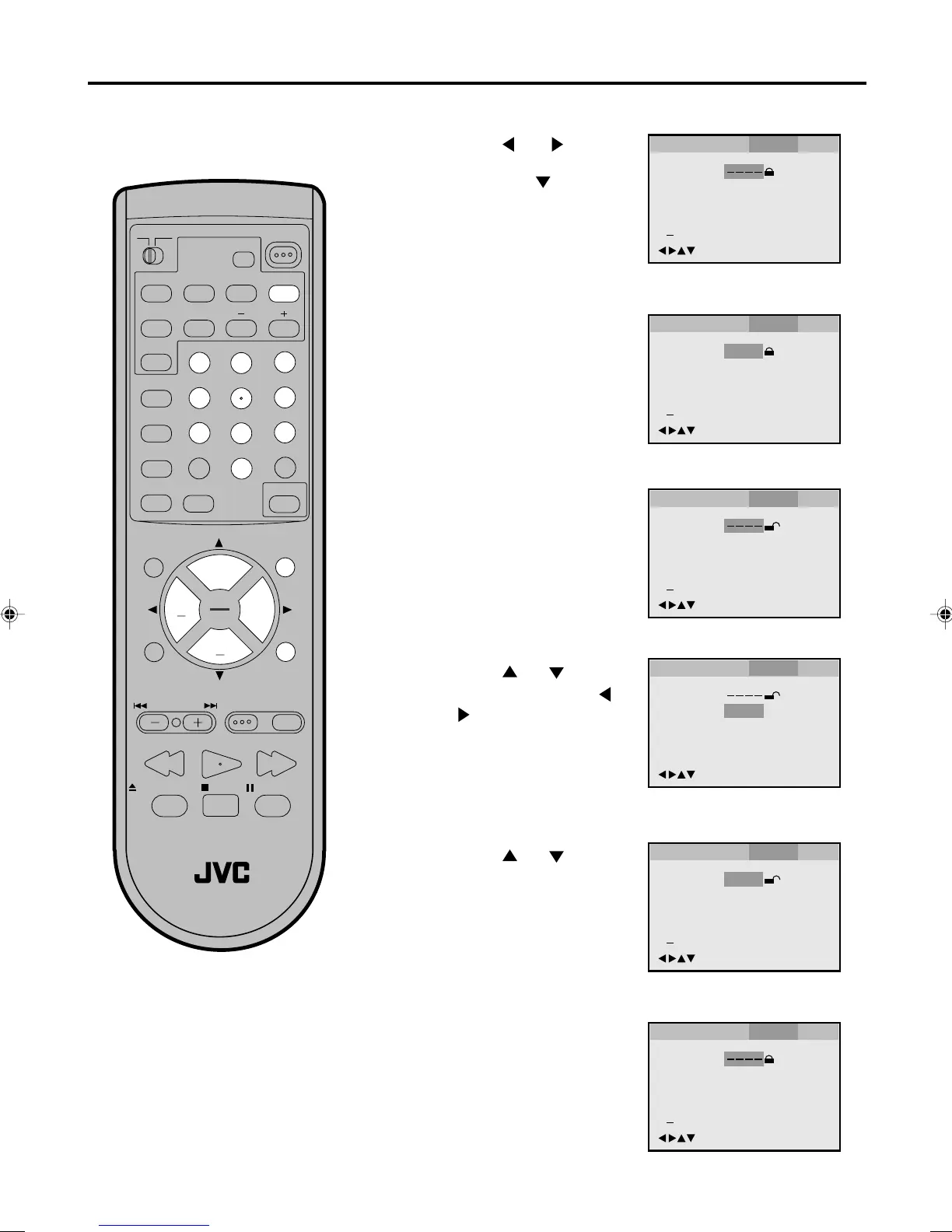
To change the parental level
Press number buttons
(0-9) to enter the password
you have stored.
1
Press DVD SETUP in the stop mode or No Disc.
Press
or to select
Parental.
Then press
or ENTER.
2
Press ENTER.
The rating is now unlocked.
3
Note:
Do not forget the password. If you forget
the password, contact the dealer that you
purchased the unit from.
Password
Parental
5
/Enter/Setup/Return
Language Picture Parental Other
Press or to select
Parental, then press
or
to change the parental
level.
4
5
Password
Parental
5
0 9/Cancel
/Enter/Setup/Return
Language Picture Parental Other
6
Press DVD SETUP or RE-
TURN to remove the paren-
tal control screen.
7
Press or to select
Password, then press
number buttons (0-9) to
enter the password.
Note: You can change the
password if you want.
Press ENTER.
Now the parental level is
changed and locked.
5870201AE(28-37) 5/4/01, 5:35 PM36


 To Next Page