EasyManua.ls Logo

JVC AV-2106TE - Using the Buttons on the TV

JVC AV-2106TE
89 pages
Print Icon
To Next Page IconTo Next Page
To Previous Page IconTo Previous Page
Loading...
16
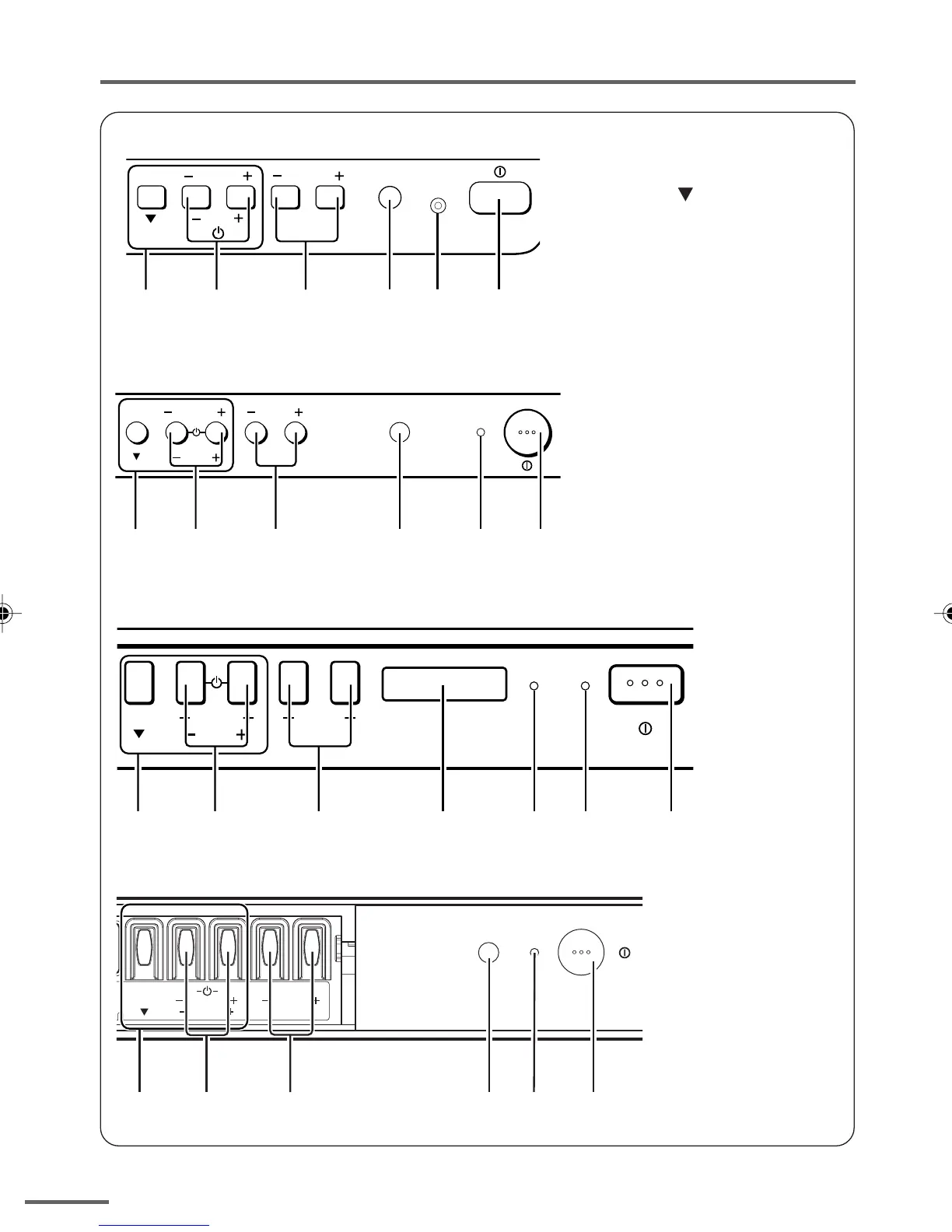
Using the buttons on the TV
1 MENU button
• MENU
button
2 CHANNEL m buttons
• MENU m buttons
3 VOLUME m buttons
• EXIT from MENU buttons
4 Remote control sensor
5 ON TIMER lamp
The light is switched on
while ON TIMER function
is operating.
6 POWER lamp
When the Main power is
on, the light is red.
7 POWER/ON TIMER lamp
When the Main power is
on, the light is green.
When ON TIMER function
is on, it is red.
8 Main power button
<AV-14A16>
<AV-21T16>
<AV-21F16>
MENU CHANNEL VOLUME
EXIT
POWER /
ON TIMER
1
2
3
78
4
MENU
CHANNEL
VOLUME
EXIT
ON TIMER POWER
1
2
3
4 5 6 8
MENU CHANNEL VOLUME
EXIT
POWER /
ON TIMER
1
2
3
4 7 8
<AV-21B16>
MENU CHANNEL VOLUME
ON
POWER
TIMER
EXIT
1
2
3
4 7 8
GGT0106-001A-H_P14-17 16/1/06, 5:49 PM16

Table of Contents