1-24 (No.YA243)
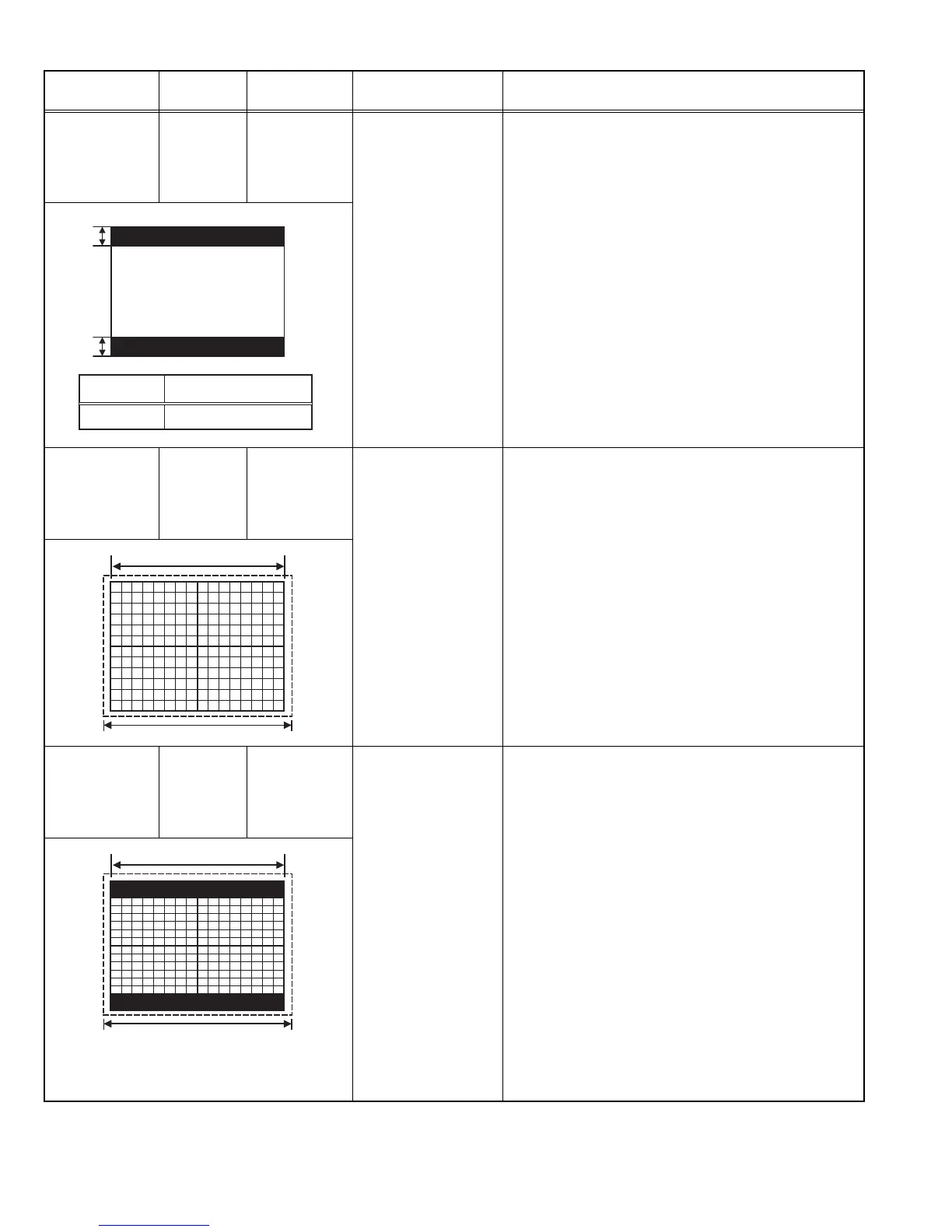
V. SIZE /
V. POSITION
(16:9)
Signal
generator
Remote
control unit
[2.DEF (D)]
D08: V. SIZE+-
D14: V. LIN+-
• V. SIZE / V. POSITION (4:3) adjustment should be
finished.
(1) Receive a black and white signal (color off).
(2) Select 16:9 mode.
(3) Confirm that the width of V. BLANKING is equal to
adjustment value (B).
(4) If the value (B) is not correct, select 2.DEF(D) from
the SERVICE MODE.
(5) Adjust < D08 > (V. SIZE+-) and < D14 > (V. LIN+-)
to be same to adjustment value (B).
NOTE :
• When you change the VERTICAL adjustment value of
the regular mode (4:3), review the adjustment of 16:9
mode again.
H. SIZE /
H. POSITION /
SIDE PIN
(4:3)
Signal
generator
Remote
control unit
[2.DEF (D)]
D03: H POSI
D15: H SIZE
D23: EW PARA
D19: EWCR TOP
D21: EWCR BTM
(1) Receive the crosshatch signal.
(2) Select 2.DEF(D) from the SERVICE MODE.
(3) Select < D03 > (H POSI).
(4) Adjust < D03 > to the left width and right width of the
crosshatch screen becomes equal.
(5) Select < D15 > (H SIZE).
(6) Adjust < D15 > to the horizontal screen size become
setting value is 90%.
(7) Select < D23 > (EW PARA).
(8) Adjust < D23 > to vertical line at both side to become
straight.
(9) If it is necessary, readjust step 3 to 8.
NOTE:
If it is not straight at the vertical upper and bottom corner
line, adjust the upper and bottom conrner pin by < D19 >
(EWCR TOP) amd < D21 > (EWCR BTM).
H. POSITION /
H. SIZE /
SIDE PIN
(16:9)
Signal
generator
Remote
control unit
[2.DEF (D)]
D16: H SIZE+-
D04: H POSI+-
D24: EW PARA+-
D20: EWCR T+-
D22: EWCR B+-
• V. SIZE / V. POSITION adjustment should be finished.
• H. SIZE / H. POSITION / SIDE PIN adjustment should
be finished. (Regular size(4:3)).
(1) Receive the crosshatch signal.
(2) Select 16:9 mode.
(3) Select 2.DEF(D) from the SERVICE MODE.
(4) Confirm both sides of crosshatch to be the
adjustment value 90%.
(5) If the value is not correct, adjust < D16 > (H SIZE+-)
and < D04 > (H POSI+-) to the horizontal screen size
become setting value is 90%.
(6) Confirm the second vertical line from left to right to
be straight.
(7) If it is not straight, adjust to be straight by < D24 >
(EW PARA+-), < D20 > (EWCR T+-) and < D22 >
(EWCR B+-).
NOTE :
• Review the adjustment of 16:9 mode again when you
change the SIDE PIN adjustment value of regular
(4:3) mode.
Item
Measuring
instrument
Test point Adjustment part Description
B'
[B=B']
B
Adjust point
B
Setting value
50mm
Picture size 100%
Screen size
Picture size 100%
Screen size


 To Next Page