EasyManua.ls Logo

JVC CA-C55BK - Remote Controller Usage; Remote Control Operation and Numeric Keypad; Care and Maintenance General Notes

JVC CA-C55BK
144 pages
Print Icon
To Next Page IconTo Next Page
To Previous Page IconTo Previous Page
Loading...
GL-L
(Lp0Z
ON)
Using
the
Remote
Controller
How
to
Use
the
Remote
Controller
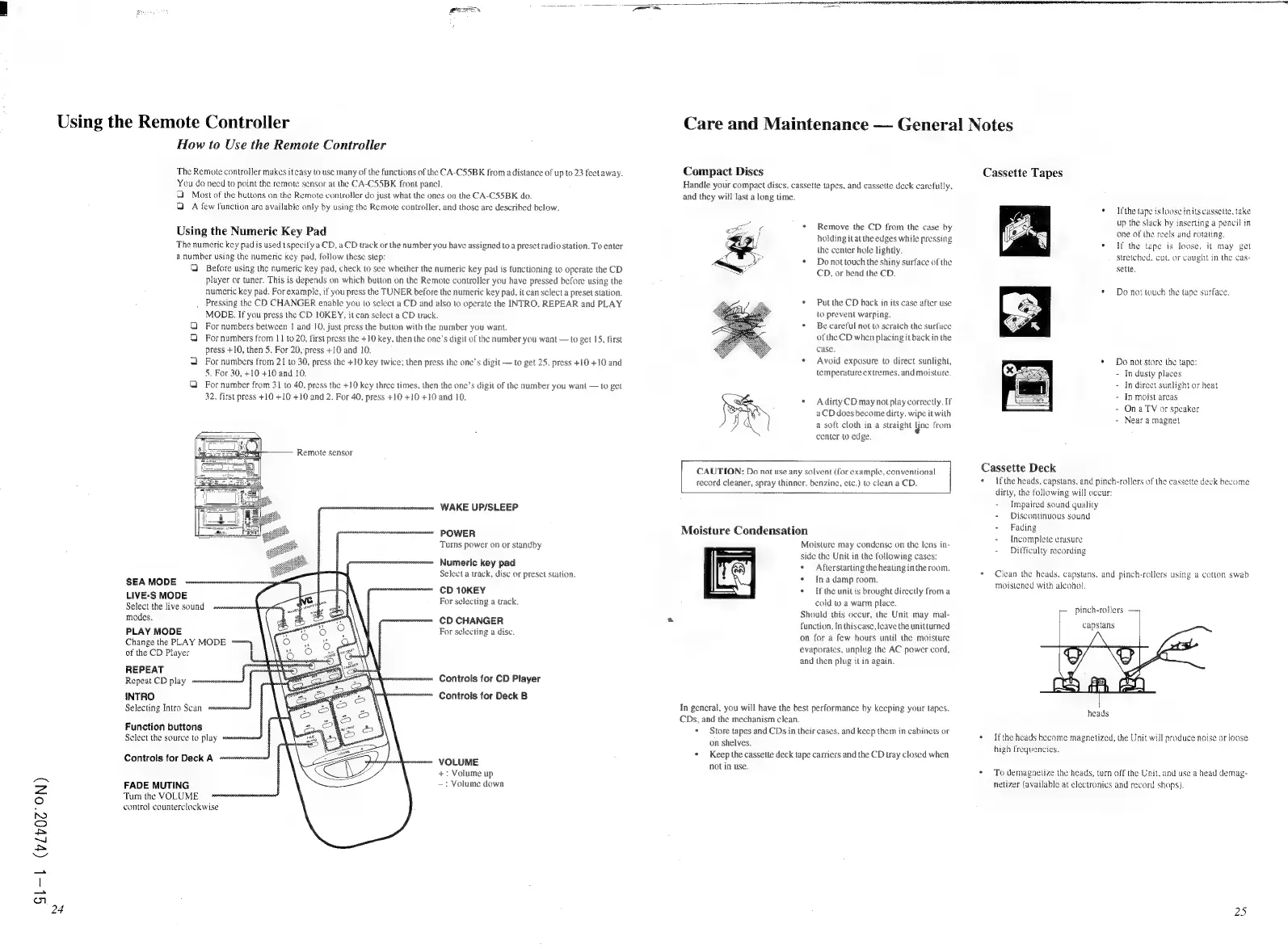
The
Remote
controller
makes
it
easy
to
use
many
of
the
functions
of
the
CA-CS5BK
froma
distance
of
up
to
23
feetaway.
You
do
need
to
point
the
remote
sensor
at
the
CA-CS55BK
front
panel.
Most
of
the
buttons
on
the
Remote
controller
do
just
what
the
ones
on
the
CA-CS5BK
do.
QA
few
function
are
available
only
by
using
the
Remote
controller,
and
those
are
described
below.
Using
the
Numeric
Key
Pad
The
numeric
key
pad
is
used
t
specify
a
CD,
a
CD
track
or
the
number
you
have
assigned
to
a
preset
radio
station.
To
enter
a
number
using
the
numeric
key
pad,
follow
these
step:
Q
Before
using
the
numeric
key
pad,
check
to
see
whether
the
numeric
key pad
is
functioning
to
operate
the
CD
player
or
tuner.
This
is
depends
on
which
button
on
the
Remote
controller
you
have
pressed
before
using
the
numeric
key
pad.
For
example,
if
you
press
the
TUNER
before
the
numeric
key
pad,
it
can
sclect
a
preset
station.
Pressing
the
CD
CHANGER
enable
you
to
select
a
CD
and
also
to
operate
the
INTRO,
REPEAR
and
PLAY
MODE.
If
you
press
the
CD
LOKEY,
it
can
select
a
CD
track.
For
numbers
between
|
and
10,
just
press
the
button
with
the
number
you
want.
For
numbers
from
11
to
20,
first
press
the
+10
key,
then
the
one’s
digit
of
the
number
you
want
to
get
15,
first
press
+10,
then
5,
For
20,
press
+10
and
10.
For
numbers
from
21
to
30,
press
the
+10
key
twice;
then
press
the
one’s
digit
to
get
25,
press
+10
+10
and
5.
For
30,
+10
+10
and
10.
For
number
from
31
to
40,
press
the
+10
key
three
times,
then
the
one’s
digit
of
the
number
you
want
to
get
32,
first
press
+10
+10 +10
and
2.
For
40,
press
+10
+10 +10
and
10.
oO
v
oo
Remote
sensor
WAKE
UP/SLEEP
POWER
Turns
power
on
or
standby
Numeric
key
pad
Select
a
track,
disc
or
preset
station.
SEA
MODE
etoeesoenesets
CD
10KEY
LIVE-S
MODE
ast
2
Select
the
live
sound
For
selecting
a
track.
modes.
CD
CHANGER
PLAY
MODE
For
selecting
a
dise.
Change
the
PLAY
MODE
omens
of
the
CD
Player
REPEAT
=f
mms
i
Repeat
CD
play
nner
3
Controls
for
CD
Player
INTRO
Controis
for
Deck
B
Selecting
Intro
Scan
sevreesee
Function
buttons
Sclect
the
source
to
play
Controls
for
Deck
A.
snes
VOLUME
+:
Volume
up
FADE
MUTING
—:
Volume
down
Turn
the
VOLUME
control
counterclockwise
Ne
A
Care
and
Maintenance
General
Notes
Compact
Discs
Handie
your
compact
discs.
cassette
tapes,
and
cassette
deck
carefully,
and
they
will
last
a
long
time.
¢
Remove
the
CD
from
the
case
by
holding
itat
the
edges
while
pressing
ihe
center
hole
lightly.
*
Donottouch
the
shiny
surface
of
the
CD,
or
bend
the
CD.
*
Putthe
CD
back
in
its
case
after
use
io
prevent
warping.
*
Becareful
not
to
scratch
the
surface
of
the
CD
when
placing
it
back
in
the
case.
*
Avoid
exposure
to
direct
sunlight,
temperature
extremes,
and
moisture.
+
AdirtyCD
may
not
play
correctly.
If
aCD
does
become
dirty,
wipe
it
with
a
soft
cloth
in
a
straight
Yne
from
center
to
edge.
CAUTION:
Do
not
use
any
solvent
(for
example,
conventional
record
cleaner,
spray
thinner.
benzine,
ctc.)
to
clean
a
CD.
Moisture
Condensation
Moisture
may
condense
on
the
lens
in-
side
the
Unit
in
the
following
cases:
*
Afterstarting
the
heating
in
the
room.
¢
Ina
damp
room.
*
Ifthe
unitis
brought
directly
froma
cold
to
a
warm
place.
Should
this
occur,
the
Unit
may
mal-
function.
In
thiscase,
leave
the
unit
turned
on
for
a
few
hours
until
the
moisture
evaporates,
unplug
the
AC
power
cord,
and
then
plug
il
in
again.
ry
In
gencral,
you
will
have
the
best
performance
by
keeping
your
tapes.
CDs,
and
the
mechanism
clean.
*
Store
tapes
and
CDs
in
their
cases.
and
keep
them
in
cabinets
or
on
shelves.
*
Keep
the
cassette
deck
tape
carriers
and
the
CD
tray
closed
when
not
in
use.
Ca
Ca
ssette
Tapes
+
Ifthe
tape
is
loose
in
its
cassette,
take
up
the
slack
by
inserting
a
pencil
in
one
of
the
reels
and
rotating.
+
If
the
tape
is
loose,
it
may
get
stretched,
cut,
or
caught
in
the
cas-
selle,
¢
Do
not
touch
the
tape
surface,
*
Do
not
store
the
tape:
-
In
dusty
places
-
Indirect
sunlight
or
heat
-
In
moist
areas
-
Ona
TV
or
speaker
-
Near
a
magnet
ssette
Deck
Ifthe
heads,
capstans,
and
pinch-rollers
of
the
cassette
deck
become
dirty,
the
following
will
occur:
-
Impaired
sound
quality
-
Discontinuous
sound
-
Fading
-
Incomplete
erasure
-
Difficulty
recording
Clean
the
heads.
capstans,
and
pinch-rollers
using
a
cotton
swab
moistened
with
alcohol.
pinch-rollers
capstans
heads
Ifthe
heads
become
magnetized,
the
Unit
will
produce
noise
or
loose
high
frequencies.
To
demagnetize
the
heads,
turn
off
the
Unit.
and
use
a
head
demag-
netizer
(available
at
electronics
and
record
shops).
25

Related product manuals