EasyManua.ls Logo

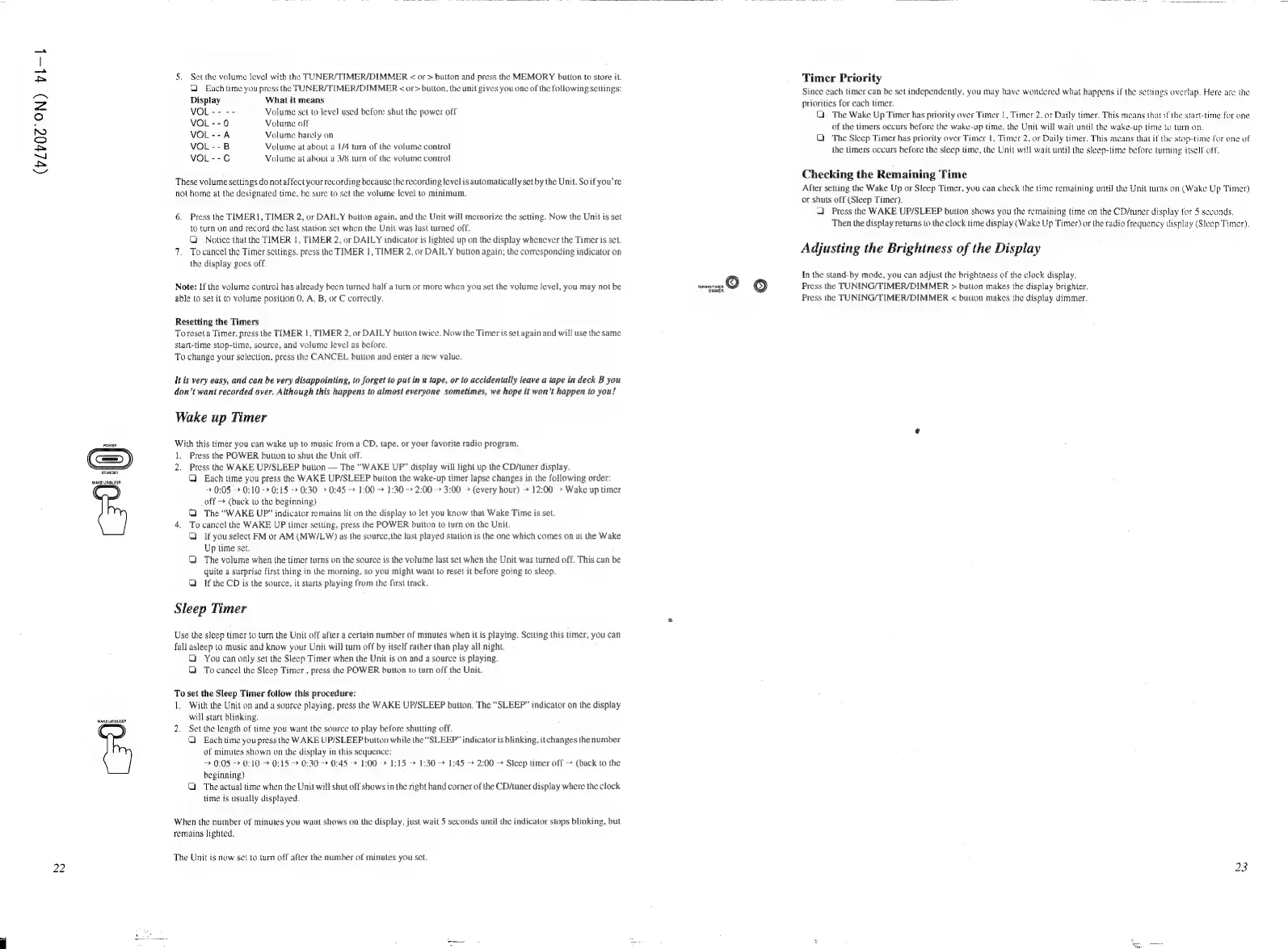
JVC CA-C55BK - Timer Priority and Display Adjustment; Timer Priority and Remaining Time Check; Wake Up and Sleep Timer Operation; Wake Up Timer Operation

JVC CA-C55BK
144 pages
Print Icon
To Next Page IconTo Next Page
To Previous Page IconTo Previous Page
Loading...
(vlv0@'
ON)
tl-1L
22
WAKE
UPSUEEP
WAKE
UPSLEEP:
5.
Set
the
volume
level
with
the
TUNER/TIMER/DIMMER
<
or
>
buiton
and
press
the
MEMORY
button
to
store
it.
Each
time
you
press
the
TUNER/TIMER/DIMMER
<
or>
buiton,
the
unit
gives
you
one
of
the
following
sellings:
Display
What
it
means
VOL----
Volume
set
to
level
used
before
shut
the
power
off
VOL
--0
Volume
olf
VOL--A
Volume
barely
on
VOL
--B
Volume
at
about
a
1/4
tum
of
the
volume
control
VOL
--C
Volume
at
about
4
3/8
tum
of
the
volume
control
These
volume
settings
do
notaffect
your
recording
because
the
recording
level
is
automatically
set
by
the
Unit,
So
if
you’re
not
home
at
the
designated
time.
be
sure
to
set
the
volume
level
to
minimum.
6.
Press
the
TIMER],
TIMER
2,
or
DAILY
button again,
and
the
Unit
will
memorize
the
setting.
Now
the
Unit
is
set
to
turn
on
and
record
the
last
station
set
when
the
Unit
was
last
turned
off.
Q
Notice
that
the
TIMER
|,
TIMER
2,
or
DAILY
indicator
is
lighted
up
on
the
display
whenever
the
Timer
is
set.
7.
Tocancel
the
Timer
settings,
press
the
TIMER
|,
TIMER
2,
or
DAILY
button
again;
the
corresponding
indicator
on
the
display
goes
off.
Note:
If
the
volume
control
has
already
been
turned
half
a
turn
or
more
when
you
set
the
volume
level,
you
may
not
be
able
to
set
it
(o
volume
position
0,
A.
B,
or
C
correctly.
Resetting
the
Timers
To
reset
a
Timer,
press
the
TIMER
|,
TIMER
2,
or
DAILY
button
twice.
Now
the
Timer
is
set
again
and
will
use
the
same
start-time
stop-time,
source,
and
volume
level
as
before.
To
change
your
selection,
press
the
CANCEL
button
and
enter
a
new
value.
Itis
very
easy,
and
can
be
very
disappointing,
to
forget
to
put
in
a
tape,
or
to
accidentally
leave
a
tape
in
deck
B
you
don’t
want
recorded
over.
Although
this
happens
to
almost
everyone
sometimes,
we
hope
it
won’t
happen
to
you!
Wake
up
Timer
With
this
timer
you
can
wake
up
to
music
from
a
CD,
tape.
or
your
favorite
radio
program.
1.
Press
the
POWER
button
to
shut
the
Unit
off.
2.
Press
the
WAKE
UP/SLEEP
button
The
“WAKE
UP?”
display
will
light
up
the
CD/tuner
display.
Q
Each
time
you
press
the
WAKE
UP/SLEEP
button
the
wake-up
timer
lapse
changes
in
the
following
order:
+
0:05
>
O:10->O:15
0:30
>
0:45
->
1:00
>
1:30
->
2:00
>
3:00
»
(every
hour)
>
12:00
>
Wake
up
imer
off
>
(back
to
the
beginning)
Q
The
“WAKE
UP”
indicator
remains
lit
on
the
display
to
let
you
know
that
Wake
Time
is
set.
4.
To
cancel
the
WAKE
UP
timer
setting,
press
the
POWER
button
to
turn
on
the
Unit.
Q
Ifyou
select
FM
or
AM
(MW/LW)
as
the
source,
the
last
played
station
is
the
one
which
comes
on
at
the
Wake
Up
time
set.
The
volume
when
the
timer
turns
on
the
source
is
the
volume
last
set
when
the
Unit
was
turned
off.
This
can
be
quite
a
surprise
first
thing
in
the
morning,
so
you
might
want
to
reset
it
before
going
to
sleep.
If
the
CD
is
the
source,
it
starts
playing
from
the
first
track.
Sleep
Timer
Use
the
sleep
timer
to
turn
the
Unit
off
after
a
certain
number
of
minutes
when
it
is
playing.
Setting
this
timer,
you
can
fall
asleep
to
music
and
know
your
Unit
will
turn
off
by
itself
rather
than
play
all
night.
Q
You
can
only
set
the
Sleep
Timer
when
the
Unit
is
on
and
a
source
is
playing.
O
To
cancel
the
Sleep
Timer
,
press
the
POWER
button
to
turn
off
the
Unit.
To
set
the
Sleep
Timer
follow
this
procedure:
1.
With
the
Unit
on
and
a
source
playing,
press
the
WAKE
UP/SLEEP
button.
The
“SLEEP”
indicator
on
the
display
will
start
blinking.
2.
Set
the
length
of
time
you
want
the
source
to
play
before
shutting
off.
1
Each
time
you
press
the
WAKE
UP/SLEEP
button
while
the
“SLEEP”
indicator
is
blinking,
itchanges
the
number
of
minutes
shown
on
the
display
in
this
sequence:
->
0:05
-
0:10
>
0:15
->
0:30
0:45
->
1:00
>
1:15
1:30
1:45
->
2:00
>
Sleep
timer
off
->
(back
to
the
beginning)
Q
The
actual
time
when
the
Unit
will
shut
off
shows
in
the
right
hand
corner
of
the
CD/tuner
display
where
the
clock
time
is
usually
displayed.
When
the
number
of
minutes
you
want
shows
on
the
display,
just
wait
5
seconds
until
the
indicator
stops
blinking,
but
remains
lighted.
The
Unit
is
now
set
to
turn
off
after
the
number
of
minutes
you
set.
meee)
©
wai
Timer
Priority
Since
each
timer
can
be
set
independently,
you
may
have
wondered
what
happens
if
the
settings
overlap.
Here
are
the
prioritics
for
each
timer.
G.
The
Wake
Up
Timer
has
priority
over
Timer
1,
Timer
2.
or
Daily
timer.
This
means
that
if
the
start-time
for
one
of
the
limers
occurs
before
the
wake-up
time,
the
Unit
will
wait
until
the
wake-up
time
to
turn
on.
Q
The
Sleep
Timer
has
priority
over
Timer
1,
Timer
2,
or
Daily
timer.
This
means
that
if
the
stop-time
for
one
of
the
timers
occurs
before
the
sleep
time,
the
Unit
will
wait
until
the
sleep-time
before
tuming
itself
off,
Checking
the
Remaining
Time
After
setting
the
Wake
Up
or
Sleep
Timer,
you
can
check
the
time
remaining
unti]
the
Unit
turns
on
(Wake
Up
Timer)
or
shuts
off
(Sleep
Timer).
4
Press
the
WAKE
UP/SLEEP
button
shows
you
the
remaining
time
on
the
CD/tuner
display
for
5
seconds.
Then
the
display
returns
to
the
clock
time
display
(Wake
Up
Timer)
or
the
radio
frequency
display
(Sleep
Timer).
Adjusting
the
Brightness
of
the
Display
In
the
stand-by
mode,
you
can
adjust
the
brightness
of
the
clock
display.
Press
the
TUNING/TIMER/DIMMER
>
bution
makes
the
display
brighter.
Press
the
TUNING/TIMER/DIMMER
<
button
makes
the
display
dimmer.
23

Related product manuals