EasyManua.ls Logo

JVC CA-C55BK - Tuner Operation and Timer Setup; Station Management and Timer Configuration

JVC CA-C55BK
144 pages
Print Icon
To Next Page IconTo Next Page
To Previous Page IconTo Previous Page
Loading...
EL-L
(pZv07
ON)
ny
Q
CANCEL
PRESET
SCAN
PMMODEMUTE
To
cancel
the
preset
stations:
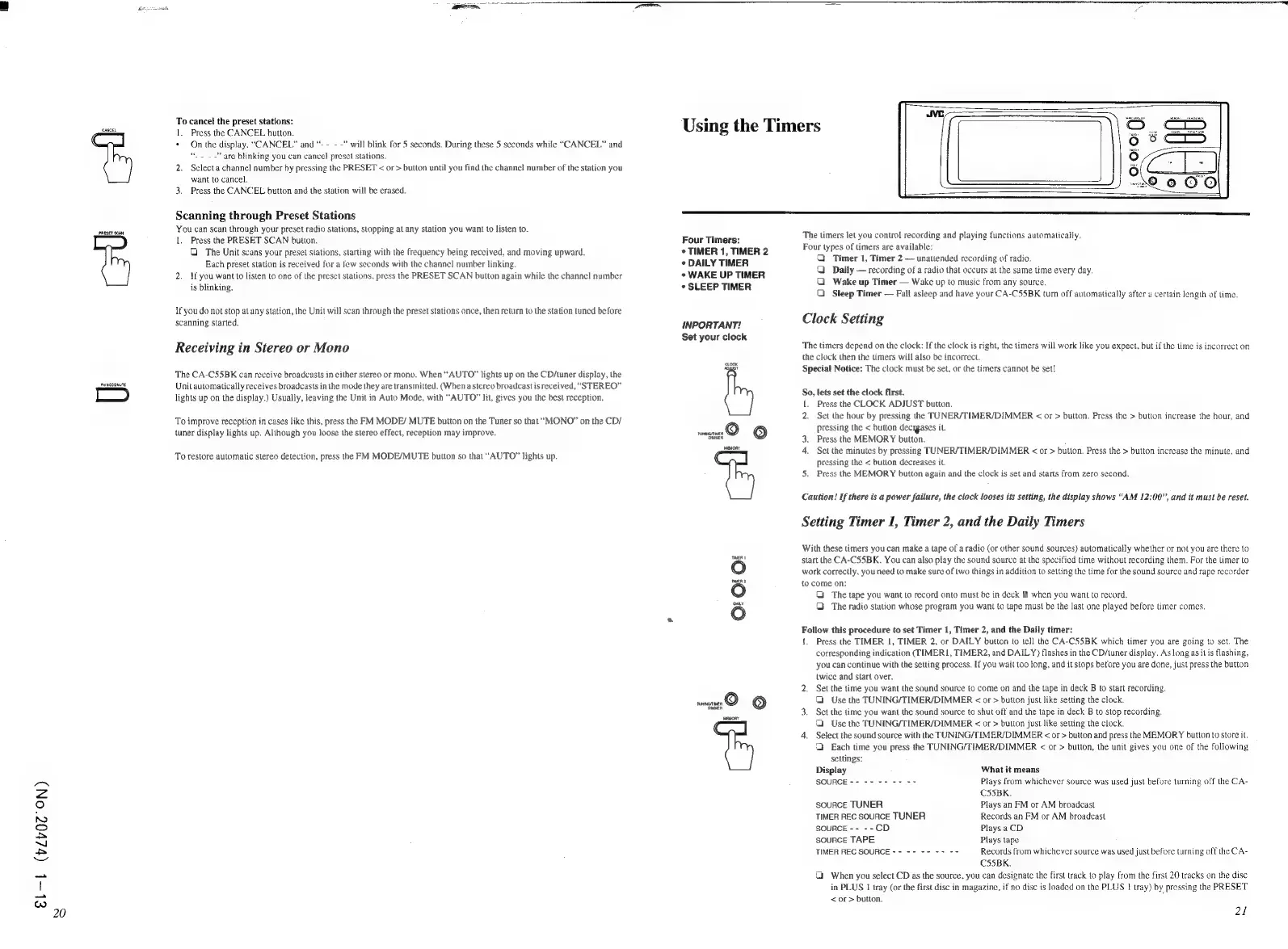
1.
Press
the
CANCEL
button.
*
On
the
display,
“CANCEL”
and
“-
- -
-”
will
blink
for
5
seconds.
During
these
5
seconds
while
“CANCEL”
and
“.~
~~
are
blinking
you
can
cancel
preset
stations.
2.
Select
a
channel
number
by
pressing
the
PRESET
<
or
>
button
until
you
find
the
channel
number
of
the
station
you
want
to
cancel,
3,
Press
the
CANCEL
button
and
the
station
will
be
erased.
Scanning
through
Preset
Stations
You
can
scan
through
your
preset
radio
stations,
stopping
al
any
station
you
want
to
listen
to.
1.
Press
the
PRESET
SCAN
button,
G
The
Unit
scans
your
preset
stations,
starting
with
the
frequency
being
received,
and
moving
upward.
Each
preset
station
is
received
for
a
few
seconds
with
the
channel
number
linking.
2.
if
you
want
to
listen
to
one
of
the
preset
stations,
press
the
PRESET
SCAN
button
again
while
the
channe!
number
is
blinking.
If
you
do
not
stop
atany
station,
the
Unit
will
scan
through
the
preset
stations
once,
then
return
to
the
station
tuned
before
scanning
started.
Receiving
in
Stereo
or
Mono
The
CA-CSSBK
can
receive
broadcasts
in
either
stereo
or
mono.
When
“AUTO”
lights
up
on
the
CD/tuner
display,
the
Unit
automatically
receives
broadcasts
in
the
mode
they
are
transmitted,
(When
a
stereo
broadcast
is
received,
“STEREO”
lights
up
on
the
display.)
Usually,
leaving
the
Unit
in
Auto
Mode,
with
“AUTO”
lit,
gives
you
the
best
reception.
To
improve
reception
in
cases
like
this,
press
the
FM
MODE/
MUTE
button
on
the
Tuner
so
that
“MONO”
on
the
CD/
tuner
display
lights up.
Although
you
loose
the
stereo
effect,
reception
may
improve.
To
restore
automatic
stereo
detection,
press
the
FM
MODE/MUTE
button
so
that
“AUTO”
lights
up.
Using
the
Timers
Four
Timers:
¢
TIMER
1,
TIMER
2
¢
DAILY
TIMER
*
WAKE
UP
TIMER
*
SLEEP
TIMER
INPORTANT!
Set
your
clock
mg
©
"OMMER
mevony
TIMER
1
wer
2
pay
The
timers
let
you
control
recording
and
playing
functions
automatically,
Four
types
of
timers
are
available:
Q
Timer
1,
Timer
2
unattended
recording
of
radio.
Q
Daily
recording
of
a
radio
that
occurs
at
the
same
time
every
day.
OQ
Wake
up
Timer
Wake
up
to
music
from
any
source.
Q
Sleep
Timer
Fall
asleep
and
have your
CA-CS55BK
tum
off
automatically
after
a
certain
length
of
time.
Clock
Setting
The
timers
depend
on
the
clock:
If
the
clock
is
right,
the
timers
will
work
like
you
expect,
but
if
the
time
is
incorrect
on
the
clock
then
the
timers
will
also
be
incorrect.
Special
Notice:
The
clock
must
be
set,
or
the
timers
cannot
be
set!
So,
lets
set
the
clock
first.
{.
Press
the
CLOCK
ADJUST
button.
2.
Set
the
hour
by
pressing
the
TUNER/TIMER/DIMMER
<
or
>
button.
Press
the
>
button
increase
the
hour,
and
pressing
the
<
button
decigases
it.
3.
Press
the
MEMORY
button.
4.
Set
the
minutes
by
pressing
TUNER/TIMER/DIMMER
<
or
>
button.
Press
the
>
button
increase
the
minute,
and
pressing
the
<
button
decreases
it.
5.
Press
the
MEMORY
button
again
and
the
clock
is
set
and
starts
from
zero
second.
Caution!
If
there
is
a
power
failure,
the
clock
looses
its
setting,
the
display
shows
“AM
12:00”,
and
it
must
be
reset.
Setting
Timer
1,
Timer
2,
and
the
Daily
Timers
With
these
timers
you
can
make
a
tape
of
a
radio
(or
other
sound
sources)
automatically
whether
or
not
you
are
there
to
start
the
CA-CS55BK.
You
can
also
play
the
sound
source
at
the
specified
time
without
recording
them.
For
the
timer
to
work
correctly,
you
need
to
make
sure
of
two
things
in
addition
to
setting
the
time
for
the
sound
source
and
rape
recorder
to
come
on:
The
tape
you
want
to
record
onto
must
be
in
deck
B
when
you
want
to
record.
&
The
radio
station
whose
program
you
want
to
tape
must
be
the
last
one
played
before
timer
comes.
Follow
this
procedure
to
set
Timer
1,
Timer
2,
and
the
Daily
timer:
{.
Press
the
TIMER
1,
TIMER
2,
or
DAILY
button
to
tell
the
CA-C55BK
which
timer
you
are
going
to
set.
The
corresponding
indication
(TIMER
1,
TIMER2,
and
DAILY)
flashes
in
the
CD/tuner
display.
As
long
as
itis
flashing,
you
can
continue
with
the
setting
process.
If
you
wait
too
long,
and
it
stops
before
you
are
done,
just
press
the
button
twice
and
start
over.
2.
Set
the
time
you
want
the
sound
source
to
come
on
and
the
tape
in
deck
B
to
start
recording.
Use
the
TUNING/TIMER/DIMMER
<
or
>
button
just
like
setting
the
clock.
3.
Set
the
time
you
want
the
sound
source
to
shut
off
and
the
tape
in
deck
B
to
stop
recording.
1
Use
the
TUNING/TIMER/DIMMER
<
or
>
button
just
like
setting
the
clock.
4.
Select
the
sound
source
with
the
FUNING/TIMER/DIMMER
<
or
>
button
and
press
the
MEMORY
button
to
store
it.
Q
Each
time
you
press
the
TUNING/TIMER/DIMMER
<
or
>
button,
the
unit
gives
you
one
of
the
following
settings:
Display
What
it
means
SOURCE
--
-- --
-- --
Plays
from
whichever
source
was
used
just
before
turning
off the
CA-
CS5BK.
souace
TUNER
Plays
an
FM
or
AM
broadcast
TIMER
REC
SOURCE
TUNER
Records
an
FM
or
AM
broadcast
SOURCE
--
--CD
Plays
aCD
source
TAPE
Plays
tape
Records
from
whichever
source
was
used
just
before
turning
off the
CA-
CS55BK.
|
When
you
select
CD
as
the
source,
you
can
designate
the
first
track
to
play
from
the
first
20
tracks
on
the
disc
in
PLUS
1
tray
(or
the
first
disc
in
magazine,
if
no
disc
is
loaded
on
the
PLUS
|
tray)
by
pressing
the
PRESET
<
or
>
button.
TIMER
REC
SOURCE
--
-- --
-- --
2

Related product manuals