EasyManua.ls Logo

JVC CA-C55BK - Disassembly Procedures; Flywheel and Cam Switch Circuit Board Removal

JVC CA-C55BK
144 pages
Print Icon
To Next Page IconTo Next Page
To Previous Page IconTo Previous Page
Loading...
TS
ld
-
@
“nN
@
Removing
the
pinch
roller
arm
assembly
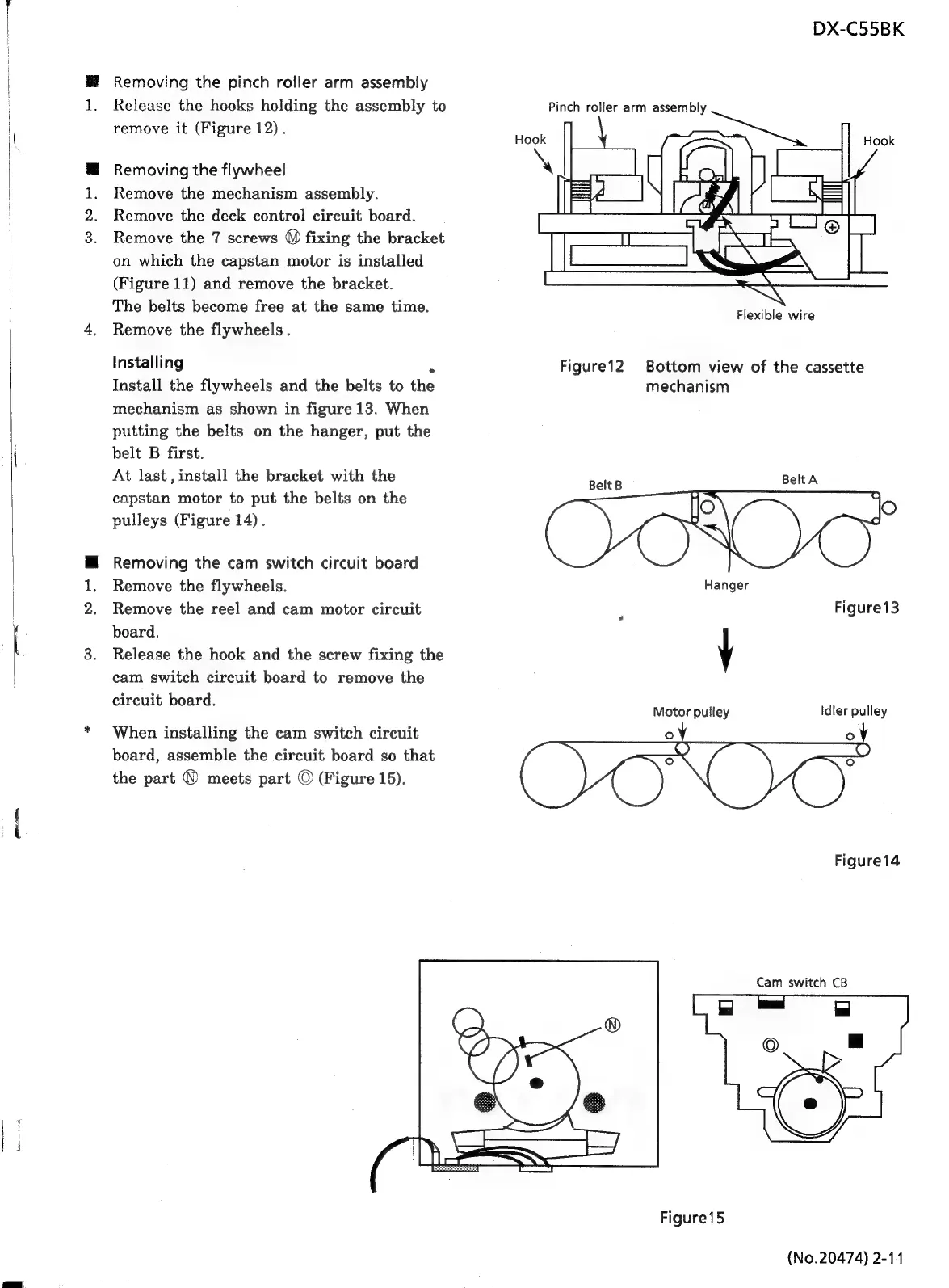
Release
the
hooks
holding
the
assembly
to
remove
it
(Figure
12).
Removing
the
flywheel
Remove
the
mechanism
assembly.
Remove
the
deck
control
circuit
board.
Remove
the
7
screws
™)
fixing
the
bracket
on
which
the
capstan
motor
is
installed
(Figure
11)
and
remove
the
bracket.
The
belts
become
free
at
the
same
time.
Remove
the
flywheels
.
Installing
_
Install
the
flywheels
and
the
belts
to
the
mechanism
as
shown
in
figure
13.
When
putting
the
belts
on
the
hanger,
put
the
belt
B
first.
At
last,
install
the
bracket
with
the
capstan
motor
to
put
the
belts
on
the
pulleys
(Figure
14).
Removing
the
cam
switch
circuit
board
Remove
the
flywheels.
Remove
the
reel
and
cam
motor
circuit
board.
Release
the
hook
and
the
screw
fixing
the
cam
switch
circuit
board
to
remove
the
circuit
board.
When
installing
the
cam
switch
circuit
board,
assemble
the
circuit
board
so
that
the
part
©
meets
part
©
(Figure
15).
Pinch
roller
arm
assembly
Figure12
Belt
B
DX-C55BK
Flexible
wire
Bottom
view
of
the
cassette
mechanism
Motor
pulley
°
co)
Figure15
BeltA
Figure13
Idler
pulley
2
°
Figure14
Cam
switch
CB
(No.20474)
2-11

Related product manuals