EasyManua.ls Logo

JVC CA-C55BK - Disassembly Procedures; Head Assembly, Motor, and Component Removal

JVC CA-C55BK
144 pages
Print Icon
To Next Page IconTo Next Page
To Previous Page IconTo Previous Page
Loading...
DX-C55BK
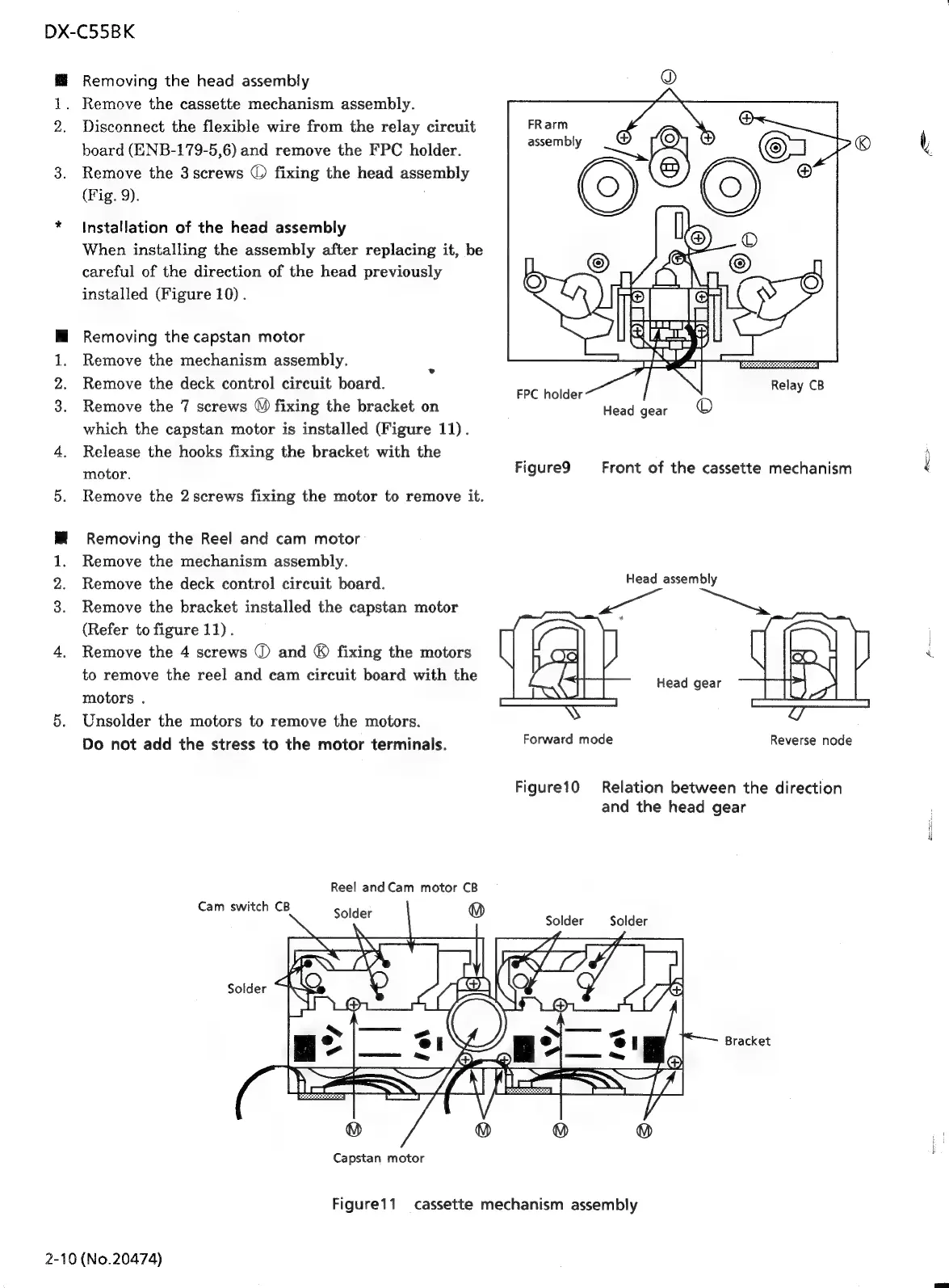
Removing
the
head
assembly
1.
Remove
the
cassette
mechanism
assembly.
2.
Disconnect
the
flexible
wire
from
the
relay
circuit
board
(ENB-179-5,6)
and
remove
the
FPC
holder.
3.
Remove
the
3screws
©
fixing
the
head
assembly
(Fig.
9).
*
Installation
of
the
head
assembly
When
installing
the
assembly
after
replacing
it,
be
careful
of
the
direction
of
the
head
previously
installed
(Figure
10).
M
Removing
the
capstan
motor
1.
Remove
the
mechanism
assembly.
2.
Remove
the
deck
control
circuit
board.
3.
Remove
the
7
screws
©)
fixing
the
bracket
on
which
the
capstan
motor
is
installed
(Figure
11).
4.
Release
the
hooks
fixing
the
bracket
with
the
motor.
5.
Remove
the
2
screws
fixing
the
motor
to
remove
it.
Removing
the
Reel
and
cam
motor
Remove
the
mechanism
assembly.
Remove
the
deck
control
circuit
board.
Remove
the
bracket
installed
the
capstan
motor
(Refer
to
figure
11).
4.
Remove
the
4
screws
2
and
®
fixing
the
motors
to
remove
the
reel
and
cam
circuit
board
with
the
motors
.
5.
Unsolder
the
motors
to
remove
the
motors.
Do
not
add
the
stress
to
the
motor
terminals.
wen>
@
Reel
and
Cam
motor
CB
Cam
switch
CB
Capstan
motor
Solder
(0)
FRarm
assembly
FPC
holder
Head
gear
Relay
CB
Figure9
Front
of
the
cassette
mechanism
Head
assembly
wee
ei
Head
gear
Forward
mode
Reverse
node
Figure10
Relation
between
the
direction
and
the
head
gear
Solder
Solder
Figurei1
cassette
mechanism
assembly
2-10
(No.20474)
Bracket
A

Related product manuals