EasyManua.ls Logo

JVC CA-C55BK - Electrical Adjustments; Playback Level, Frequency Response, and Bias Adjustments

JVC CA-C55BK
144 pages
Print Icon
To Next Page IconTo Next Page
To Previous Page IconTo Previous Page
Loading...
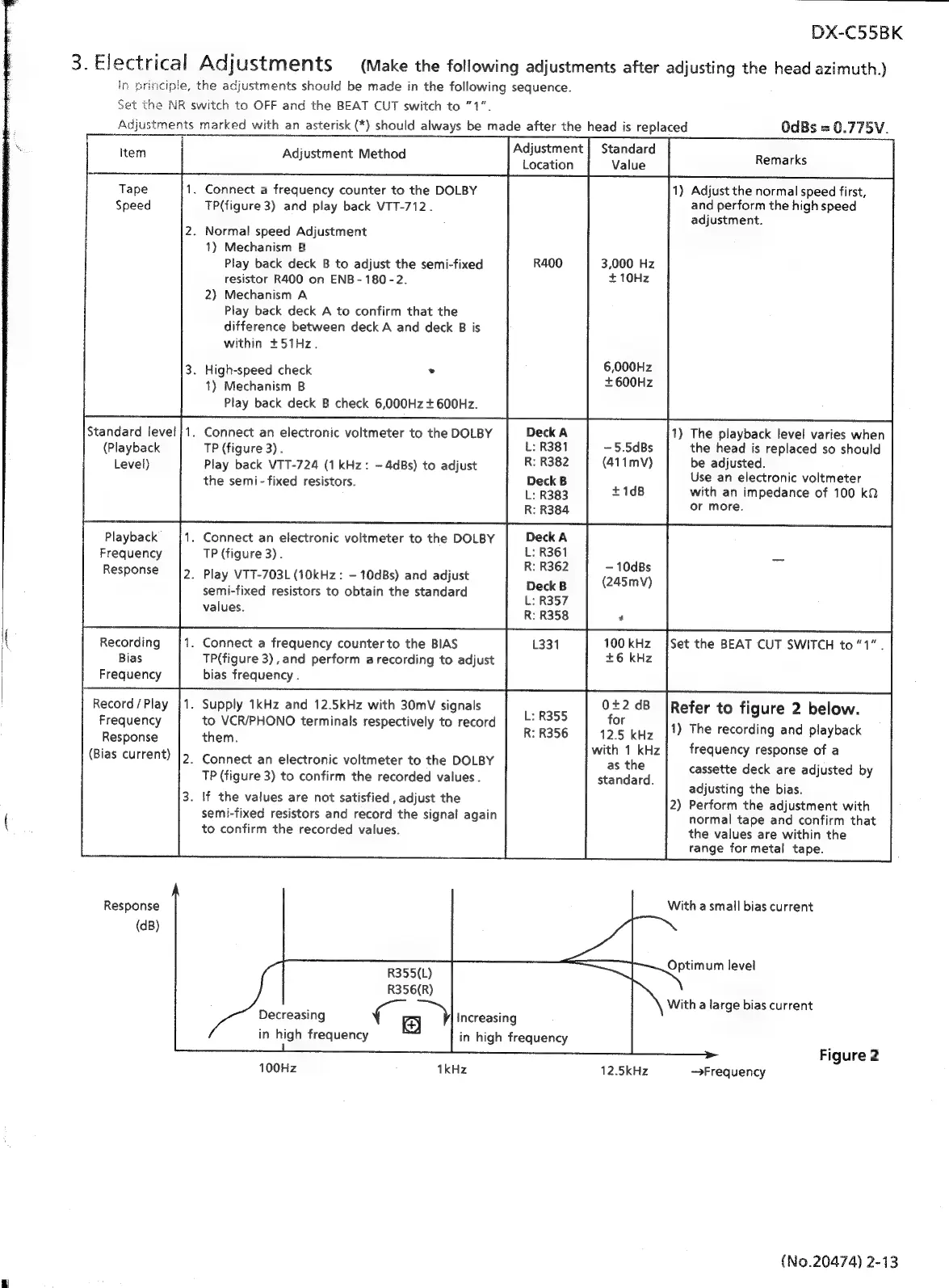
DX-C55BK
3.
Electrical
Adjustments
(Make
the
following
adjustments
after
adjusting
the
head
azimuth.)
In
principle,
the
adjustments
should
be
made
in
the
following
sequence.
Set
the
NR
switch
to
OFF
and
the
BEAT
CUT
switch
to
71ā€.
Adjustments
marked
with
an
asterisk
(*)
should
always
be
made
after
the
head
is
replaced
OdBs
=
0.775V.
Adjustment
|
Standard
;
Location
Value
Remarks
1)
Adjust
the
normal
speed
first,
and
perform
the
high
speed
adjustment.
Adjustment
Method
1.
Connect
a
frequency
counter
to
the
DOLBY
TP(figure
3)
and
play
back
VTT-712.
2.
Normal
speed
Adjustment
1)
Mechanism
B
Play
back
deck
B
to
adjust
the
semi-fixed
resistor
R400
on
ENB-
180-2.
2)
Mechanism
A
Play
back
deck
A
to
confirm
that
the
difference
between
deck
A
and
deck
B
is
within
+51Hz.
3,000
Hz
+10Hz
6,000Hz
.
High-
d
check
>
igh-speed
chec
vipa
1)
Mechanism
B
Play
back
deck
B
check
6,000Hz
+
600Hz.
.
Connect
an
electronic
voltmeter
to
the
DOLBY
TP
(figure
3)
.
Play
back
VTT-724
(1
kHz:
-4dBs)
to
adjust
the
semi
-
fixed
resistors.
Standard
level
(Playback
Level)
1)
The
playback
level
varies
when
the
head
is
replaced
so
should
be
adjusted.
Use
an
electronic
voltmeter
with
an
impedance
of
100
kQ
or
more.
Playback
.
Connect
an
electronic
voltmeter
to
the
DOLBY
Frequency
TP
(figure
3).
ode
-
s
Response
=
|2_
Play
VTT-703L
(10kHz:
-10dBs)
and
adjust
(245mV)
semi-fixed
resistors
to
obtain
the
standard
values.
(
Recording
.
Connect
a
frequency
counter
to
the
BIAS 1331
100
kHz
{Set
the
BEAT
CUT
SWITCH
to
ā€œ1ā€.
Bias
TP(figure
3),and
perform
a
recording
to
adjust
+6
kHz
Frequency
bias
frequency
.
Record/Play
|1.
Supply
1kHz
and
12.5kHz
with
30mV
signals
0+2dB
|Refer
to
figure
2
below.
Frequency
to
VCR/PHONO
terminals
respectively
to
record
ei
kHz
|!)
The
recording
and
playback
Response
them.
aati
iplas-
current)
with
1
kHz
frequency
response
of
a
2.
Connect
an
electronic
voltmeter
to
the
DOLBY
as
the
cassette
deck
are
adjusted
by
TP
(figure
3)
to
confirm
the
recorded
values
.
standard.
adjusting
the
bias.
2)
Perform
the
adjustment
with
normal
tape
and
confirm
that
the
values
are
within
the
range
formetal
tape.
3.
If
the
values
are
not
satisfied
,
adjust
the
semi-fixed
resistors
and
record
the
signal
again
to
confirm
the
recorded
values.
Response
With
a
small
bias
current
(dB)
Optimum
level
R355(L)
R356(R)
Decreasing
a
oO
in
high
frequency
With
a
large
bias
current
Increasing
in
high
frequency
Figure
2
100Hz
1kHz
12.5kHz
Frequency
{No.20474)
2-13
1

Related product manuals