EasyManua.ls Logo

JVC CA-C55BK - Record Sensitivity and Erase Ratio Checks; Music Scan Check

JVC CA-C55BK
144 pages
Print Icon
To Next Page IconTo Next Page
To Previous Page IconTo Previous Page
Loading...
DX-C55BK
Adjustment
Method
Pause
Siansald
Remarks
Location
Value
.
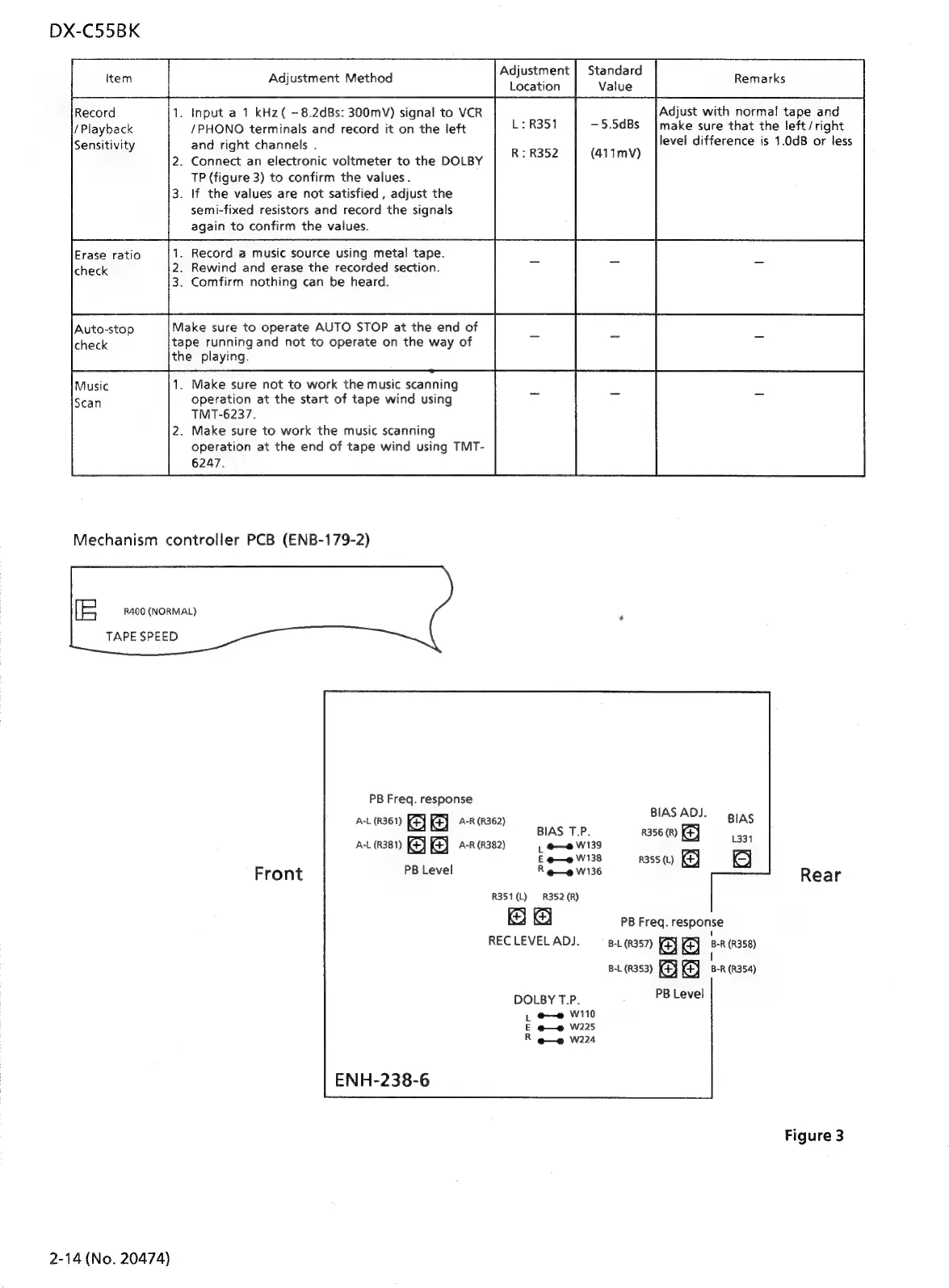
Input
a
1
kHz(
~8.2dBs:
300mV)
signal
to
VCR
Adjust
with
normal
tape
and
|
/PHONO
terminals
and
record
it
on
the
left
—5.5dBs_
|make
sure
that
the
left/right
and
right
channels
.
level
difference
is
1.0dB
or
less
.
Connect
an
electronic
voltmeter
to
the
DOLBY
CAVE)
TP
(figure
3)
to
confirm
the
values.
.
If
the
values
are
not
satisfied
,
adjust
the
semi-fixed
resistors
and
record
the
signals
again
to
confirm
the
values.
Erase
ratio
.
Record
a
music
source
using
metal
tape.
.
Rewind
and
erase
the
recorded
section.
.
Comfirm
nothing
can
be
heard.
Make
sure
to
operate
AUTO
STOP
at
the
end
of
tape
running
and
not
to
operate
on
the
way
of
the
playing.
1.
Make
sure
not
to
work
the
music
scanning
operation
at
the
start
of
tape
wind
using
TMT-6237.
.
Make
sure
to
work
the
music
scanning
operation
at
the
end
of
tape
wind
using
TMT-
6247.
Mechanism
controller
PCB
(ENB-179-2)
i=
R400
(NORMAL)
TAPE
SPEED
PB
Freq.
response
BIAS
ADJ.
A-L
(R361)
(4)
KY
A-R
(R362)
BIAS
BIAS
T.P.
R356
(R)
ea
A-L
(R381)
A-R
(R382)
|
oe
W139
E
eo
W138
R355
(L)
Front
PB
Level
R
e—e
W136
Rear
R351
(L)
R352
(R)
PB
Freq.
response
RECLEVELADJ.
—_
8.357)
GY
GB
RR358)
:
B-L
(R353)
B-R
(R354)
DOLBY
T.P.
:
REESE)
|
oe
W110
E
@—e
W225
R
@—e
W224
ENH-238-6
Figure
3
2-14
(No.
20474)

Related product manuals