EasyManua.ls Logo

JVC CA-C55BK - Disassembly Procedures; Component Removal Steps

JVC CA-C55BK
144 pages
Print Icon
To Next Page IconTo Next Page
To Previous Page IconTo Previous Page
Loading...
Disassembly
Procedures
a
wre
&
=
oe
|
oT
wn
&
#
oC
N
XT-CS5BK
Removing
the
Top
cover
Remove
the
%
screws
fixing
both
sides
of
the
Top
Cover,
and
the
4
screws
fixing
the
rear
sides.
Remove
the
Top
Cover.
Removing
the
CD-Tuner
PCB
(ENA-149)
Remove
the
Top
Cover.
Remove
the
3
screws
@.
Disconnect
the
connectors.
(P201,P903,P904,J711,
J721,J901,F
W801
,FW803,FW831,JB201,JB202)
Remove
the
2
screws
fixing
the
CD-Tuner
PCB.
Remove
the
CD-Tuner
PCB.
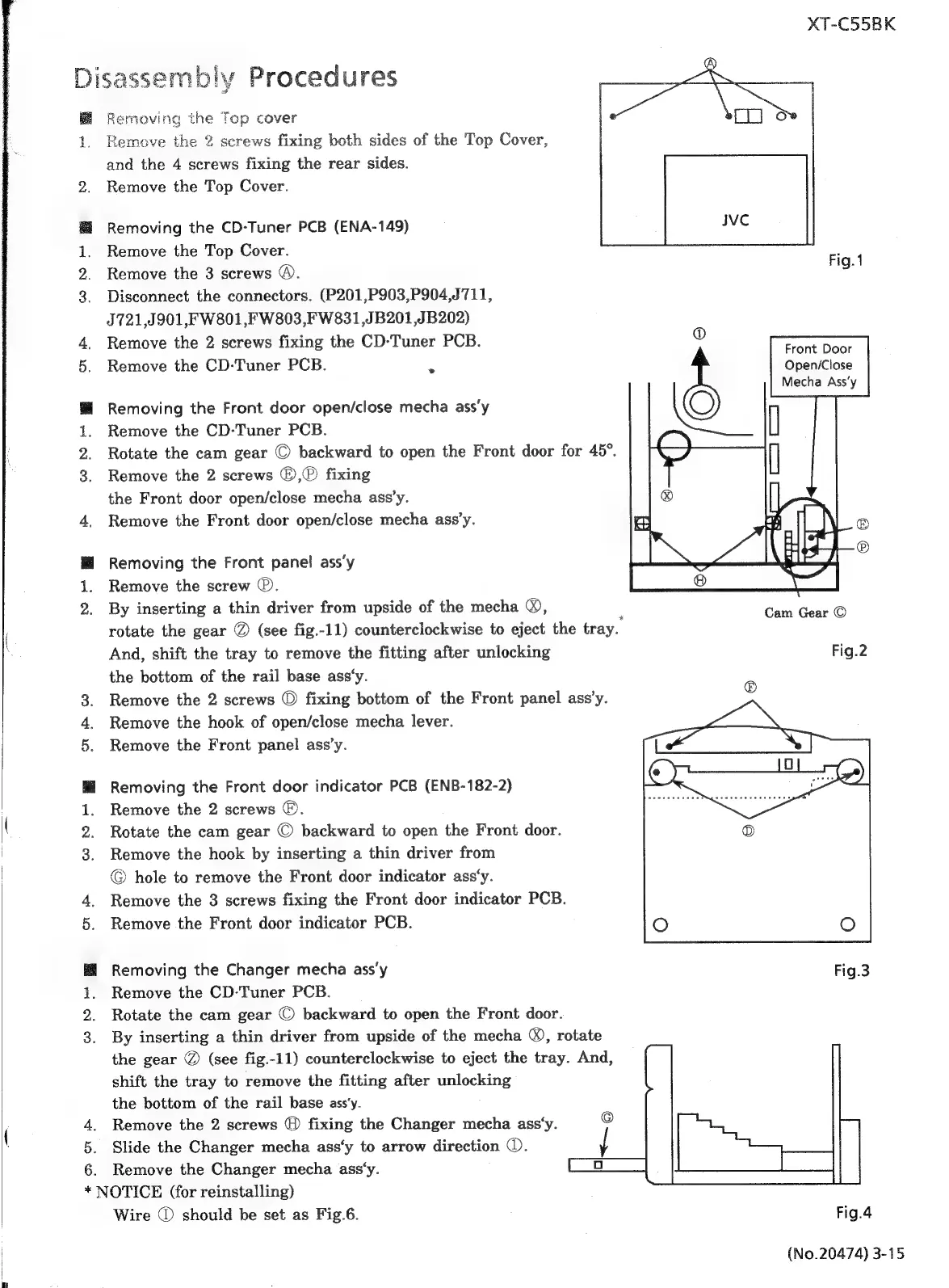
Fig.1
2
Removing
the
Front
door
open/close
mecha
ass’y
Remove
the
CD-Tuner
PCB.
Rotate
the
cam
gear
©
backward
to
open
the
Front
door
for
45°.
Remove
the
2
screws
©,®
fixing
the
Front
door
open/close
mecha
ass’y.
Remove
the
Front
door
open/close
mecha
ass’y.
Removing
the
Front
panel
ass’y
Remove
the
screw
®.
By
inserting
a
thin
driver
from
upside
of
the
mecha
®),
Cam
Gear
©
rotate
the
gear
@
(see
fig.-11)
counterclockwise
to
eject
the
tray.
And,
shift
the
tray
to
remove
the
fitting
after
unlocking
Fig.2
the
bottom
of
the
rail
base
ass‘y.
Remove
the
2
screws
©
fixing
bottom
of
the
Front
panel
ass’y.
Remove
the
hook
of
open/close
mecha
lever.
Remove
the
Front
panel
ass’y.
Removing
the
Front
door
indicator
PCB
(ENB-182-2)
Remove
the
2
screws
©.
Rotate
the
cam
gear
©
backward
to
open
the
Front
door.
Remove
the
hook
by
inserting
a
thin
driver
from
©
hole
to
remove
the
Front
door
indicator
ass‘y.
Remove
the
3
screws
fixing
the
Front
door
indicator
PCB.
Remove
the
Front
door
indicator
PCB.
Removing
the
Changer
mecha
ass‘y
Remove
the
CD-Tuner
PCB.
Rotate
the
cam
gear
©
backward
to
open
the
Front
door.
By
inserting
a
thin
driver
from
upside
of
the
mecha
®,
rotate
the
gear
@
(see
fig.-11)
counterclockwise
to
eject
the
tray.
And,
shift
the
tray
to
remove
the
fitting
after
unlocking
the
bottom
of
the
rail
base
ass‘y.
Remove
the
2
screws
@
fixing
the
Changer
mecha
ass‘y.
Slide
the
Changer
mecha
ass‘y
to
arrow
direction
©.
Remove
the
Changer
mecha
ass‘y.
OTICE
(for
reinstalling)
Wire
@
should
be
set
as
Fig.6.
Fig.4
(No.20474)
3-15

Related product manuals