EasyManua.ls Logo

JVC CA-C55BK - Disassembly Procedures; Magazine, Turntable Base, and Pickup Removal; Magazine Holder and Lifter Unit Assy Removal

JVC CA-C55BK
144 pages
Print Icon
To Next Page IconTo Next Page
To Previous Page IconTo Previous Page
Loading...
XT-C55BK
>
one
Bg
Sop
eh
pat
aad
ony
8
OF
ae
BS
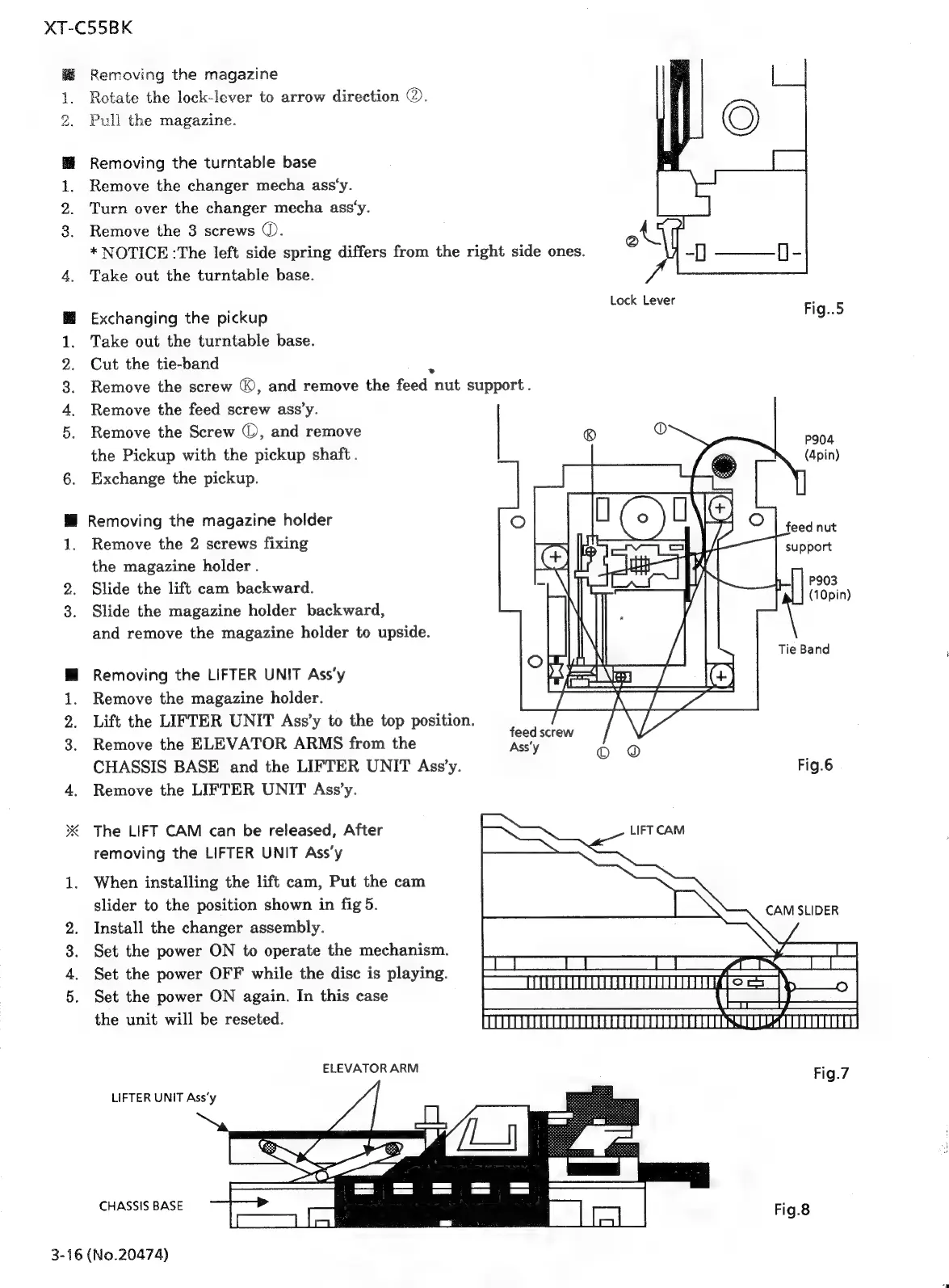
Removing
the
magazine
Rotate
the
lock-lever
to
arrow
direction
@.
Pull
the
magazine.
Removing
the
turntable
base
Remove
the
changer
mecha
ass‘y.
Turn
over
the
changer
mecha
ass‘y.
Remove
the
3
screws
(.
*
NOTICE
:The
left
side
spring
differs
from
the
right
side
ones.
Take
out
the
turntable
base.
Exchanging
the
pickup
Take
out
the
turntable
base.
Cut
the
tie-band
oN]
Lock
Lever
Fig..5
Remove
the
screw
©,
and
remove
the
feed
nut
support.
Remove
the
feed
screw
ass’y.
Remove
the
Screw
©,
and
remove
the
Pickup
with
the
pickup
shaft
.
Exchange
the
pickup.
Removing
the
magazine
holder
Remove
the
2
screws
fixing
the
magazine
holder
.
Slide
the
lift
cam
backward.
Slide
the
magazine
holder
backward,
and
remove
the
magazine
holder
to
upside.
Removing
the
LIFTER
UNIT
Ass‘y
Remove
the
magazine
holder.
Lift
the
LIFTER
UNIT
Ass’y
to
the
top
position.
Remove
the
ELEVATOR
ARMS
from
the
CHASSIS
BASE
and
the
LIFTER
UNIT
Ass’y.
Remove
the
LIFTER
UNIT
Ass’y.
The
LIFT
CAM
can
be
released,
After
removing
the
LIFTER
UNIT
Ass’y
When
installing
the
lift
cam,
Put
the
cam
slider
to
the
position
shown
in
fig
5.
Install
the
changer
assembly.
Set
the
power
ON
to
operate
the
mechanism.
Set
the
power
OFF
while
the
disc
is
playing.
Set
the
power
ON
again.
In
this
case
the
unit
will
be
reseted.
ELEVATORARM
LIFTER
UNIT
Ass‘y
CHASSIS
BASE
3-16
(No.20474)
P904
(4pin)
P903
(10pin)
\
Tie
Band
feed
screw
Ass'y
Fig.6
LIFT
CAM
CAM
SLIDER
poe
——|_
ee
oe.
Se
O
EY
,
EC
Sma
ALT
STUNTATEEATIUTOTITOTITLY
(C=1=—m\
ae
eae,
|
CRE
AEE
PLOT
TT
Ne
TT
Fig.7
Fig.8

Related product manuals