EasyManua.ls Logo

JVC CA-C55BK - Switch Operation Check

JVC CA-C55BK
144 pages
Print Icon
To Next Page IconTo Next Page
To Previous Page IconTo Previous Page
Loading...
—eonetl
i
i
i
i
i
XT-C55BK
Operation
check
by
each
switch.
SW801
:
Single
tray
open/close
detect
switch.
When
a
single
tray
is
ejected,
the
open
signal
is
“L”
and
when
it
is
closed,
the
close
signal
is
“L“.
SW802
:
Magazine
in
switch.
When
a
magazine
is
inserted,
the
switch
is
turned
on.
SW803
:
JAB
switch.
When
drive
plate
comes
toward,
the
switch
is
turned
on.
(The
switch
is
turned
on
momentarily.)
SW803_
:
Tray
load
switch.
When
the
tray
of
a
disc
is
loaded,
the
switch
is
turned
on.
SW804_
:
UP/DOWN
switch.
When
the
mecmanism
goes
up
or
down,
this
sw
turns
on
and
off
alternately.
$W805
:
Reset
switch.
When
the
mechanism
comes
to
the
point
undeer
the
initial
position,
the
switch
is
turned
on.
SW805
:
Memory
switch.
When
the
power
is
off
in
playing
a
disc,
and
on
again,
the
switch
detect
which
height
the
tray
should
be
returned.
‘:
SW807_
:
Pickup
rest
switch.
When
pickup
comes
to
the
initial
position,
the
switch
is
turned
on.
$W251
:
FD
Close
switch.
This
switch
turns
on
when
the
front
door
is
closed.
$W252
:
FD
Open
switch.
This
switch
turns
on
when
the
front
door
is
opened.
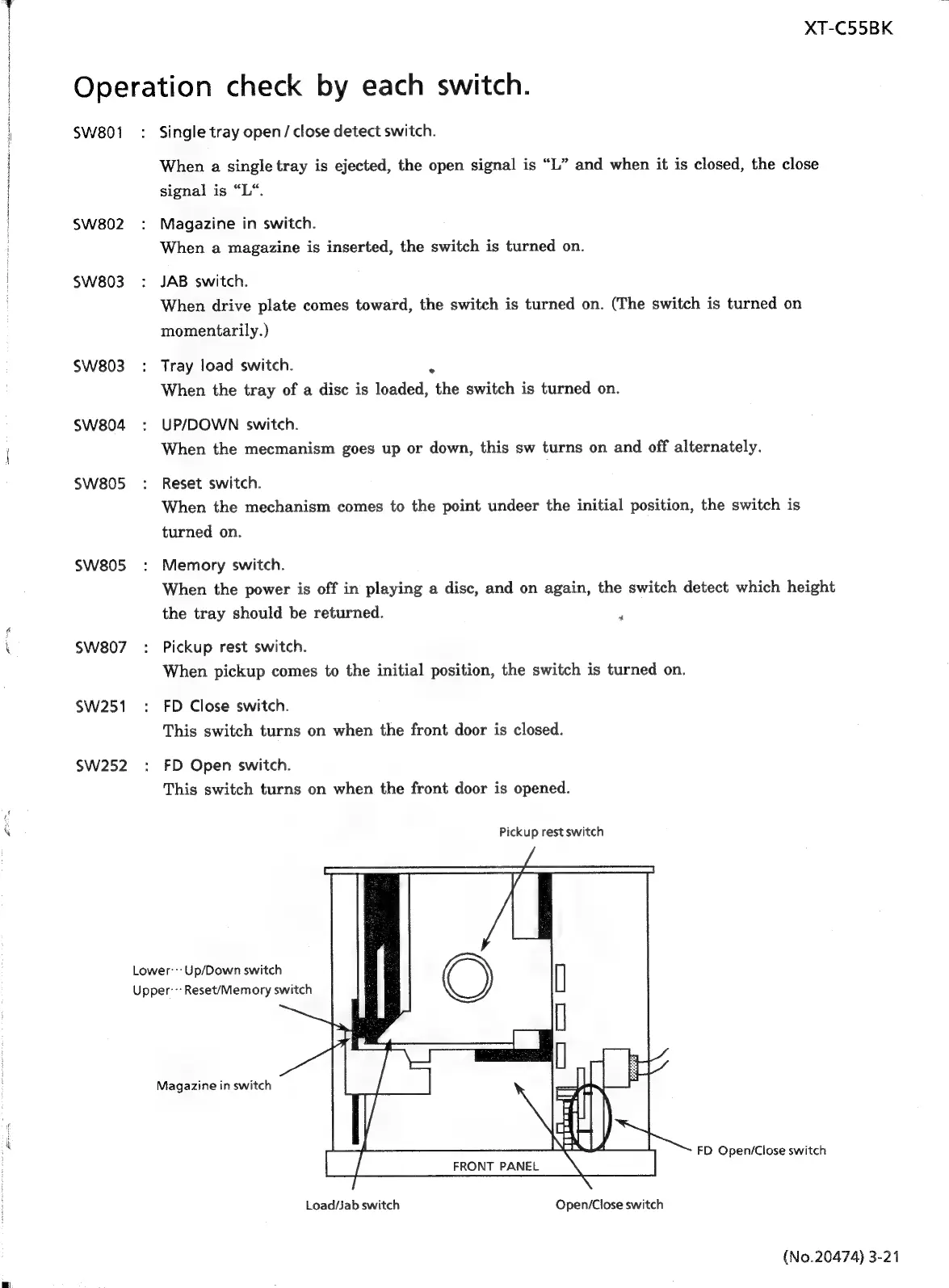
Pickup
rest
switch
Lower:::Up/Down
switch
Upper--:
Reset/Memory
switch
Magazine
in
switch
FD
Open/Close
switch
FRONT
PANEL
Load/jab
switch
Open/Close
switch
(No.20474)
3-21

Related product manuals