11
English
2
Select a preset number.
Playing Back a Disc
Before operating a disc, be familiar how a disc is recorded.
• DVD Video comprises of “
Titles
” which includes
“
Chapters,
” DVD Audio/MP3/WMA comprise of
“
Groups
” which includes “
Tracks,
” JPEG comprises of
“
Groups
” which includes “
Files,
” and CD/SVCD/VCD
comprise of only “
Tracks
.”
• For JPEG playback, see page 30.
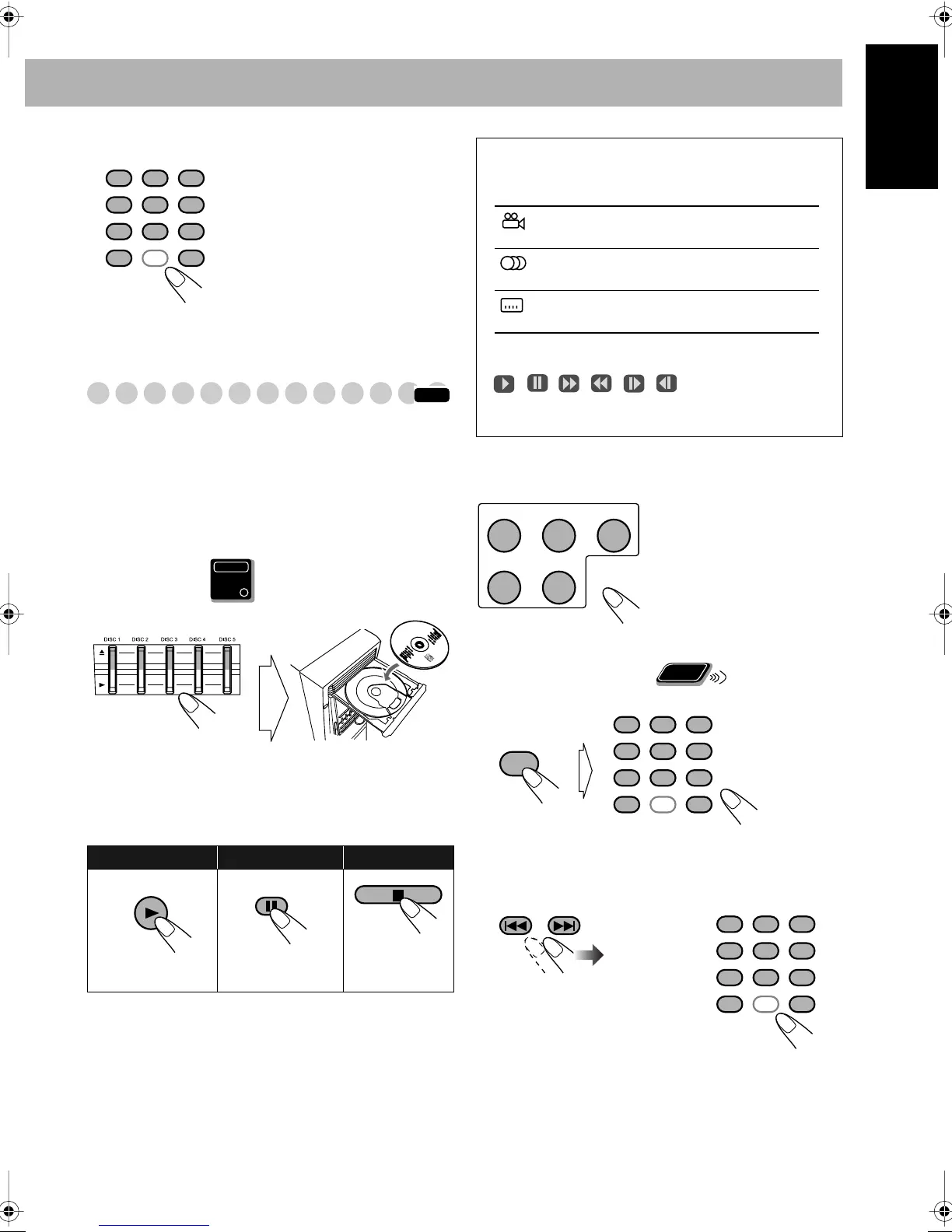
To insert discs
• When using an 8 cm disc, place it on the inner circle of the
disc tray.
To close the disc tray,
press the same 0
again.
• If you press 3
for the same tray, the disc tray closes
automatically and playback starts.
While playing DVD/SVCD/VCD/MP3:
This System can
store the stop point, and when you start playback again by
pressing DVD/CD 3
, it starts from the position where you
have stopped—Resume Play. (RESUME indicator lights up
when you stop playback.)
To stop completely while Resume is activated,
press 7
twice. (To cancel Resume, see “RESUME” on page 40.)
To select a disc
To select a title/group
While playing a disc...
To select a chapter/track
While playing a disc...
Examples:
To select preset number 5, press 5.
To select preset number 15, press
+10, then 5.
To select preset number 30, press
+10, +10, then 10.
• You can also use 4
/¢
buttons on the remote control or
PRESET +/– buttons on the main
unit.
To start:
To pause: To stop:
Playback of the
current disc starts.
To release it, press
DVD/CD 3
.
123
456
789
10 0 +10
INFO
Main Unit
ONLY
DVD/CD
FM MODE
On-screen guide icons
• During disc playback, the following icons may appear for
a while on the TV screen:
Appears at the beginning of a scene containing
multi-angle views.
Appears at the beginning of a scene containing
multi-audio languages.
Appears at the beginning of a scene containing
multi-subtitle languages.
• The following icons will be also shown on the TV screen
to indicate your current operation.
, , , , ,
• To deactivate the on-screen guide icons, see “ON
SCREEN GUIDE” on page 40.
Playback starts.
or
• First time you press
4
, you can go back
to the beginning of the
current chapter/track.
DISC 1 DISC 2
DISC 4 DISC 5
DISC 3
Remote
ONLY
GROUP/TITLE
123
456
789
10 0 +10
123
456
789
10 0 +10
DX-T7_T9[UGUX]-f.book Page 11 Wednesday, February 16, 2005 1:10 PM



 To Next Page