11 CA-EX90
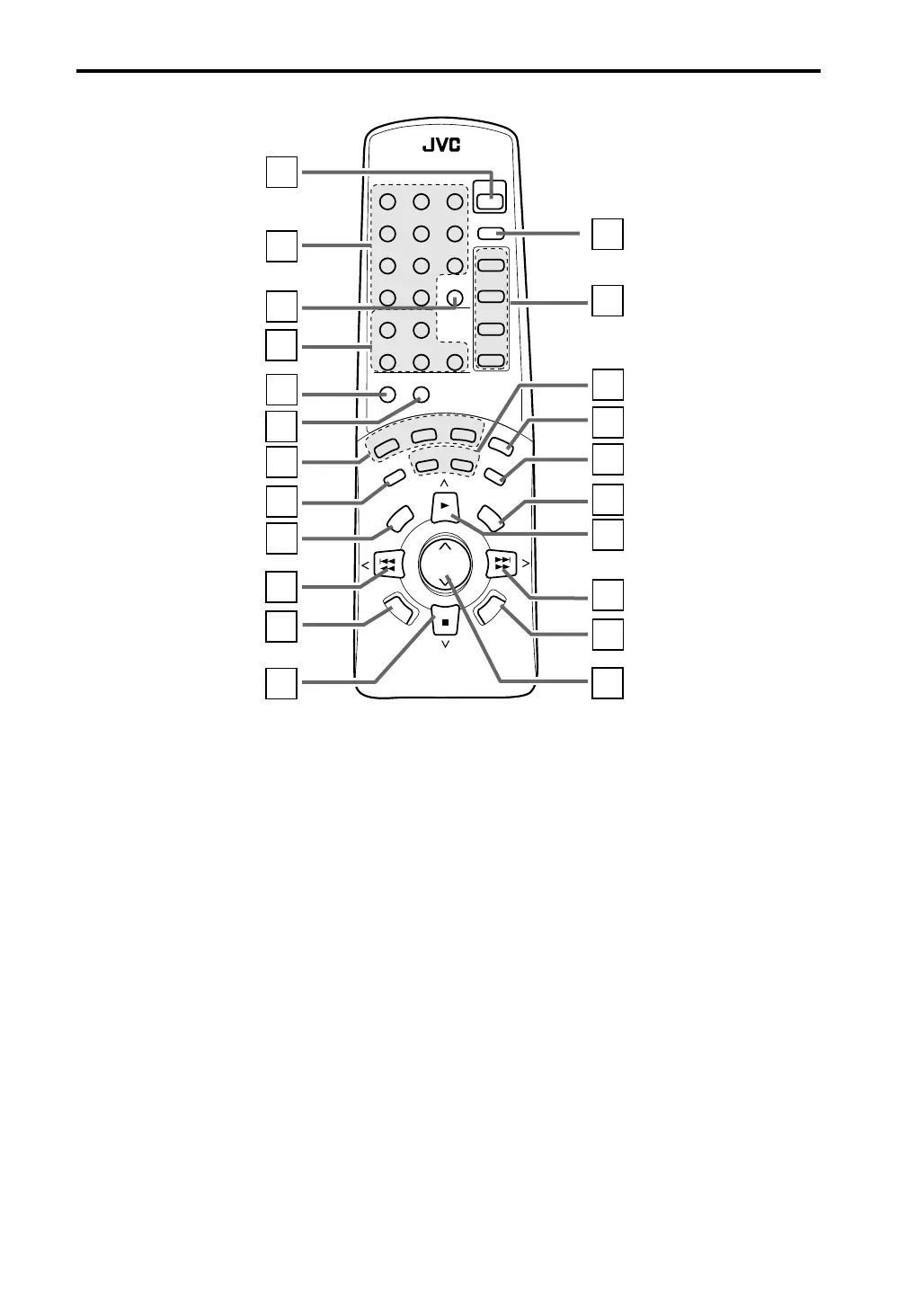
Remote control
Remote control
1 POWER
Press to switch the power between ON and
STANDBY.
2 Number buttons
• Use to select preset channels when
listening to the tuner.
• Use to select tracks after pressing CD,
CD1, CD2, CD3 or PLAY MODE.
3 FM MODE/MUTING
Press to switch the FM mode between
AUTO and MONO.
4 CD controls
PLAY MODE: Press repeatdly to select the
play mode you desire (PROG
RAM, RANDOM, or off
(continuous play)).
REPEAT: Press repetedly to select the repeat
mode (REPEAT ALL, REPEAT 1 CD,
REPEAT 1, or off).
CD1, CD2, CD3: Press to select a
CD tray.
5 DIRECT
Press to listen to the original sound of the
source.
6 S.A.BASS
Press to activate Signal Adaptive BASS
function for enhancing the low frequencies.
7 Tone control buttons
BASS: Press to adjust low frequencies.
After pressing BASS, press +/R or –/L
to adjust the bass.
TREBLE: Press to adjust high frequencies.
After pressing TREBLE, press +/R
or –/L to adjust the treble.
BALANCE: Press to adjust the balance.
After pressing BALANCE, press
+/R or –/L to adjust the balance
8 CANCEL
• Press to cancel a timer operation.
• Press to erase a CD program step.
RM–SEEX90U REMOTE CONTROL
FM MODE
/MUTING
SLEEP
POWER
S.A.BASS
VOLUME
CANCEL
SET
TAPE
DIRECTION
FADE
MUTING
TAPE
CONTROL
REC
PAUSE
DIRECT
2
1
3
4
5
6
7
8
10
11
12
14
13
15
16
17
18
19
20
21
22
123
456
789
10
+
10
AUX
TUNER
CD
TAPE
PLAY
MODE REPEAT
CD 3CD 2CD 1
–/L
+/R
BASS
TREBLE
BALANCE
CLOCK
/TIMER
9
EN01-23.CA-EX90[J]/5/18 98.6.8, 8:20 AM11


 To Next Page