EasyManua.ls Logo

JVC Compact VHS GR-HF700 - Page 2

JVC Compact VHS GR-HF700
19 pages
Print Icon
To Next Page IconTo Next Page
To Previous Page IconTo Previous Page
Loading...
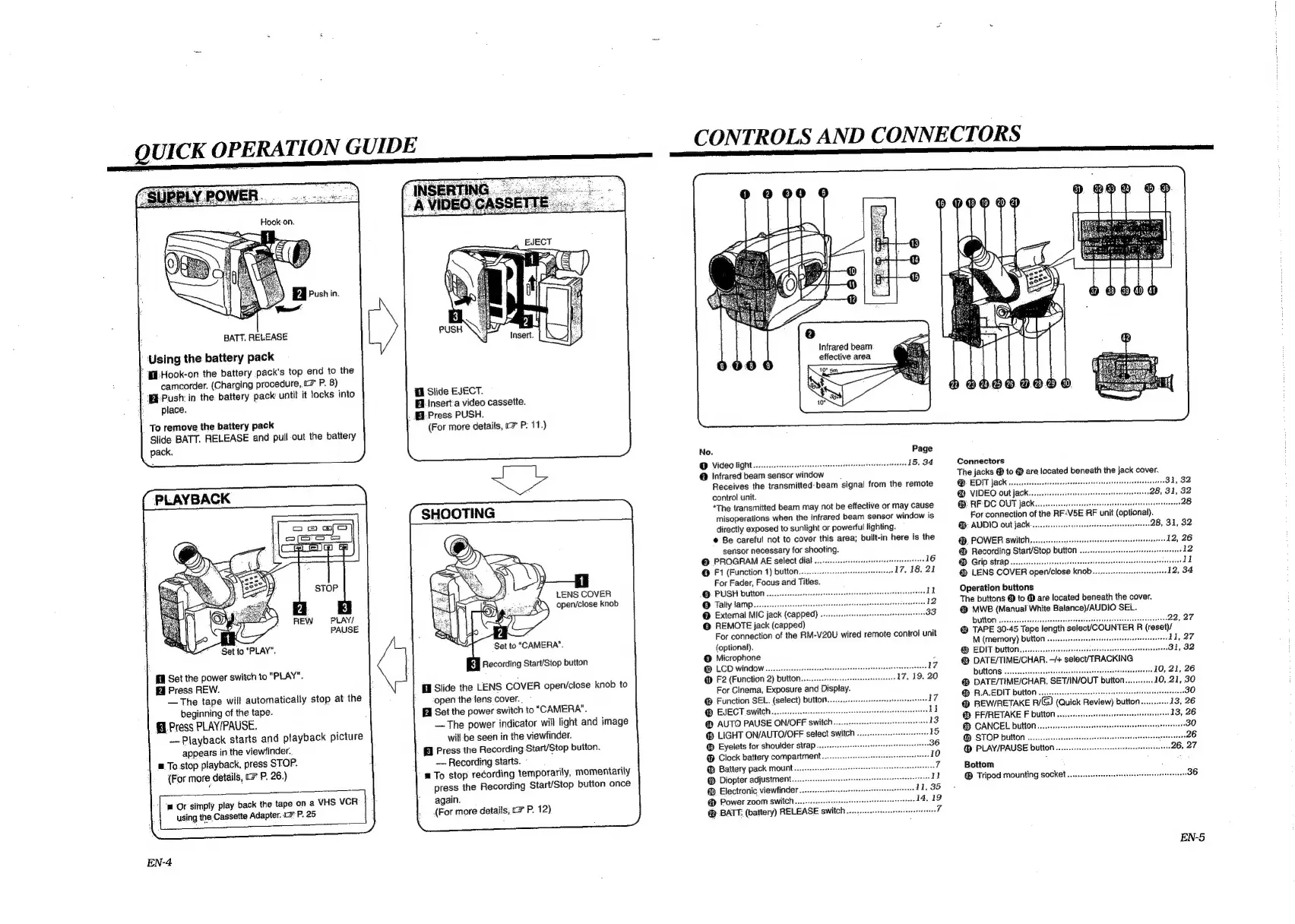
QUICK
OPERATION
GUIDE
BATT.
RELEASE
Using
the
battery
pack
:
{-Hook-on
the
battery
pack's
top
end
to
the
camcorder.
(Charging
procedure,
c
P.
8)
‘Push:
in
the.
battery
pack
until
it
locks
into
place.
To
remove
the
battery
pack
Slide
BATT.
RELEASE
and
pull
out
the
battery
pack.
PLAYBACK
PLAY/
PAUSE
Set
the
power
switch
to
"PLAY".
Press
REW.
—The
tape
will
automatically
stop
at
the
beginning
of
the
tape.
fl
Press
PLAY/PAUSE.
Playback
starts
and
playback
picture
appears
in
the
viewfinder.
a
To.stop
playback,
press
STOP.
(For
more
details,
c=
P.
26.)
‘m
Or
simply
play
back
the
tape
on
a
VHS
VCR
using
the.
Cassette
Adapter.
1
P.
25
EN-4
fl
Slide
EJECT.
Hi
Insert'a
video
cassette.
[El
Press
PUSH.
(For
more
details,
7
P:
11.)
LENS
COVER
open/close
knob
KW
Recording
Start/Stop
button
HI
Slide
the
LENS
COVER
open/close
knob
to
open
the
lens
cover.
,
Bl
Set
the
power
switch
to
"CAMERA".
—The
power
indicator
will
light
and
image
will.be
seen
in
the
viewfinder.
Press
the
Recording
Start/Stop
button.
Recording
starts.
©
a
To
stop
recording
temporarily,
momentarily
press
the
Recording
Start/Stop
button
once
again.
{For
more
details,
o>
P.
12)
CONTROLS
AND
CONNECTORS
Infrared
beam
effective
area
No.
Page
@
VidCO
HGH
22...
eeeeeeeeereeereteeneeeteecaceerteeseeesanaanee
15,
34
@
Infrared
beam
sensor
window
Receives
the
transmitted-beam
signal
from
the
remote
control
unit.
“The
transmitted
beam
may
not
be
effective
or
may
cause
misoperations
when
the
infrared
beam
sensor
window
is
directly
exposed
to
sunlight
or
powerful
lighting.
®
Be
careful
not
to
cover
this
area;
built-in
here
is
the
sensor
necessary
for
shooting.
©
PROGRAM
AE
select
dial
@
F1
(Function
1)
button
For
Fader,
Focus
and
Titles.
©
PUSH
button
..
©
Tally
lamp.......
@
External
MIC
jack
(capped)
.
@
REMOTE
jack
(capped)
For
connection
of
the
RM-V20U
wired
remote
control
unit
(optional).
@
Microphone
@
LCD
window............
17
@
F2
(Function
2)
button.....
For
Cinema,
Exposure
and
Display.
@
Function
SEL.
(select)
button..
EJECT
switch...
@
AUTO
PAUSE
ON/OFF
switch...
®
LIGHT
ON/AUTO/OFF
select
switch
.
®
Eyelets
for
shoulder
strap...
Clock
battery
compartment.
@
Battery
pack
mount.
@
Diopter
adjustment..
@
Electronic
viewfinder
@
Power
zoom
switch....
@
BATT,
(battery)
RELEASE
switcl
Connectors
The
jacks
@
to
@
are
located
beneath
the
jack
cover.
®.
EDIT
jack
@
VIDEO
out
jack...
@
RF
DC
OUT
jack......
For
connection
of
the
RF-
(opt
.
@:
AUDIO
OUL
JACK...
ee
csesetesecerrerereeateteeneesessen
28,
31,
32
@.
POWER
switch
12,
26
@
Recording
Start/Stop
button
ee
GIP
StrAP
....
eeesrereereerese
@
LENS
COVER
open/close
knob.
Operation
buttons
The
buttons
@
to
@
are
located
beneath
the
cover.
@
MWB
(Manual
White
Balance)/AUDIO
SEL.
DULOT
oo
eeeceecteeccracsneaceensceeeeeeesneepesssccterrenneesteenentens
22,
27
@
TAPE
30-45
Tape
length
selec/COUNTER
R
(reset)/
M
(memory)
button
..
11,
27
@
EDIT
button
81,
32
@
DATE/TIME/CHAR.
~/+
select/TRACKING
DULONS
00...
eeeeeeeeteeeteeeeeeteeseareenee
10,
21,
26
@
DATE/TIME/CHAR.
SET/IN/OUT
button..
@
R.A.EDIT
buiton
.
@
REW/RETAKE
Eyed)
(Quick
Review)
button
13,
26
@
FF/RETAKE
F
button
.
@
CANCEL
button..
@
STOP
button
......
26
@
PLAY/PAUSE
button
..
Bottom
Tripod
mounting
socket
....
EN-5S

Related product manuals