EasyManua.ls Logo

JVC Compact VHS GR-HF700 - Recording Operation

JVC Compact VHS GR-HF700
19 pages
Print Icon
To Next Page IconTo Next Page
To Previous Page IconTo Previous Page
Loading...
RECORDING
OPERATION
‘Preparations
Supply
power.(>
P.
7.)
®
Insert
a
video
cassette
correctly.
(>
P.
11.)
Adjust
the
grip
strap.
(c=
P.
17.)
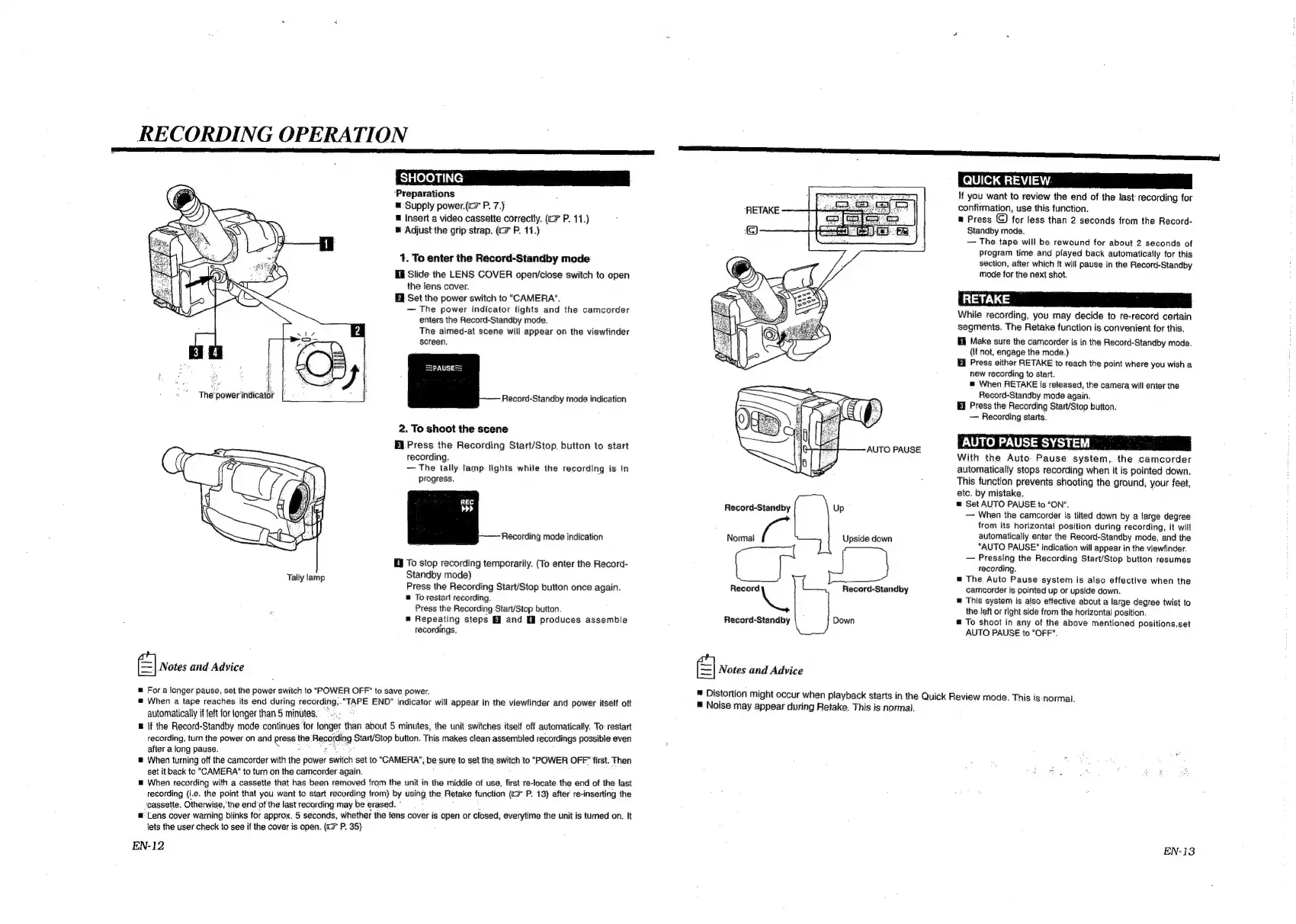
1.
To
enter
the
Record-Standby
mode
Hi
Slide
the
LENS
COVER
open/close
switch
to
open
the lens
cover.
Set
the
power
switch
to
"CAMERA".
The
power
indicator
lights
and
the
camcorder
enters
the
Record-Standby
mode.
2
The
aimed-at
scene
will
appear
on
the
viewfinder
screen.
i}
a
Record-Standby
mode
indication
2.
To
shoot
the
scene
Ei
Press
the
Recording
Start/Stop.
button
to
start
recording.
The
tally
lamp
lights
while
the
recording
is
in
progress.
Recording
mode
indication
i
To
stop
recording
temporarily.
(To
enter
the
Record-
Tally
lamp
Standby
mode)
Press
the
Recording
Start/Stop
button
once
again.
@
To
restart
recording.
Press
the
Recording
Start/Stop
button.
Repeating
steps
and
£8
produces
assemble
recordings.
el
Notes
and
Advice
@
Fora
longer
pause,
set
the
power
switch
to
"POWER
OFF"
to
save
power.
®
When
a
tape
reaches
its
end
during
recording,."TAPE
END"
indicator
will
appear
in
the
viewfinder
and
power
itself
off
automatically
if
left
for
longer
than
5
minutes.
~
@
{f
the
Record-Standby
mode
continues
for
longer
than
about
5
minutes,
the
unit
switches
itself
off
automatically.
To
restart
recording,
turn
the
power
on
and
press
the
Recording
Start/Stop
button.
This
makes
clean
assembled
recordings
possible
even
after
a
long
pause.
pees:
2
®
When
turning
off
the
camcorder
with
the
power
switch
set
to
"CAMERA",
be
sure
to
set
the.
switch
to
"POWER
OFF"
first.
Then
set
it
back
to
CAMERA’
to
turn
on
the
camcorder
again.
=
When
recording
with
a
cassette
that
has
been
removed
from
the
unit
in
the
middle
of
use,
first
re-locate
the
end
of
the
last
recording
(i.e.
the
point
that
you
want
to
start
recording
from)
by
using
the
Retake
function
(«=
P.
13)
after
re-inserting
the
‘cassette.
Otherwise,
the
end
of
the
last'
recording
may
be
erased.”
m
Lens
cover
warning
blinks
for
approx.
5
seconds,
whether
the
lens
cover
is
open
or
closed,
everytime
the
unit
is
tumed
on.
It
lets
the
user
check
to
see
if
the
cover
is
open.
(<>
P.
35)
EN-12
“RETAKE
Record
LL
Record-Standby
Record-Standby
Normal
a
El
Notes
and
Advice
Up
Upside
down
Record-Standby
Down
If
you
want
to
review
the
end
of
the
last
recording
for
confirmation,
use
this
function.
&
Press
for
less
than
2
seconds
from
the
Record-
Standby mode.
The.
tape
will
be
rewound
for
about
2
seconds
of
Program
time
and
played
back
automatically
for
this
section,
after
which
it
will
pause
in
the
Record-Standby
mode
for
the
next
shot.
While
recording,
you
may
decide
to
re-record
certain
segments.
The
Retake
function
is
convenient
for
this.
El
Make
sure
the
camcorder
is in
the
Record-Standby
mode.
(If
not,
engage
the
mode.)
Press
either
RETAKE
to
reach
the
point
where
you
wish
a
new
recording
to
start.
®
When
RETAKE
is
released,
the
camera
will
enter
the
Record-Standby
mode
again.
Hf
Press
the
Recording
Start/Stop
button.
~—
Recording
starts.
AUTO
PAUSE
SYSTEM
With
the
Auto:
Pause
system,
the
camcorder
automatically
stops
recording
when
it
is
pointed
down.
This
function
prevents
shooting
the
ground,
your
feet,
etc.
by
mistake,
:
@
Set
AUTO
PAUSE
to."ON".
When
the
camcorder
is
tilted
down
by
a
large
degree
from
its
horizontal
position
during
recording,
it
will
automatically
enter
the
Record-Standby
mode,
and
the
"AUTO
PAUSE"
indication
will
appear
in
the
viewfinder.
Pressing
the
Recording
Start/Stop
button
resumes
recording.
=
The.
Auto
Pause
system
is
also
effective
when
the
camcorder
is
pointed
up
or
upside
down.
=
This
system
is
also
effective
about
a
large
degree
twist
to
the
left
or
right
side
from
the
horizontal
position.
To
shoot
in
any
of
the
above
mentioned
positions,set
AUTO
PAUSE
to
"OFF".
®
Distortion
might
occur
when
playback
starts
in
the
Quick
Review
mode.
This
is-‘normal.
=
Noise
may
appear
during
Retake.
This
is
normal.
EN-13

Related product manuals