EasyManua.ls Logo

JVC Compact VHS GR-HF700 - Page 7

JVC Compact VHS GR-HF700
19 pages
Print Icon
To Next Page IconTo Next Page
To Previous Page IconTo Previous Page
Loading...
RECORDING
OPERATION
(Cont'd)
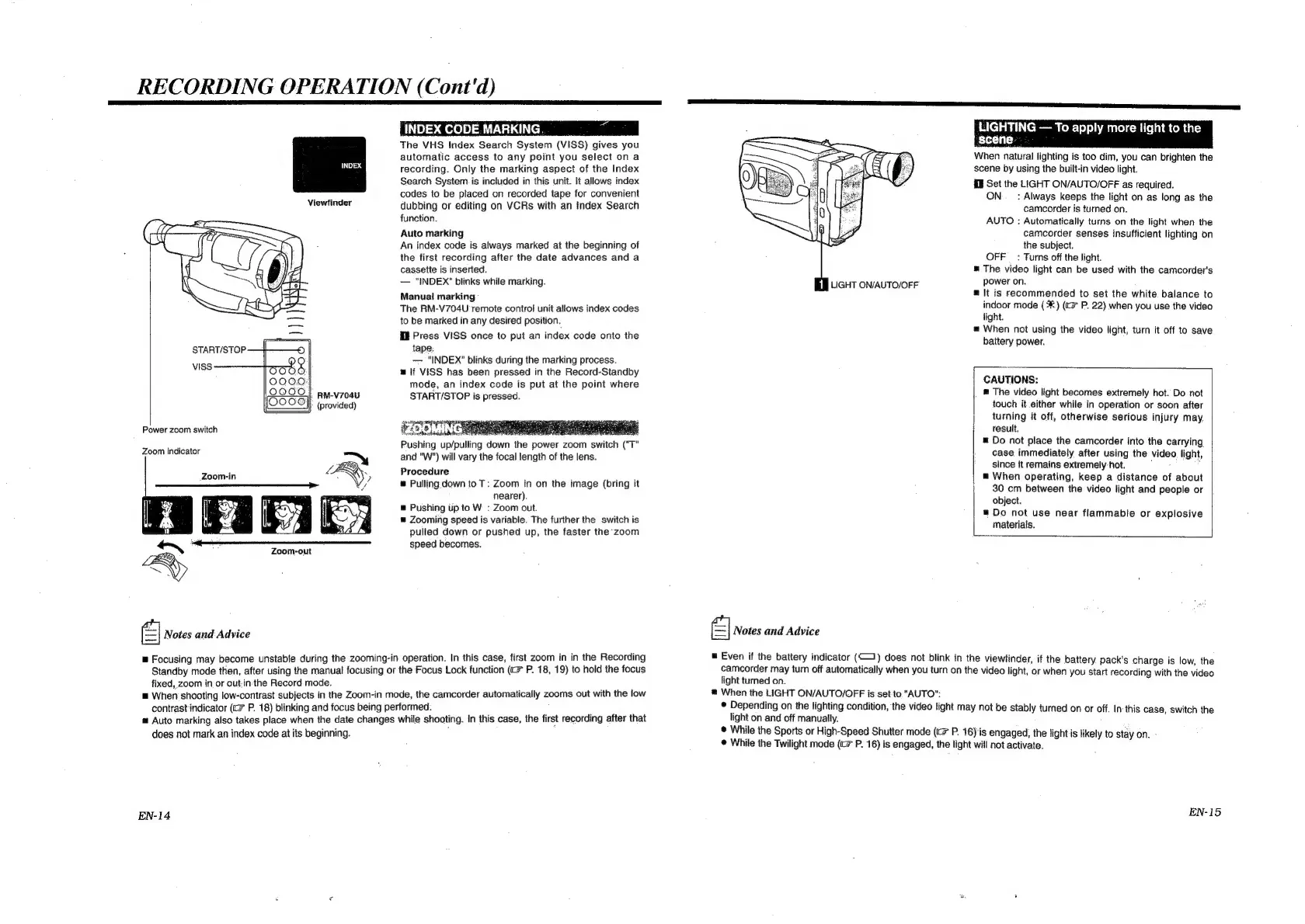
The
VHS
Index
Search
System
(VISS)
gives
you
automatic
access
to
any
point
you
select
on
a
recording.
Only
the
marking
aspect
of
the
Index
Search
System.
is
included
in
this
unit.
It
allows
index
codes
to
be
placed
on
recorded
tape
for
convenient
Viewfinder
dubbing
or
editing
on
VCRs
with
an
Index
Search
function.
Auto
marking
An
index
code
is
always
marked
at
the
beginning
of
the
first
recording
after
the
date
advances
and
a
cassette
is
inserted.
"INDEX"
blinks
while
marking.
Manual
marking
The
RM-V704U
remote
control
unit
allows
index
codes
to
be
marked
in
any
desired
position.
El
Press
ViSS
once
to
put
an
index
code
onto
the
tape:
—-
"INDEX"
blinks
during
the
marking
process.
lf
VISS
has
been
pressed
in
the
Record-Standby
mode,
an
index
code
is
put
at
the
point
where
START/STOP
VISS
RM-V704U
START/STOP
is
pressed.
(provided)
seep
sepepany
Power
zoom
switch
FZOOMINC
ae
Pushing
up/pulling
down
the
power
zoom
switch
("T"
Zoom
Ingientor
=~
and
"W")
will
vary
the
focal
length
of
the
lens.
Facaein
L
<\)
Procedure
——————_____—_—_>
‘YN
y
w
Pulling
down
to
T:
Zoom
in
on
the
image
(bring
it
nearer).
=
Pushing
up
to
W
:
Zoom
out.
=
Zooming
speed
is
variable.
The
further
the
switch
is
pulled
down
or
pushed
up,
the
faster
the
zoom
saa
eee
speed
becomes.
Zoom-out
-~
FRY
BY
|
Notes
and
Advice
=
Focusing
may
become
unstable
during
the
zooming-in
operation.
In
this
case,
first
zoom
in in
the
Recording
Standby
mode
then,
after
using
the
manual
focusing
or
the
Focus
Lock
function
(>
P.
18,
19)
to
hold
the
focus
fixed,
zoom
in
or
out.in-the
Record
mode.
=
When
shooting
low-contrast
subjects
in
the
Zoom-in
mode,
the
camcorder
automatically
zooms
out
with
the
low
contrast
indicator
(tc
P.
18)
blinking
and
focus
being
performed.
=
Auto
marking
also
takes
place
when
the
date
changes
while
shooting.
in
this
case,
the
first
recording
after
that
does
not
mark
an
index
code
at
its
beginning.
EN-14
LIGHTING
To
apply
more
light
to
the
scene.
When
natural
lighting
is
too
dim,
you
can
brighten
the
scene
by
using
the
built-in
video
light.
KE
Set
the
LIGHT
ON/AUTO/OFF
as
required.
ON:
_
:
Always
keeps
the
light
on
as
long
as
the
camcorder
is
turned
on.
AUTO
:
Automatically
turns
on
the
light
when
the
camcorder
senses
insufficient
lighting
on
the
subject.
OFF
_
:
Turns
off
the
light.
The
video
light
can
be
used
with
the
camcorder's
EB
LiGHT
on/AUTO/OFF
power
on.
m
It
is
recommended
to
set the
white
balance
to
indoor
mode
(*:)
(c¥
P.
22)
when
you
use
the
video
light.
=
When
not
using
the
video
light,
turn
it
off
to
save
battery
power.
CAUTIONS:
The
video
light
becomes
extremely
hot.
Do
not
touch
it.either
while
in
operation
or
soon
after
turning
it
off,
otherwise
serious
injury
may.
result.
Do
not
place
the
camcorder
into
the
carrying
case
immediately
after
using
the
video
light,
since
it
remains
extremely:
hot.
:
as
=
When
operating,
keep
a
distance
of
about
30
cm
between
the
video
light
and
people
or
object.
=
Do
not
use
near
flammable
or
explosive
materials.
eI
Notes
and
Advice
=
Even
if
the
battery
indicator
(1)
does
not
blink
in
the
viewfinder,
if
the
battery
pack's
charge
is
low,
the
camcorder
may
turn
off
automatically
when
you
turn
on
the
video
light,
or
when
you
start
recording
with
the
video
light
turned
on.
@
When
the
LIGHT
ON/AUTO/OFF
is
set-to
“AUTO”:
e
Depending
on
the
lighting
condition,
the
video
light
may
not
be
stably
turned
on
or
off.
In
this
case,
switch
the
light
on
and
off
manually.
®
While
the
Sports
or
High-Speed
Shutter
mode
(
P.
16)
is
engaged,
the
light
is
likely
to
stay
on.
©
While
the
Twilight
mode
(<=
P.
16)
is
engaged,
the
light
will
not
activate.
EN-15

Related product manuals