EasyManua.ls Logo

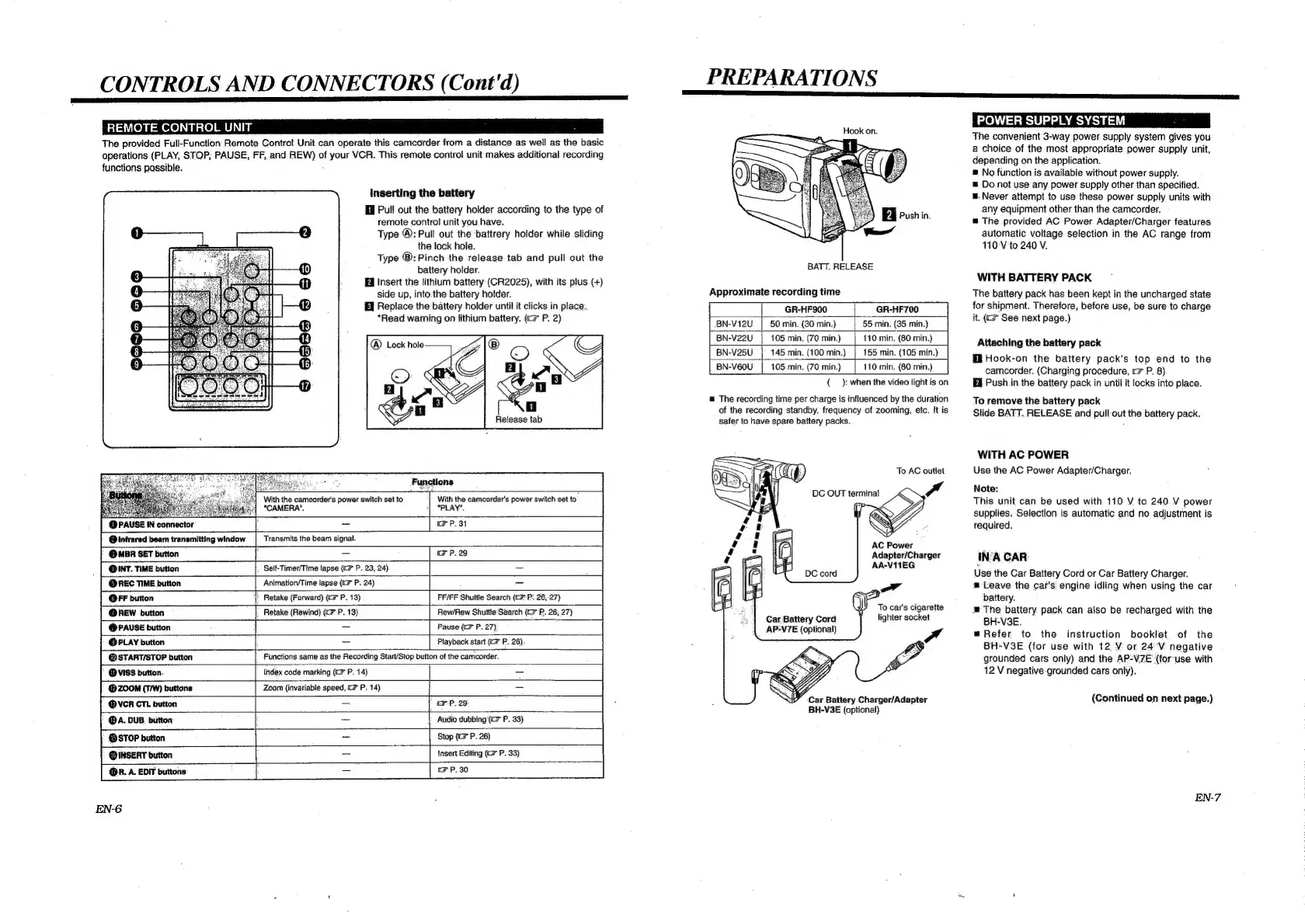
JVC Compact VHS GR-HF700 - Remote Control Unit; Power Supply System

JVC Compact VHS GR-HF700
19 pages
Print Icon
To Next Page IconTo Next Page
To Previous Page IconTo Previous Page
Loading...
CONTROLS
AND
CONNECTORS
(Cont'd)
a
an
REMOTE
CONTROL
UNIT
The
provided
Full-Function
Remote
Contro!
Unit
can
operate
this
camcorder
from
a
distance
as
well
as
the
basic
operations
(PLAY,
STOP,
PAUSE,
FF,
and
REW)
of
your
VCR.
This
remote
contro!
unit
makes
additional
recording
functions
possible.
.
inserting
the
battery
HI
Pull
out
the
battery
holder
according
to
the
type
of
remote
control
unit
you-have.
Type
®:
Pull
out
the
‘battrery
holder
while
sliding
the
lock
hole.
Type
®:Pinch
the
release
tab
and
pull
out
the
battery
holder.
Insert
the
lithium
battery
(CR2025),
with
its
plus
(+)
side
up,
into:the
battery
holder.
Replace
the
battery
holder
until
it
clicks
in
place..
*Read
warning
on
lithium
battery.
(«<>
P.
2)
Release
tab
Afr
"CAMERA’.
‘|
"PLAY".
a
With
the
camcorder's
power
switch
set
to
With
the
camcorder's
power
switch
set
to.
ee
is
@PAUSE
IN
connector
f
_
FP.
31
@
infrared
beam
transmitting
window
@MBR
SET
button
<p
-
FP.
29
ONT.
TIME
button
Self-Timer/Time
lapse
(c#
P.
23,
24)
_
@REC
TIME
button
Animation/Time
lapse
(7
P.
24)
_
OFF
button
})
Retake
(Forward)
(7
P.
13)
FF/FF
Shuttle
Search
(cP:
26,
27)
@new
button
|,
Retake
(Rewind)
(cP,
13)
Rew/Rew
Shuttle‘Search
(G7
P.
26,27)
@
PAUSE
button
:
Pause
(>
P.
27)
©
PLAY
button
-
Playback
start
(CP.
26)
@STARTISTOP
button
@ViISS
button.
(ZOOM
(TW)
buttons
@VCR
CTL
button
=
FP.
29
@A.
DUB.
button
=
{®BSTOP
button
Q@INSERT
button
@R.
A
EDIT
buttons:
oT
,
EF
P,
30
Transmits
the
beam
signal.
Functions
same
as
the
Recording
Start/Stop
button
of
the
camcorder.
lndex
code
marking
(>
P.
14)
Zoom
{invariable
speed,
CF
P;
14)
Audio
dubbing'(cz"
P.
33)
Stop
(ic
P.
26)
Insert
Editing
(CF
P.
33)
EN-6
PREPARATIONS
Hook
on.
BATT.
RELEASE
Approximate
recording
time
|
GR-HF900
GR-HF700
|
BN-V12U
50
min.
(30
min.)
55
min,
(35
min.)
BN-V22U
105
min.
(70
min.)
110
min.
(80
min.}
|
BN-V25U
145
min.
(100
min.)
155
min.
(105
min.)
|
BN-V60U
105
min.
(70
min.)
110
min.
(80
min.)
|
{__
):
when
the
video
light
is
on
The
recording
time
per
charge
is
influenced
by
the
duration
of
the
recording
standby,
frequency
of
zooming,
etc.
It
is
safer
to
have
spare
battery
packs.
Car:Battery
Cord
AP-V7E
(optional)
To
AC
outlet
Adapter/Charger
AA-VITEG
To
car's
cigarette
lighter
socket
Y
Car
Battery
Charger/Adapter
BH-V3E
(optional)
POWER
SUPPLY
SYSTEM
=
The
convenient
3-way
power.
supply
system
gives
you
a
choice
of
the
most
appropriate
power
supply
unit,
depending
on
the
application.
®
No
function
is
available
without
power
supply.
ws
Do.not
use
any
power
supply
other
than
specified.
=.
Never
attempt
to
use
these
power
supply
units
with
any
equipment
other
than
the
camcorder.
The
provided
AC
Power
Adapter/Charger
features
automatic
voltage
selection
in
the
AC
range
from
110-V
to
240
V.
WITH
BATTERY
PACK
The
battery
pack
has
been
kept
in
the
uncharged
state
for
shipment.
Therefore,
before
use,
be
sure
to
charge
it.
(C7
See
next
page.)
Attaching
the
battery
pack
HB
Hook-on
the
battery
pack's
top
end
to
the
camcorder.
(Charging
procedure,
rc
P.
8)
Bi
Push
in
the
battery
pack
in
until
it
locks
into
place.
To
remove
the
battery
pack
Slide
BATT.
RELEASE
and
pull
out
the
battery
pack.
WITH
AC
POWER
Use
the
AC
Power
Adapter/Charger.
Note:
This
unit
can
be
used
with
110
V
to
240.
V
power
supplies.
Selection
is
automatic
and
no
adjustment
is
required.
INA
CAR
Use
the
Car
Battery
Cord
or
Car
Battery
Charger.
Leave
the
car's
engine
idling
when
using
the
car
battery.
=
The
battery
pack
can
also
be
recharged
with
the
BH-V3E.
=
Refer
to
the
instruction
booklet
of
the
BH-V3E
(for
use
with
12.
V
or
24
V
negative
grounded
cars
only)
and
the
AP-V7E
‘(for-use
with
12
V
negative-grounded
cars
only).
(Continued
on
next
page.)

Related product manuals