EasyManua.ls Logo

JVC Compact VHS GR-HF700 - Page 4

JVC Compact VHS GR-HF700
19 pages
Print Icon
To Next Page IconTo Next Page
To Previous Page IconTo Previous Page
Loading...
PREPARATIONS
(Cont'd)
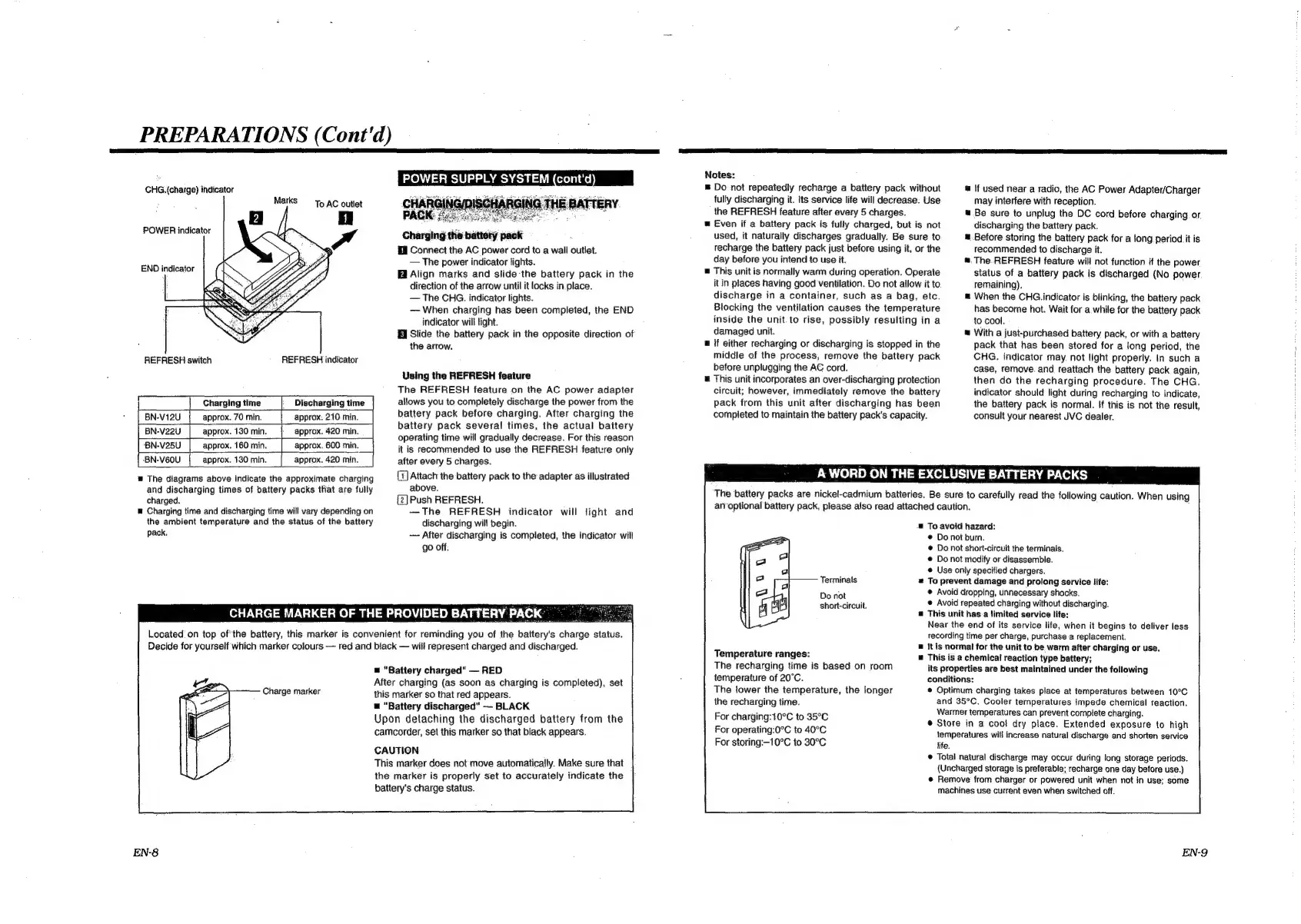
GHG.
(charge)
indicator
POWER
indicator
END
indicator
REFRESH
switch
REFRESH
indicator
Charging
time
Discharging
time
BN-V12U
approx.
70
min.
approx.
210
min.
BN-V22U
approx.
130
min.
approx.
420
min.
‘BN-V25U
approx.
160
min.
approx.
600
min.
-BN-V60U
approx.
130
min.
approx.
420
min.
w
The
diagrams
above
indicate
the
approximate
charging
and
discharging
times
of
battery
packs
that
are
fully
charged.
®
Charging
time
and
discharging
time
will
vary
depending
on
the
ambient
temperature
and
the
status
of
the
battery
pack,
{i
Connect
the
AC
power
cord
to
a
wall
outlet.
The
power
indicator
fights.
Align
marks
and
slide-the
battery
pack
in
the
direction
of
the
arrow
until
it
locks
in.place.
The
CHG.
indicator
lights.
When
charging
has
been
completed,
the
END
indicator
will
light.
Slide
the
battery
pack
in
the
opposite
direction
of
the
arrow.
Using
the
REFRESH
feature
The
REFRESH
feature
on
the
AC
power
adapter
allows
you
to
completely
discharge
the
power
from
the
battery
pack
before
charging.
After
charging
the
battery
pack
several
times,
the
actual
battery
operating
time
will
gradually
decrease.
For
this
reason
it
is
recommended
to
use
the
REFRESH
feature
only
after
every
5
charges.
(7)
Attach
the
battery
pack
to
the
adapter
as
illustrated
above.
{2]
Push
REFRESH.
—The
REFRESH
indicator
will
light
and
discharging
will
begin.
--
After
discharging
is
completed,
the
indicator
will
go
off.
CHARGE
MARKER
OF
THE
PROVIDED
BATTERY
PACK
Located
on
top
ofthe
battery,
this
marker
is
convenient
for
reminding
you
of
the
battery's
charge
status.
Decide
for
yourself
which
marker
colours
red
and
black
will
represent
charged
and
discharged.
=
"Battery
charged"
RED
Notes:
=
Do
not
repeatedly
recharge
a
battery
pack
without
fully
discharging
it.
Its
service
life
will
decrease.
Use
the
REFRESH
feature
after
every
5
charges.
@
Even
if
a
battery
pack
is
fully
charged,
but
is
not
used,
it
naturally
discharges
gradually.
Be
sure
to
recharge
the
battery
pack
just
before
using
it,
or
the
day
before
you
intend
to
use
it.
@
This
unit
is
normally
warm
during
operation.
Operate
it
in
places
having
good
ventilation.
Do
not
allow
it
to
discharge
in
a
container,
such
as
a
bag,
etc.
Blocking
the
ventilation
causes
the
temperature
inside
the
unit.to
rise,
possibly
resulting
in
a
damaged
unit.
§
if
either
recharging
or
discharging
is
stopped
in
the
middle
of
the
process,
remove
the
battery
pack
before
unplugging
the
AC
cord.
@
This
unit
incorporates
an
over-discharging
protection
circuit;
however,
immediately
remove
the
battery
pack
from
this
unit
after
discharging
has
been
completed
to
maintain
the
battery
pack's
capacity.
short-circuit.
Temperature
ranges:
.
The
recharging
time
is
based
on
room
A
WORD
ON
THE
EXCLUSIVE
BATTERY
PACKS
The
battery
packs
are
nickel-cadmium
batteries.
Be
sure
to
carefully
read
the
following
caution.
When
using
anoptional
battery
pack,
please
also
read
attached
caution.
=
To
avoid
hazard:
@
Do
not
burn.
©
Do
not
short-circuit
the
terminals.
©
Do
not
modify
or
disassemble.
@
Use
only
specified
chargers.
Terminals
=
To
prevent
damage
and
prolong
service
life:
Do
not
©
Avoid
dropping,
unnecessary
shocks.
@
Avoid
repeated
charging
without
discharging.
@
This
unit
has.a
limited
service
life:
Near
the
end
of
its
service
life,
when
it
begins
to
deliver
less
recording
time
per
charge,
purchase
a
replacement.
B
It
is
normal
for
the
unit
to
be
warm
after
charging
or
use.
This
is
a
chemical
reaction
type
battery;
its
properties
are
best
maintained
under
the
following
If
used
near
a
radio,
the
AC
Power
Adapter/Charger
may
interfere
with
reception.
Be
sure
to
unplug
the
DC
cord
before
charging.
or.
discharging
the
battery
pack.
=
Before
storing
the
battery
pack
for
a
fong
period
it
is
recommended
to
discharge
it.
=.
The.REFRESH
feature
will
not
function
if
the
power
status
of
a
battery
pack
is
discharged
(No
power
remaining).
When
the
CHG.
indicator
is
blinking,
the
battery
pack
has
become
hot.
Wait
for
a.
while
for
the
battery
pack
to
cool.
With
a
just-purchased
battery
pack,
or
with
a
battery
pack
that
has
been
stored
for
a
long
period,
the
CHG.
indicator
may,
not
light
properly.
In
such
a
case,
remove.
and
reattach
the
battery
pack
again,
then
do
the
recharging
procedure.
The
CHG.
indicator
should
light
during
recharging
to
indicate,
the
battery
pack
is
normal.
If
this
is
not
the
result,
consult
your
nearest
JVC
dealer.
temperature
of
20°C.
The
tower
the
temperature,
the
longer
the
recharging
time.
conditions:
©
Optimum
charging
takes
place
at
temperatures
between
10°C
and
35°C.
Cooler
temperatures
impede
chemical
reaction.
aperereny
re
Warmer
temperatures
can
prevent
complete
charging.
rovenatging
io
210
oe
@
Store
in
a
cool
dry
place.
Extended
exposure
to
high
For
operating:0°C
to
40°C
temperatures
will
increase
natural
discharge
and
shorten
service
For
storing:—10°C
fo
30°C
life.
@
Total
natural
discharge
may
occur
during
tong
storage
periods.
(Uncharged
storage
is
preferable;
recharge
one
day
before
use.)
@
Remove
from
charger
or
powered
unit
when
not
in
use;
some
machines
use
current
even
when
switched
off.
After
charging
(as
soon
as
charging
is
completed),
set
this
marker
so
that
red
appears.
=
"Battery
discharged"
BLACK
Charge
marker
Upon
detaching
the
discharged
battery
from
the
camcorder,
set
this
marker
so
that
black
appears.
CAUTION
This
marker
does
not
move
automatically.
Make
sure
that
the
marker
is
properly
set
to
accurately
indicate
the
battery's
charge
status.
EN-8
EN-9

Related product manuals