EasyManua.ls Logo

JVC Compact VHS GR-HF700 - Adjusting the Grip; Viewfinder Adjustment; Loading and Unloading a Video Cassette

JVC Compact VHS GR-HF700
19 pages
Print Icon
To Next Page IconTo Next Page
To Previous Page IconTo Previous Page
Loading...
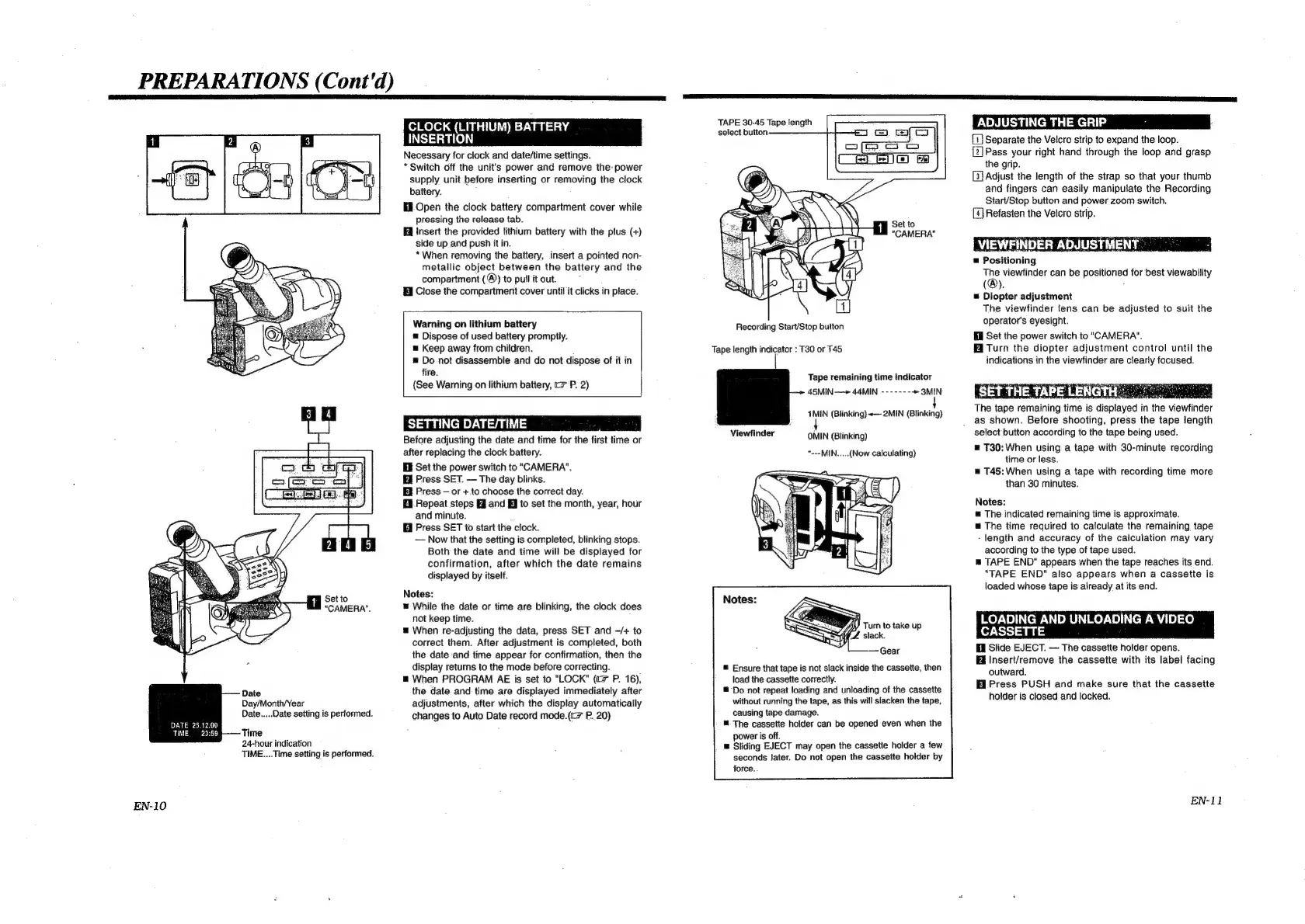
PREPARATIONS
(Cont'd)
1
Set
to
"“CAMERA’.
Date
Day/Month/Year
Date.....Date
setting
is
performed.
DATE
25.12.00
:
TIME,
23:59
Time
24-hour
indication
TIME....Time
setting
is
performed.
EN-10
CLOCK
(LITHIUM)
BATTERY
INSERTION
Necessary
for
clock
and
date/time
settings.
*
Switch
off
the
unit's
power
and
remove
the:
power
supply
unit
before
inserting
or
removing
the
clock
battery.
Open
the
clock
battery
compartment
cover
while
pressing
the
release
tab.
Insert
the
provided
lithium
battery
with
the
plus
(+)
side
up
and
push
it
in.
*
When
removing
the
battery,
insert
a
pointed
non-
metailic
object
between
the
battery
and
the
compartment
(®)
to
pull
it
out.
Close
the
compartment
cover
until
it
clicks
in
place.
Warning
on
lithium
battery
=
Dispose
of
used
battery
promptly.
Keep
away
from
children.
.
=
Do
not
disassemble
and
do
not
dispose
of
it
in
fire.
(See
Warning
on
lithium
battery,
c=
P.
2)
SETTING
DATE/TIME
Before
adjusting
the
date
and
time
for
the
first
time
or
after
replacing
the
clock
battery.
Ef
Set
the
power
switch
to
"CAMERA".
Press
SET.
The
day
blinks.
Ei
Press
or
+
to
choose
the
correct
day.
Hi
Repeat
steps
HJ
and
EJ
to
set
the
month,
year,
hour
and
minute.
@
Press
SET
to
start
the
clock.
~—
Now
that
the
setting
is
completed,
blinking
stops.
Both
the
date
and
time
will
be
displayed
for
confirmation,
after
which
the
date
remains
displayed
by
itself.
Notes:
While
the
date
or
time
are
blinking,
the
clock
does
not
keep
time.
=
When
re-adjusting
the
data,
press
SET
and
—/+
to
correct
them.
After
adjustment
is
completed,
both
the
date
and
time
appear
for
confirmation,
then
the
display
returns
to
the
mode
before
correcting.
;
m@
When
PROGRAM
AE
is
set
to
"LOCK"
(c=
P.
16),
the
date.
and
time
are
displayed
immediately
after
adjustments,
after
which
the
display
automatically
changes
to
Auto Date
record
mode.(tc>
P..20)
TAPE
30-45
Tape
length
select
button
1
Set
to
"CAMERA"
Recording
Start/Stop
button
Tape
length
indicator
:
T30
or
T45
Tape
remaining
time
indicator
45MIN-—»
44MIN
-------
+>
3MIN
4MIN
(Blinking)~—
2MIN
(Blinking)
Viewfinder
OMIN
(Blinking)
*---MIN.....(Now
calculating)
®
Ensure
that
tape
is
not
slack
inside
the
cassette,
then
load
the
cassette
correctly.
Do
not
repeat
loading
and
unloading
of
the
cassette
without
running
the
tape,
as
this
will
slacken
the
tape,
causing
tape
damage.
The
cassette
holder
can
be
opened
even
when
the
power
is
off.
®
Sliding
EJECT
may
open
the
cassette
holder
a
few
seconds
later.
Do
not
open
the
cassette
holder
by
force..
ADJUSTING
THE
GRIP
d
.
Separate
the
Velcro
strip
to
expand
the
loop.
Pass
your
right
hand
through
the
loop
and
grasp
the
grip.
[3]
Adjust
the
length
of
the
strap
so
that
your
thumb
and
fingers
can
easily
manipulate
the
Recording
Start/Stop
button
and
power
zoom
switch.
[4]
Refasten
the
Velcro
strip.
VIEWFINDER
ADJUSTMENT
=
Positioning
The
viewfinder
can
be
positioned
for
best
viewability
(®).
=
Diopter
adjustment
The
viewfinder
lens
can
be
adjusted
to
suit
the
operator's
eyesight.
Ell
Set
the
power
switch
to
"CAMERA".
Hi
Turn
the
diopter
adjustment
control
until
the
indications
in
the
viewfinder
are
clearly
focused.
‘SET
THE
TAPE
LENGTI
See
as
The
tape
remaining
time
is
displayed
in
the
viewfinder
as
shown.
Before
shooting,
press
the
tape
length
select
button
according
to
the
tape
being
used.
=
T30:
When
using
a
tape
with
30-minute
recording
time
or
less.
m
T45:
When
using
a
tape
with
recording
time
more
than
30
minutes.
Notes:
®
The
indicated
remaining
time
is
approximate.
m=
The
time
required
to
calculate
the
remaining
tape
-
length
and
accuracy
of
the
calculation
may
vary
according
to
the
type
of
tape
used.
®
TAPE
END"
appears
when
the
tape
reaches
its
end.
“TAPE
END"
also
appears
when
a
cassette
is
loaded
whose
tape
is
already
at
its
end.
LOADING
AND
UNLOADING
A
VIDEO
CASSETTE
El
Slide
EJECT.
The
cassette
holder
opens.
Insert/remove
the
cassette
with
its
label
facing
outward.
fi
Press
PUSH
and
make
sure
that
the
casseite
holder
is
closed
and
locked.
EN-11

Related product manuals