EasyManua.ls Logo

JVC Compact VHS GR-HF700 - Page 8

JVC Compact VHS GR-HF700
19 pages
Print Icon
To Next Page IconTo Next Page
To Previous Page IconTo Previous Page
Loading...
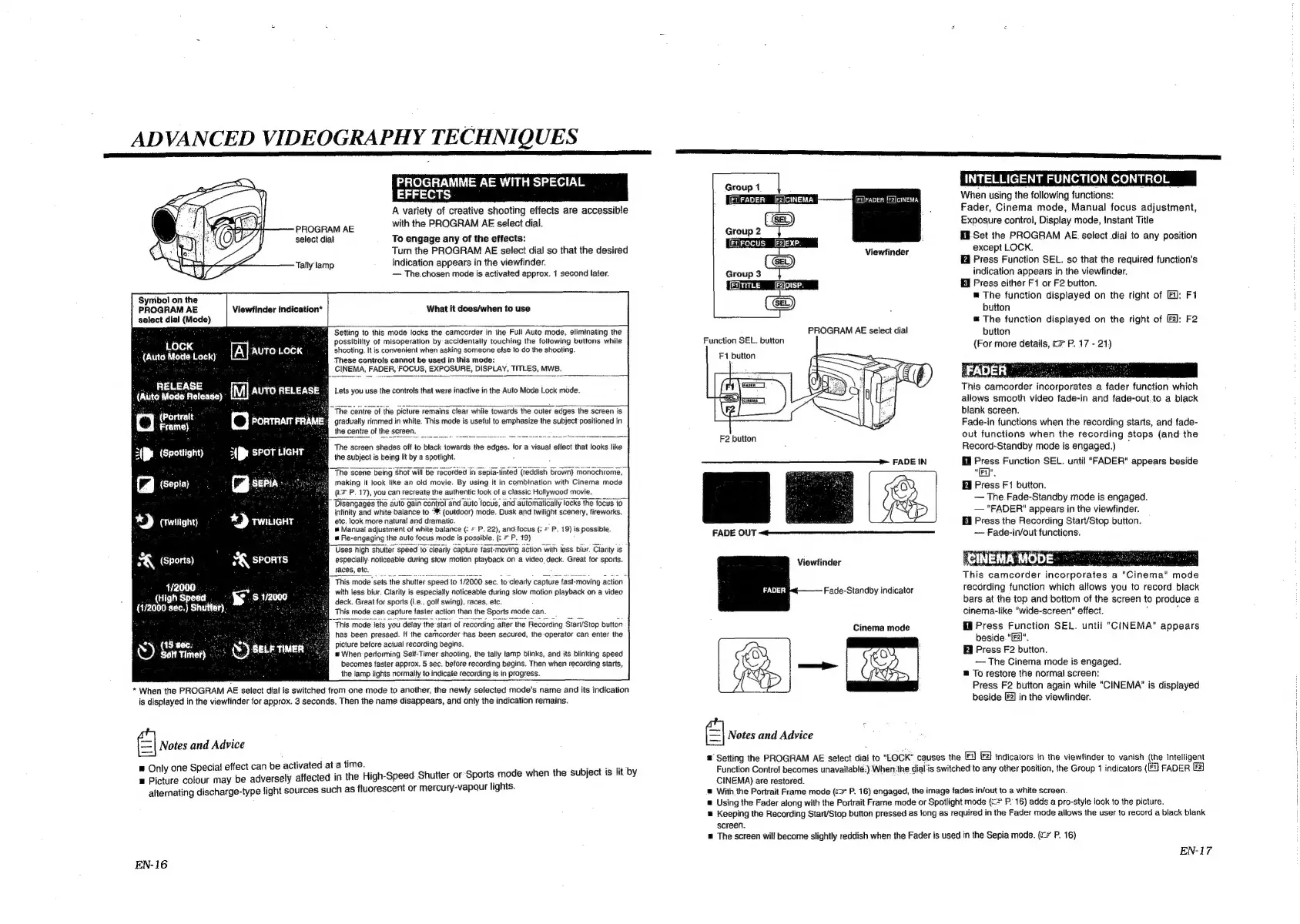
ADVANCED
VIDEOGRAPHY
TECHNIQUES
PROGRAMME
AE
WI
EFFECTS
A
variety
of
creative
shooting
effects
are
accessible
with
the
PROGRAM
AE
select
dial.
H
SPECIAL
PROGRAM
AE
select
dial
To
engage
any
of
the
effects:
Turn
the
PROGRAM
AE
select
dial
so
that
the
desired
Tally
lamp
indication
appears
in
the
viewfinder.
The.chosen
mode
is
activated
approx.
1
second
later.
What
it
does/when
to
use
Symbol
on
the
PROGRAM
AE
Viewfinder
indication*
select
dial
(Mode)
:
ae
.
:
Suite
§Setting
to
this
mode
locks
the
camcorder
in
the
Full
Auto
mode,
eliminating
the
LOCK
:
Bal
possibility
of
misoperation
by
accidentally
touching
the
following
buttons
while
2
Haut
Mote
Lock
rth
ren
mele
¢
@
shooting.
It
is
convenient
when
asking
someone
else
to
do
the
shooting.
(Auto
ack)
These
controls
cannot
be
used
in
this
mode:
4 g
CINEMA,
FADER,
FOCUS,
EXPOSURE,
DISPLAY,
TITLES,
MWB.
titad
ake
oleae}
-
[Ml
F\Ya
rah:
(t8-$-\\-8)
Lets
you
use
the
controls
that
were
inactive
in
the
Auto
Mode
Lock
made.
@|
(Portratt
Frame)
3(J.
(Spottight)
Cg
(serie)
KY
crmigny
he
centre
of
the
picture
remains
clear
while
towards
the
outer
edges
the
screen
is.
grtadually
rimmed
in
white.
This
mode
is
useful
to
emphasize
the
subject
positioned
in
fea
The
screen
shades
off
to
black
towards
the
edges.
for
a
visual
effect
that
looks
like
fm
the
subject
is
being
lit
by
a
spotlight.
:
‘The
scene
being
shot
will
be
recorded
in
Sepia-tinted
(reddish
brown)
monochrome,
making
it
look
like
an
old
movie.
By
using
it
in
combination
with
Cinema
mode
(i
P.
17),
you
can
recreate
the
authentic
look
of
a
classic
Hollywood
movie.
Disengages
the
auto
gain
control
and
auto
focus,
and
automatically
locks
the
focus
to
B
intinity
and
white
balance
to
utdoor)
mode.
Dusk
and
twilight
scenery,
fireworks,
We
etc.
look
more
natural
and
dramatic.
#
Manual
adjustment
of
white
balance
(:
=
P.
22),
and-focus
(:
=
P.
19)
is
possible.
@
Re-engaging
the
auto
focus
mode
is
possible.
*
P.
19)
Uses
high
shutter
speed
to
clearly
capture
fast-moving
action
with
less
blur.
Clarity
is
especially
noticeable
during
slow
motion
playback
on
a
video.
deck.
Great
for
sports.
races,
etc.
0
SK,
(Sports)
4/2000
.
This
mode
sets
the
ip
000
sec.
to
clearly
capture
fast-moving
action
:
(High
si
f
:
with
less
blur.
Clarity
is
especially
noticeable
during
slow
motion
playback
on
a
video
;
ay
deck.
Great
for
sports
(i.e.,
golt
swing),
races,
etc.
(172000
sec.)
Shutter),
:
This
mode
can
capture
faster
action
than
the
Sports
mode
can.
This
mode
lets
you
detay
the’start
of
recording
after
the
Recording
Start/Stop
button
has
been
pressed.
If
the
camcorder
has
been
secured,
the
operator
can
enter
the
picture
before
actual
recording
begins.
mw
When
performing
Seif:Timer
shooting,
the
tally
tamp
blinks,
and
its
blinking
speed
becomes
faster
approx.
5
sec.
before
recording
begins.
Then
when
recording
starts,
the
lamp
lights
normally
to
indicate
recording
is
in
progress.
oN.
(15
my
1)
Gon
rimet)
:
*
When
the
PROGRAM
AE
select
dialis
switched
from
one
mode
to
another,
the
newly
selected
mode's
name
and
its
indication
is
displayed
in
the
viewfinder
for
approx.
3
seconds.
Then
the
name
disappears,
and
only
the
indication
remains.
«|
Notes
and
Advice
®
Only
one
Special
effect
can
be
activated
at
a
time.
Meee
a
Picture
colour
may
be
adversely
affected
in
the
High-Speed
Shutter
or-Sports
mode
when
the
subject
is
lit
by
alternating
discharge-type
light
sources
such
as
fluorescent
or
mercury-vapour
lights.
EN-16
INTELLIGENT
FUNCTION
CONTROL
When
using
the
following
functions:
Fader,
Cinema
mode,
Manual
focus
adjustment,
Exposure
control,
Display
mode,
Instant
Title
Hi.Set
the
PROGRAM
AE
select
dial
to
any
position
Viewfinder
except
LOCK.
@
Press
Function
SEL.
so
that
the
required
function's
Group
1
[FIFADER
([F2}CINEMA
Group
2
[EFOCUS
[EdFaben
[F2]cINEMA
Group3
_
|
indication
appears
in
the
viewfinder.
(FITITLE
([F2IDISP.
i
Press
either
F1
or
F2
button.
Ga)
=
The
function
displayed
on
the
right
of
[Ei]:
F1
(
Get)
:
button
&
The
function
displayed
on
the
right
of
[2]:
F2
PROGRAM
AE
select
dial
button
Function
SEL.
button
F1
button
(For
more
details,
c#
P.
17
-
21)
FADER
ee
This
camcorder
incorporates
a
fader
function
which
allows
smooth
video
fade-in
and
fade-out,
to
a
black
blank
screen.
Fade-in
functions
when
the
recording
starts,
and
fade-
F2
button
out
functions
when
the
recording
stops
(and
the
:
Record-Standby
mode
is
engaged.)
Press
Function
SEL.
until
"FADER"
appears
beside
"TE",
i
Press
F1
button.
The
Fade-Standby
mode
is
engaged.
"FADER"
appears
in
the
viewfinder.
Cann
eee
Hi
Press
the
Recording
Start/Stop
button.
FADE
OUT
~~
Fade-in/out
functions.
Viewfinder
eC
2M
This
camcorder
incorporates
a
"Cinema"
mode
recording
function
which
allows
you
to
record
black
bars
at
the
top
and
bottom
of
the
screen
to
produce
a
cinema-like
"wide-screen”
effect.
:
Press
Function
SEL.
until
"CINEMA"
appears
beside.
“ral”.
Bi
Press
F2
button.
The
Cinema
mode
is
engaged.
@
To
restore
the
normal
screen:
Press
F2
button
again
while
"CINEMA"
is
displayed
beside
[2]
in
the
viewfinder.
Fade-Standby
indicator
So,
‘Al-
€]
Notes
and
Advice
®
Setting
the
PROGRAM
AE
select
dial
to
"LOCK"
causes
the
[E1) [F2I
indicators
in
the
viewfinder
to
vanish
(the
Intelligent
Function
Control
becomes
unavaitablé:)
When:
the
dial'is
switched
to
any
other
position,
the
Group
1
indicators
(i
FADER
[ez]
CINEMA)
are
restored.
@
With
the
Portrait
Frame
mode
(«>
P.
16)
engaged,
the
image
fades
in/out
to
a
white
screen.
@
Using
the
Fader
along
with
the
Portrait
Frame
mode
or
Spotlight
mode
(==
P.
16)
adds
a
pro-style
look
to
the
picture.
&
Keeping
the
Recording
Start/Stop
button
pressed
as
long
as
required
in
the
Fader
mode
allows
the
user
to
record
a
black
blank
screen.
m
The
screen
will
become
slightly
reddish
when
the
Fader
is
used
in
the
Sepia
mode.
(<*
P.
16)
Cinema
mode
EN-17

Related product manuals