EasyManua.ls Logo

JVC Compact VHS GR-HF700 - Page 9

JVC Compact VHS GR-HF700
19 pages
Print Icon
To Next Page IconTo Next Page
To Previous Page IconTo Previous Page
Loading...
ADVANCED
VIDEOGRAPHY
TECHNIQUES
(Cont'd)
|
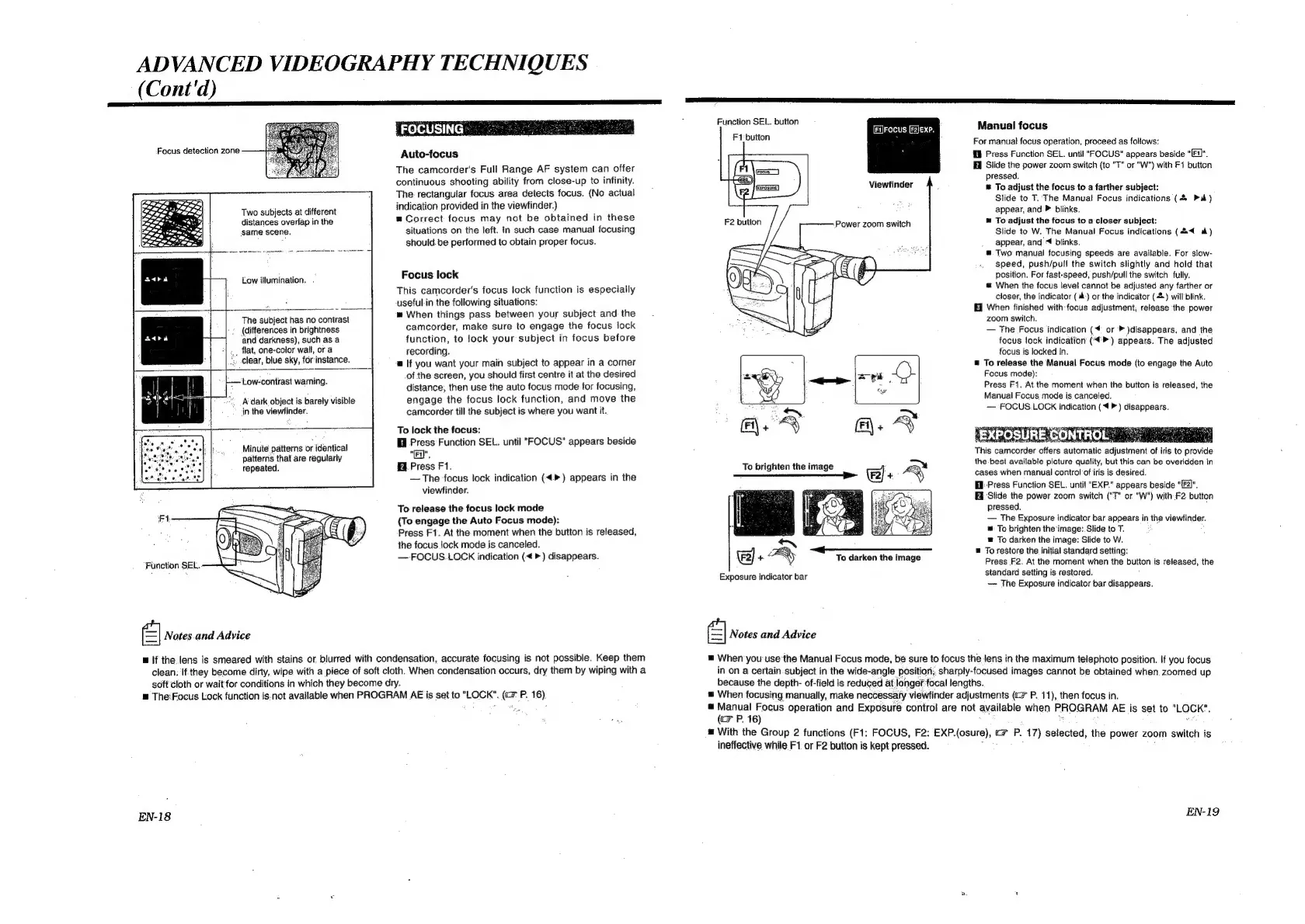
FOCUSING
-
Focus
detection
zone
Auto-focus
The
camcorder's
Full
Range
AF
system
can
offer
continuous
shooting
ability
from
close-up
to
infinity.
The:
rectangular
focus
area
detects
focus.
(No
actual
awe,
onan
:
Nhe
ti
%
:
Sel
he
Sees"
gaz
Two
subjects
at
different
indication
provided
in
the
viewfinder.)
;
“a.
distances
overlap
in
the
=
Correct
focus
may
not.
be
obtained
in
these
same
scene.
situations
on
the
left.
In
such
case
manual
focusing
should.be
performed
to
obtain
proper
focus.
|
Low
illumination.
.
The
subject
has
no
contrast
Focus
lock
This
camcorder's
focus
lock
function
is
especially
useful-in
the
following
situations:
When
things
pass
between
your
subject
and
the
(differences
in
brightness
camcorder,
make
sure
to
engage
the
focus
lock
and
darkness),
such
as
a
function,
to
lock
your
subject
in
focus
before
__
flat,
one-color
wall,
or
a
recording.
“Clear,
blue
sky,
forinstance.
a=
If
you
want
your
main
subject
to
appear
in
a
corner
of
the
screen,
you
should
first
centre
it
at
the
desired
distance,
then use
the
auto
focus
mode
for
focusing,
engage
the
focus
lock
function,
and
move
the
camcorder
till
the
subject
is
where
you
want
it.
Low-contrast
warning.
A
dark
object
is
barely
visible
in
the
viewfinder.
ma
To
lock
the
focus:
Wi
Press
Function
SEL.
until
"FOCUS"
appears
beside
Minute
patterns
or
identical
patterns
that
are
regularly
"Ed",
repeated.
Press
F1.
The
focus
lock
indication
(<>)
appears
in
the
viewfinder.
To
release
the
focus
lock
mode
(To
engage
the
Auto
Focus
mode):
Press
F1.
At
the
moment
when
the
button
is
released,
the
focus
lock
mode
is
canceled.
—-FOCUS.LOCK
indication
(<>)
disappears.
FA;
Function
SEL.
el
Notes
and
Advice
If
the
lens
is
smeared
with
stains
or
blurred
with
condensation,
accurate
focusing
is
not
possible.
Keep
them
clean;
If
they
become
dirty,
wipe
with
a
piece
of
soft
cloth.
When
condensation
occurs,
dry
them
by
wiping
with
a
soft
cloth
or
wait
for
conditions
in
which
they
become
dry.
=
The:Focus
Lock
function
is.not
available
when
PROGRAM
AE
is
set
to
"LOCK".
(c=
P.
16)
EN-18
Function
SEL.
button
Manual
focus
Focus
EXP,
F1:button
el
.
a
For
manual
focus
operation,
proceed
as
follows:
fil
Press
Function
SEL.
until
"FOCUS"
appears
beside
*"
A
Slide
the
power
zoom
switch
(to
"T"
or
"W")
with
F1
butten
RES
pressed.
Viewfinder
;
&
To
adjust
the
focus
to
a
farther
subject:
Slide
to
T.
The
Manual
Focus
indications
(&
Pa)
appear,
and:
blinks.
m
To
adjust
the
focus
to
a
closer
subject:
Slide
to
W.
The
Manual
Focus
indications
(4
a)
appear,
and
«
blinks.
"™
Two
manual
focusing
speeds
are
available.
For
slow-
speed,
push/pull
the
switch
slightly
and
hold
that
position.
For
fast-speed,
push/pull
the
switch
fully.
m=
When
the
focus
level
cannot
be
adjusted
any
farther
or
closer,
the
indicator
(
ih)
or
the
indicator
(&)
will
blink.
Ei
When
finished
with
focus
adjustment,
release
the
power
zoom
switch.
The
Focus
indication
(4
or
»
)disappears,
and
the
focus
lock
indication
(4)
appears.
The
adjusted
focus
is
locked
in.
=
To
release
the
Manual
Focus
mode
(to
engage
the
Auto
Focus
mode):
Press
F1.
At.the
moment
when
the
button
is
released,
the
Manual
Focus
mode
is
canceled.
FOCUS.LOCK
indication
(4
>)
disappears.
POSUREGONTROL”
This
camcorder
offers
automatic
adjustment
of
iris
to
provide
the
best
available
picture
quality,
but
this
can
be
overidden
in
cases
when
manual
control
of
iris
is
desired.
Hi
Press
Function
SEL.
until
"EXP."
appears
beside
“F2)",
‘Slide
the
power
zoom
switch
(“T”
or
“W")
with
F2
button
pressed.
The
Exposure
indicator
bar
appears
in
the
viewfinder.
™:
To
brighten
the
image:
Slide
to
T.
®
To
darken
the
image:
Slide
to
W.
=
To
restore
the
initial
standard
setting:
Press
F2.
At
the
moment
when
the
button
is
released,
the
standard
setting
is
restored.
~~
The
Exposure
indicator
bar
disappears.
Power
zoom
switch
To
darken
the
image
Exposure
indicator
bar
el
Notes
and
Advice
.
When
you
use
the
Manual
Focus
mode,
be
sure
to
focus
the
lens
in
the
maximum
telephoto
position.
If
you
focus
in
on
a
certain
subject
in
the
wide-angle
position;
sharply-focused
images
cannot
be
obtained
when
zoomed
up
because
the
depth-
of-field
is
reduced
at
longeffocal
lengths.
When
focusing
manually,
make
neccessaty
viewfinder
adjustments
(cP.
11),
then
focus
in.
.
ina
fi
operation
and
Exposure
control
are
not
available
when
PROGRAM
AE
is
set
to
"LOCK’.
iF
P16
t
k
d
=
With
the
Group
2
functions
(Fi:
FOCUS,
F2:
EXP.(osure),
©
P.
17)
selected,
the
power
zoom
switch
is
ineffective
while
F1.
or
F2
button
is
kept
pressed.
:
,
EN-19

Related product manuals