- 26 -
Adjustment method
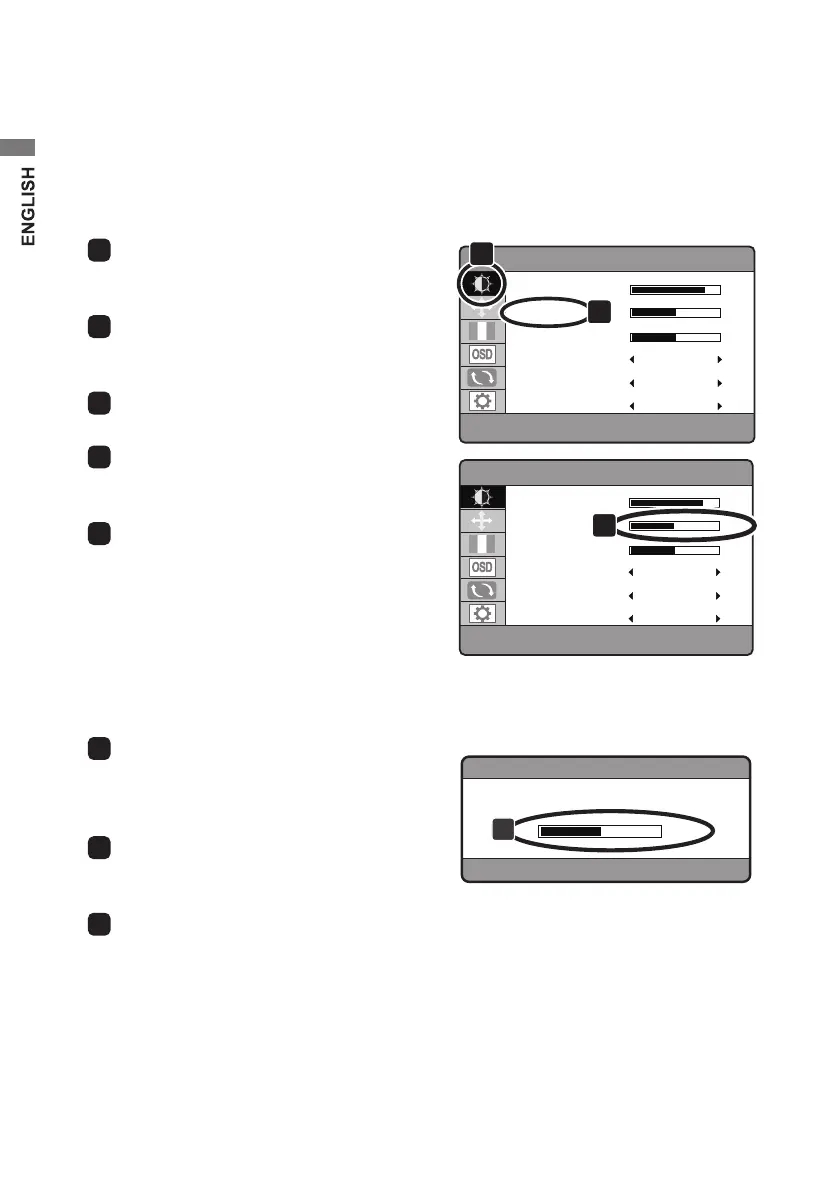
Follow the instructions below to adjust and modify the OSD settings. The procedures
below explain how to adjust, for example, Contrast.
■
Adjustment via OSD main menu
1
Press the “ M ” button, and the main menu
for the OSD controls appears.
BRIGHTNESS
CONTRAST
BLACK LEVEL
LOW BLUE
ECO
DCR
OFF
STANDARD
OFF
80
50
50
50
LUMINANCE
3
BRIGHTNESS
CONTRAST
BLACK LEVEL
LOW BLUE
ECO
DCR
OFF
STANDARD
OFF
80
48
50
50
LUMINANCE
4
2
Press the “ - / + ” button to select the
luminance icon.
3
Press the “ M ” button to select Contrast.
4
Contrast adjustment can be made by
pressing the “ - / + ” button.
5
By pressing the “ i ” button, the OSD main
menu disappears and the adjustment is
completed.
■
Direct adjustment
1
With the OSD main menu turned o, press
the “ - / + ” button, and the volume
adjustment bar appears.
VOLUME
50
2
2
Press the “ - / + ” button to adjust the
sound volume.
3
Press the “ i ” button to exit from the OSD
control panel.


 To Next Page
 Loading...